15
Setting Up The Unit
Error Compensation Setup
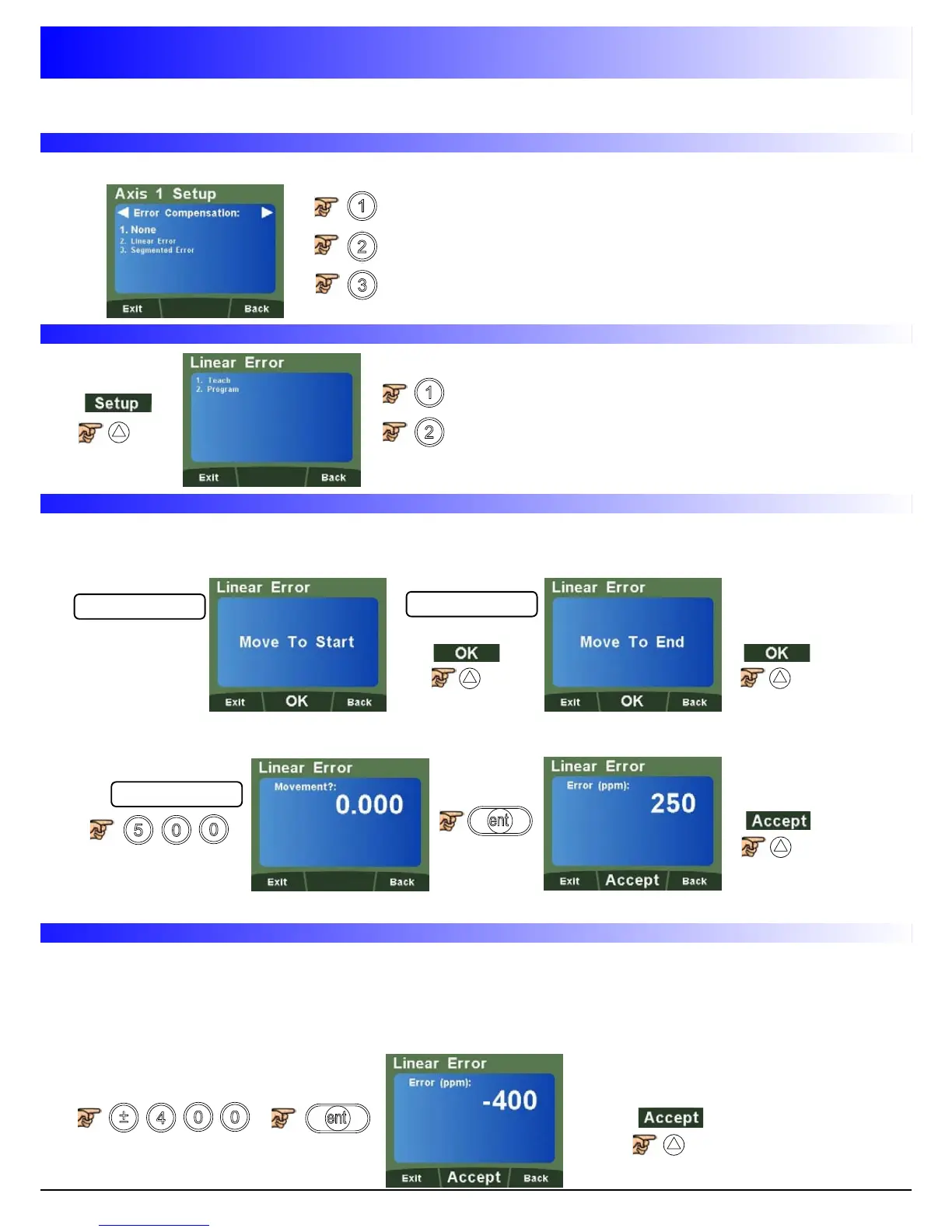
Navigate to
To select no Compensation (None)
To select Linear Error Compensation
To select Segmented Error Compensation
Linear Error Compensation Setup
To select Teach mode
To select Program mode
Teach Mode
0.000
499.875
500.000
Program Mode
First determine the correction factor required. To do this, use the following equation.
(In the example the standard distance is 500.000mm and the measured distance is 500.200mm)
Correction factor = error / actual x 1,000,000
Correction factor = (500 - 500.200) / 500.000 x 1,000,000
Correction factor = -400
Teach mode is an easier way of calculating linear errors using the DP1200 to automatically calculate
the error, by comparing the actual measurement and the physical movement.
Follow the steps below;
Move tool / probe to start position (See Fig 1)
Move tool / probe to end position (See Fig 1)
Enter the actual measurement using the numerical keypad
Check / Accept correction factor



 To Next Page