RS232 (Data Logging) / Data Acquisition
32
Standard Functions
The DP1200 can offer basic serial communication via a dedicated RS232 compatible port, which is
used for data logging purposes.
RS232 Connections
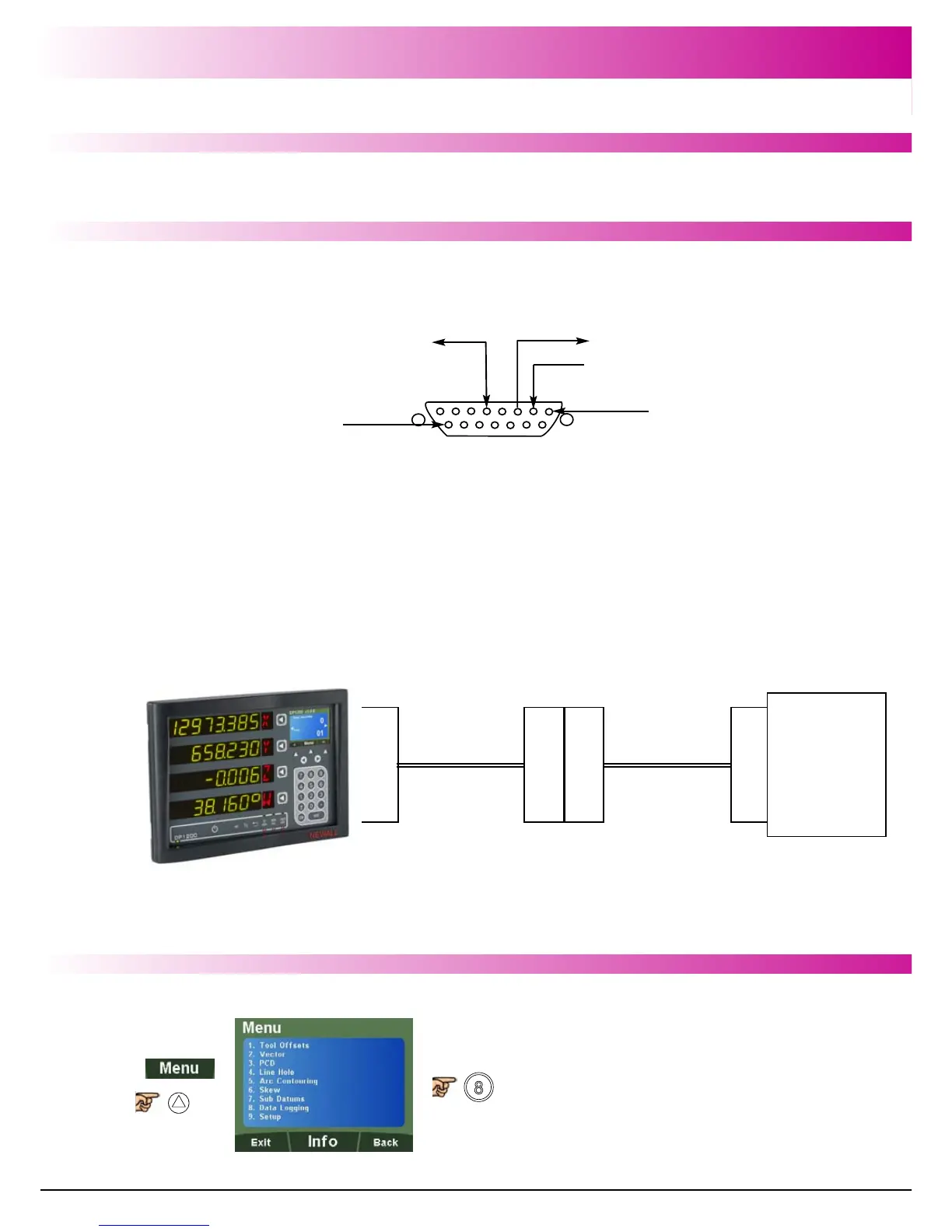
The RS232 is connected to the DP1200 via a 15-pin D-type connector at the rear of the display.
The required connection details are shown below.
The RS232 port allows position data from the DRO to be sent to a computer.
Applications:
- Quality Control – Save dimensional data from finished parts
- Test and measurement
- Length gauges
To select Data Logging
15
p
i
n
D
DRO Interface
Cable (3.5m)
Part # 307-82315
9
p
i
n
D
9
p
i
n
D
Serial to USB
Adaptor (0.5m)
Part # 307-82340
U
S
B
PC
With Supporting
Software
RS232 Setup
Pin 5 - RS232 GND
Pin 2 - RS232 RXD
Pin 3 - RS232 TXD
Pin 1
Pin 15



 To Next Page