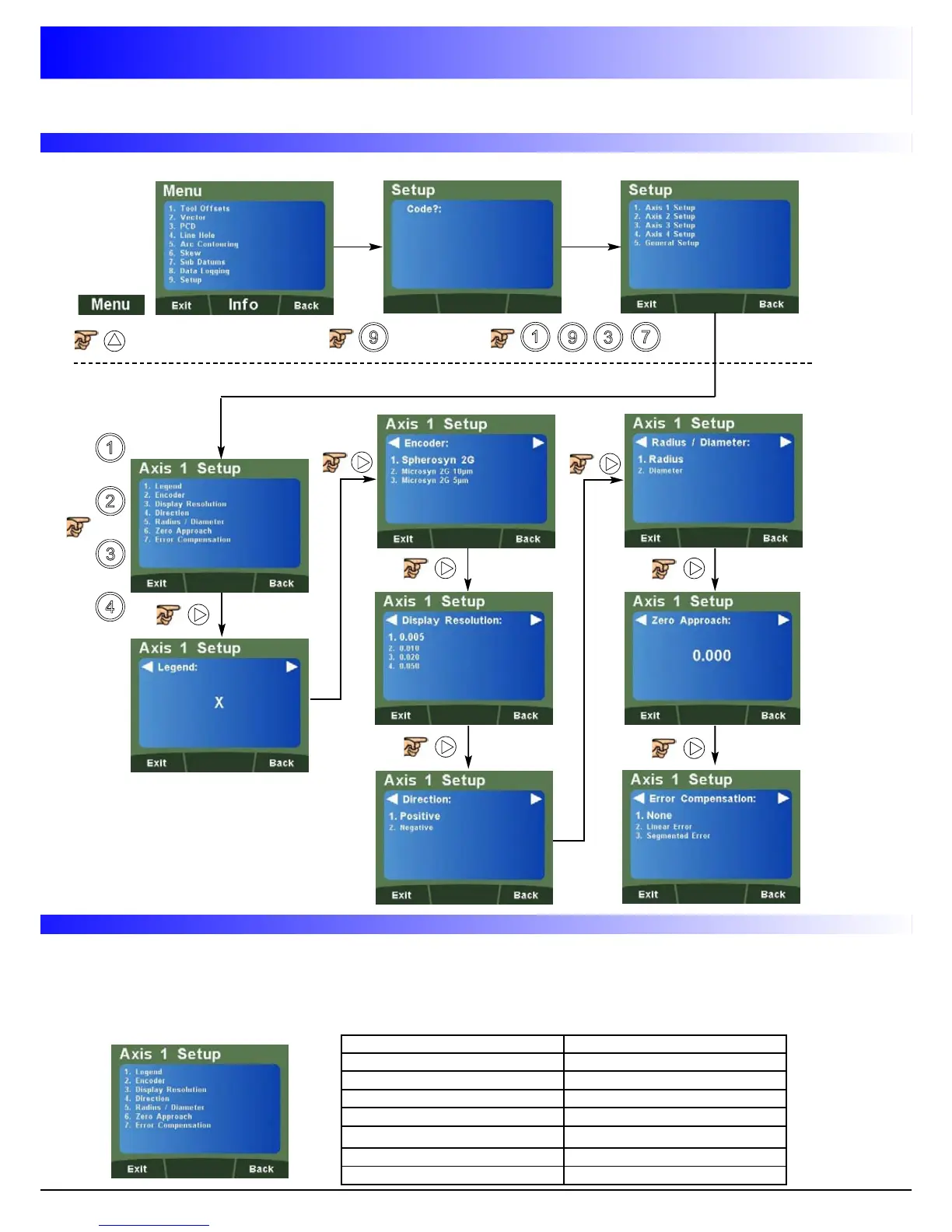
Numeric Key Setup Function
1 Legend Setup
2 Encoder Setup
3 Display Resolution Setup
4 Direction Setup
5 Radius / Diameter Setup
6 Zero Approach Setup
7 Error Compensation Setup
Setup Menu Navigation
How to enter setup
7
Navigating Axes 1, 2, 3 & 4 (Analogue) Setup
T
h
e
D
P
1
2
0
0
s
u
p
p
o
r
t
s
a
q
u
i
c
k
n
a
v
i
g
a
t
i
o
n
f
e
a
t
u
r
e
u
s
i
n
g
t
h
e
L
C
D
s
c
r
e
e
n
a
n
d
n
u
m
e
r
i
c
k
e
y
s
,
e
n
a
b
l
i
n
g
t
h
e
u
s
e
r
t
o
n
a
v
i
g
a
t
e
t
o
s
p
e
c
i
f
i
c
a
r
e
a
s
w
i
t
h
o
u
t
s
c
r
o
l
l
i
n
g
t
h
r
o
u
g
h
e
a
c
h
a
n
d
e
v
e
r
y
m
e
n
u
.
T
h
i
s
i
s
p
a
r
t
i
c
u
l
a
r
l
y
u
s
e
f
u
l
w
h
e
n
n
a
v
i
g
a
t
i
n
g
t
o
o
n
e
s
p
e
c
i
f
i
c
i
t
e
m
.
B
e
l
o
w
a
r
e
t
h
e
q
u
i
c
k
n
a
v
i
g
a
t
i
o
n
k
e
y
s
f
o
r
t
h
e
s
e
t
u
p
o
f
A
x
e
s
1
,
2
,
3
o
r
4
d
e
p
e
n
d
a
n
t
o
n
m
o
d
e
l
(
w
h
e
r
e
n
a
v
i
g
a
t
i
o
n
t
o
t
h
e
m
a
i
n
a
x
i
s
s
e
t
u
p
m
e
n
u
i
s
c
o
m
p
l
e
t
e
d
)
.
Quick Navigation of Axes 1, 2, 3 & 4 (Analogue) Setup
or
or
or
Setting Up The Unit



 To Next Page