Peak 650 User's Guide Rev. A October 2000
BIOS Setup
4-6
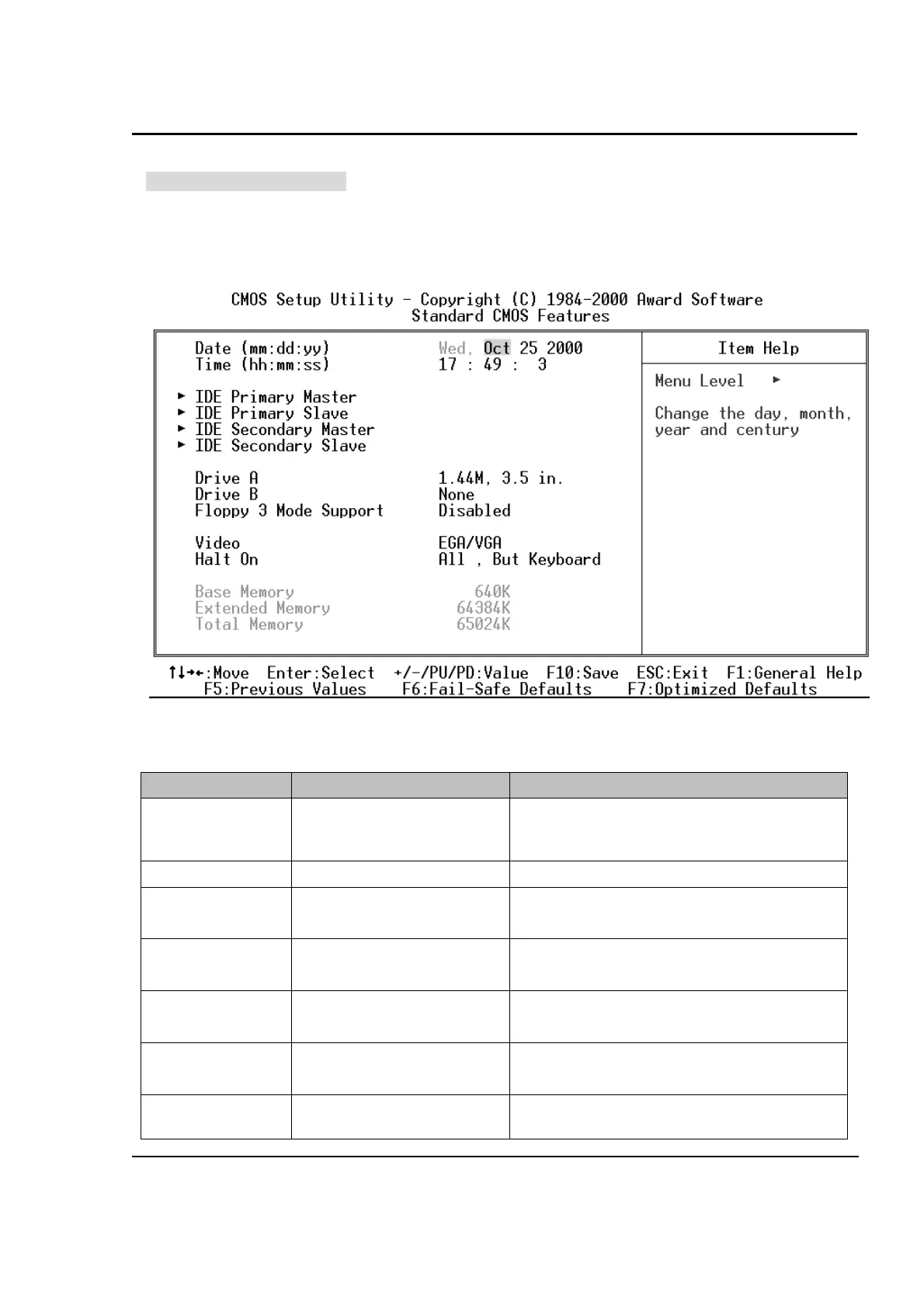
Standard CMOS Features
The items in Standard CMOS Setup Menu are divided into 11 categories. Each category includes no,
one or more than one setup items. Use the arrow keys to highlight the item and then use the
<PgUp>
or
<PgDn>
keys to select the value you want in each item.
Main Menu Selections
Item Options Description
Date MMM DD YYYY
Set the system date. Note that the eek
day
automatically changes when you set the
date
Time HH : MM : SS Set the system time
IDE Primary Master
Options are in its sub menu
(Described in Table 4-3)
Press <Enter> to enter the sub menu of
detailed options
IDE Primary Slave
Options are in its sub menu
(Described in Table 4-3)
Press <Enter> to enter the sub menu of
detailed options
IDE Secondary
Master
Options are in its sub menu
(Described in Table 4-3)
Press <Enter> to enter the sub menu of
detailed options
IDE Secondary
Slave
Options are in its sub menu
(Described in Table 4-3)
Press <Enter> to enter the sub menu of
detailed options
Drive A None
Select the type of floppy disk drive installed in
your system



 To Next Page