Peak 650 User's Guide Rev. A October 2000
Capability Expand
3-1
Chapter 3 Capability Expanding
This chapter explains how you can expand capability of your CPU board in such aspects as system memory
and CPU.
3-1 System Memory
Peak650 support 2 slots for 168-pin 3.3V Non-registered DIMM modules, providing support for up to 512MB
of main memory using DIMM modules from 8MB to 256MB. The following is the example to install the
system SDRAM memory module combination.
Note:
1. It is highly recommended to use the PC-100 or PC-133 Specification DIMM module.
2. Due to limitation of Intel 815E chipset, the board can support the ECC memory module.
Q y of Module DIMM1 DIMM2
Module Size
Max. Size
1 1 st 8~256 MB 256 MB
2 1 st 2 nd 8~256 MB 512 MB
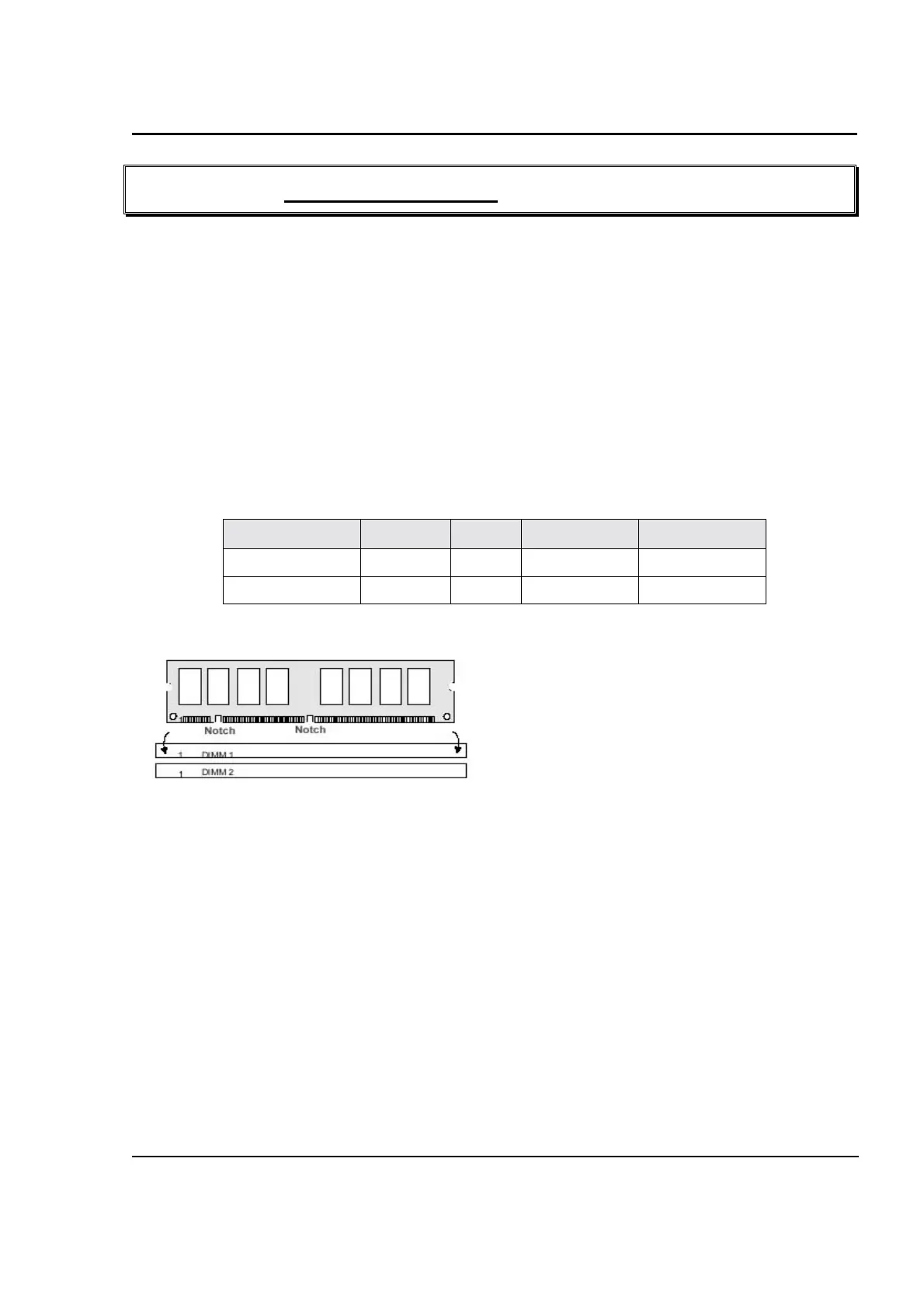
To insert the DIMMs, the modules must be oriented in
the correct way. Notice the notches of the DIMM.
Align these notches as shown in the diagram below.
Gently push the DIMM until the retainers on both
sides of the socket lock the module in place.
To remove a DIMM, push the retainers outwards to
release the module then pull the module out of the
socket.



 To Next Page