EN-14
Duo Cinema Instruction Manual
Connect Headphones
Duo Cinema is equipped with built-in speakers. However, you may also use a
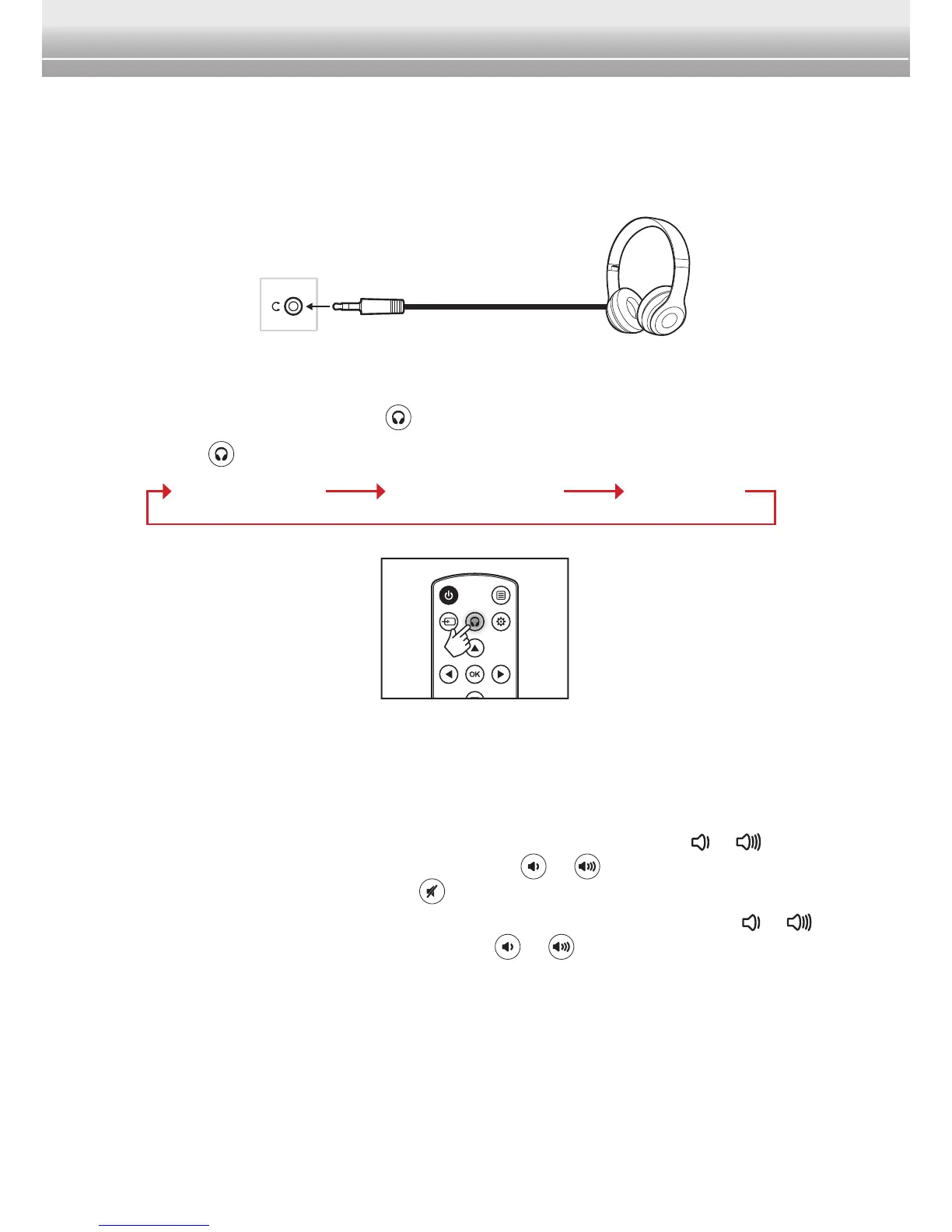
set of headphones for personal listening. To use headphones, just plug in your
headphone cable into the headphone jack of the player and/or monitor.
With the built-in IR transmitter, you can use wireless headphones. When the
IR headphone is connected to the player, you can select the channel your
prefer by simply pressing the button on the remote control.
Press the
button repeatedly to toggle the IR headphones channel.
Channel A Channel B Off
Note:
♦ When the headphones are connected, the speakers of Duo Cinema will be muted.
♦ When the IR headphones are connected, the built-in speakers are not muted. To
adjust the volume level of the speakers, do the following:
B On the player, you can adjust the volume level by touching the
or key on
the device or pressing the volume button (
or ) on the remote control. To
mute the speakers, press the
button on the remote control.
B On the monitor, you can only adjust the volume level by touching the
or
key on the device. The volume button (
or ) on the remote control does
not work.
♦ To avoid hearing damage, it is highly recommended to set the volume level to its
minimum level rst before plugging in the headphones.


 To Next Page