EN-16
Duo Cinema Instruction Manual
Using the Function Menu
To access the Function menu during playback, perform the following:
1 Press the
button to bring up the Function menu.
2 Use the
, , , or button to select the desired function.
3 Press the
button to conrm the selection.
4 Press the
button repeatedly to change the setting.
Note:
♦ The Function menu will disappear within 3 seconds if there is no operation.
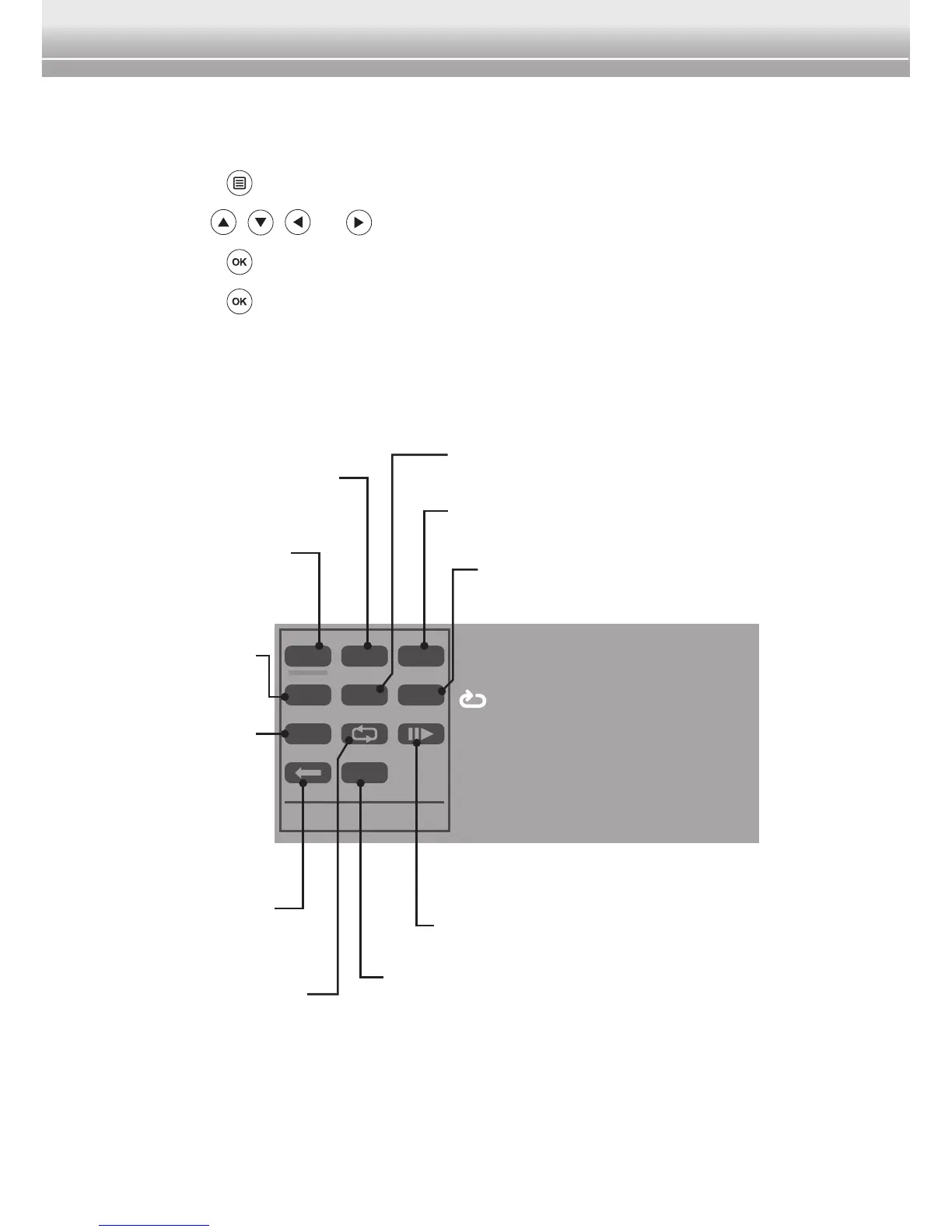
Search
Locate the chapter to play.
Subtitle
Change the subtitle language.
Repeat
Select the repeat mode.
Audio
Change the audio language.
Menu
Display the DVD
menu.
Title
Display the DVD
title.
Zoom
Zoom the picture on the screen.
Playback Speed
Slow playback at 1/2, 1/4, 1/8, or 1/16 speed.
Mute
Turn on/off the volume.
Display
Display the
playback
information
about title/
chapter elapsed
or remaining
time.
Return
Return to the DVD
menu.
MENU SRCH SUB
TITLE ZOOM AUD
DISP
MUTE
Root Menu
Subtitle
Title Elapsed
T 01 / 12 C 03 / 25 0:14:56
ALLMute Off
01 / 07: English


 To Next Page