EN-8
Duo Cinema Instruction Manual
Remote Control
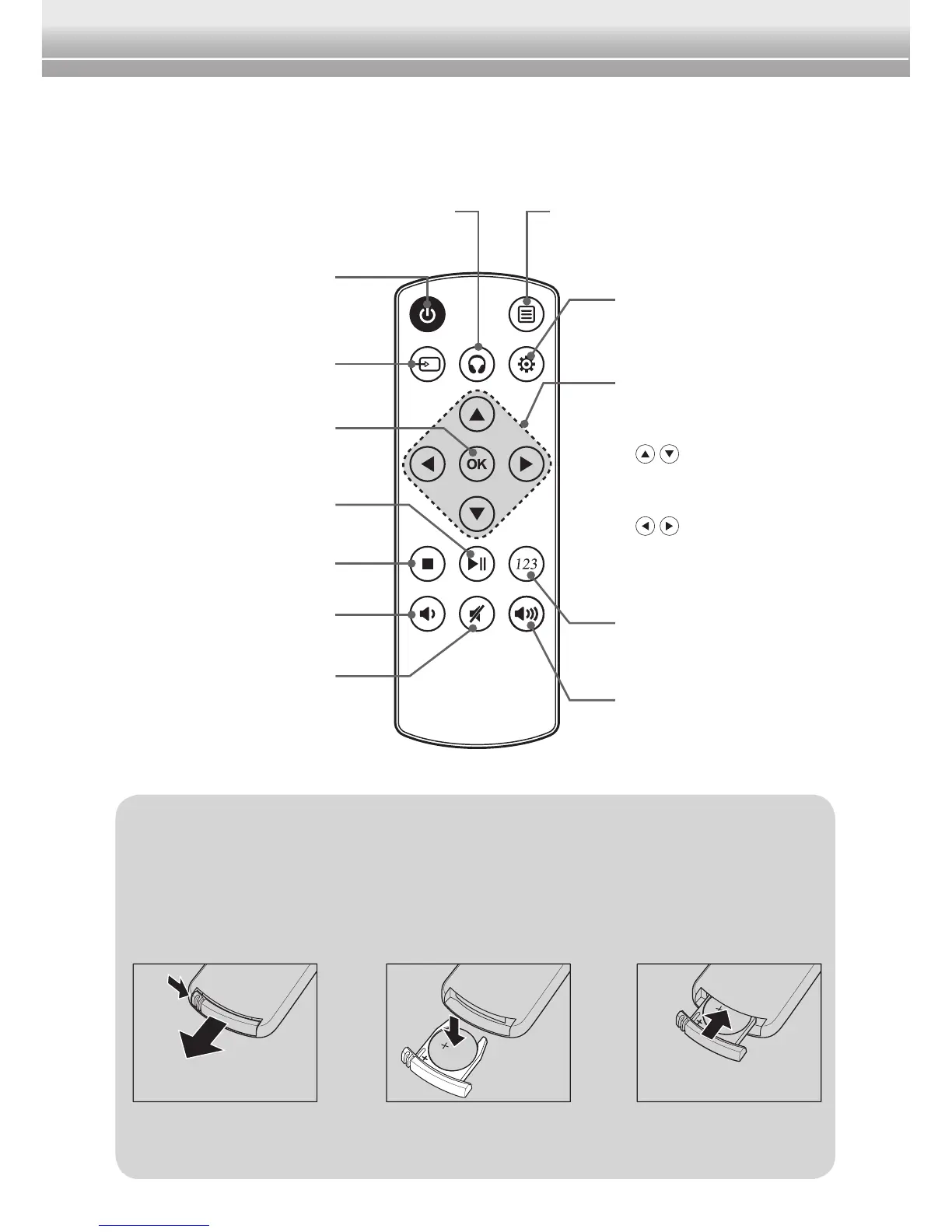
Funcons Overview
Replacing the Baery
1Pressrmlythe
latch and pull out
the battery holder.
2 Remove the old battery and
insert a new lithium coin battery
(CR2025) into the battery holder
with the positive side (+) facing
up.
3 Install the battery
holder back into
its slot.
Note:
♦ Remove the battery from the remote control when not in use for extended
periods of time to prevent possible battery leakage.
Power button
Turn this device on/off.
Source button
Switch the input source.
IR Headphones button
Switch the IR headphones channel.
Function button
Access the Function menu.
Navigation buttons
• Navigate through menus
and choose an item.
•
/ : go to previous
or next chapter/track or
scene during playback.
•
/ : scan forward/
backward at 2x, 4x, 8x,
16x, or 32x speed.
Virtual Number button
Bring up the number
keyboard.
Volume (Up) button
Increase the volume level.
OK button
Conrmtheselectionor
enter the submenu.
Play/Pause button
Play or pause playback.
Volume (Down) button
Decrease the volume level.
Mute button
Enable/Disable the mute
function.
Setup button
Access the Setup menu.
Stop button
Stop playback.


 To Next Page