19
SIM Card
Removing SIM Card
NOTE: To remove your SIM card, you need a ballpoint pen.
1
With the phone powered off, remove the battery cover and battery. See
“Detaching the Battery” on page 10.
2
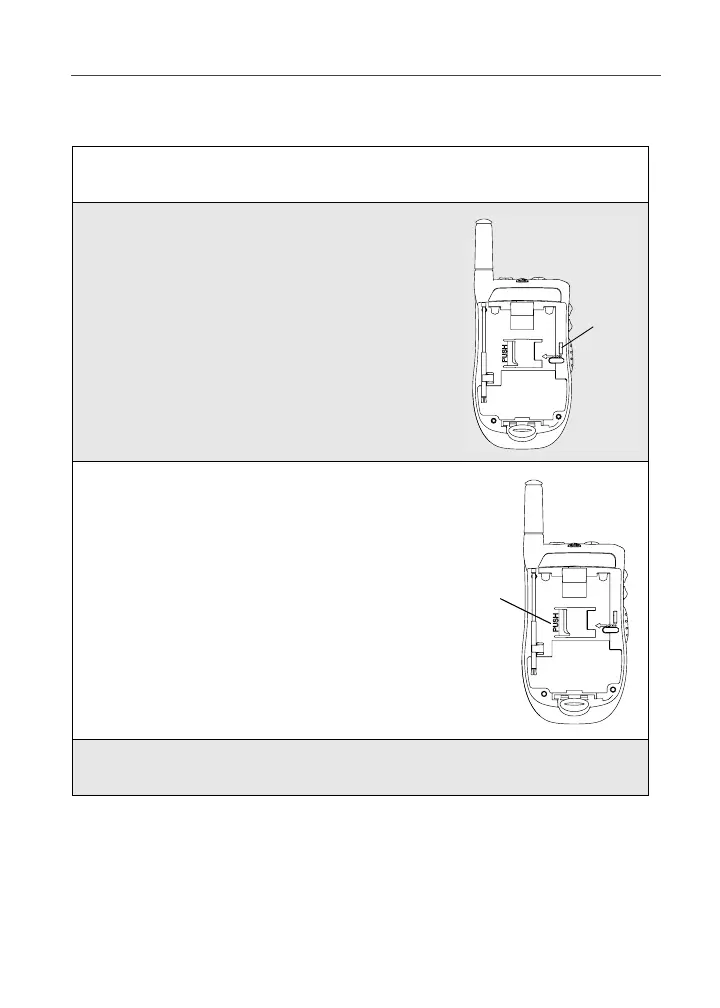
With the antenna pointing up and the back of
the phone exposed and facing up, insert the
tip of a ballpoint pen into the slot, which is to
the right and along the right edge of the SIM
card.
3
With your other hand, gently press the PUSH
tab, which is to the left of the SIM card. Hold
this tab down.
4
While holding the tab down, slide the SIM card to the left by moving
the ballpoint pen to the left within the slot.
slot
tab



 To Next Page