18
Changing the Battery
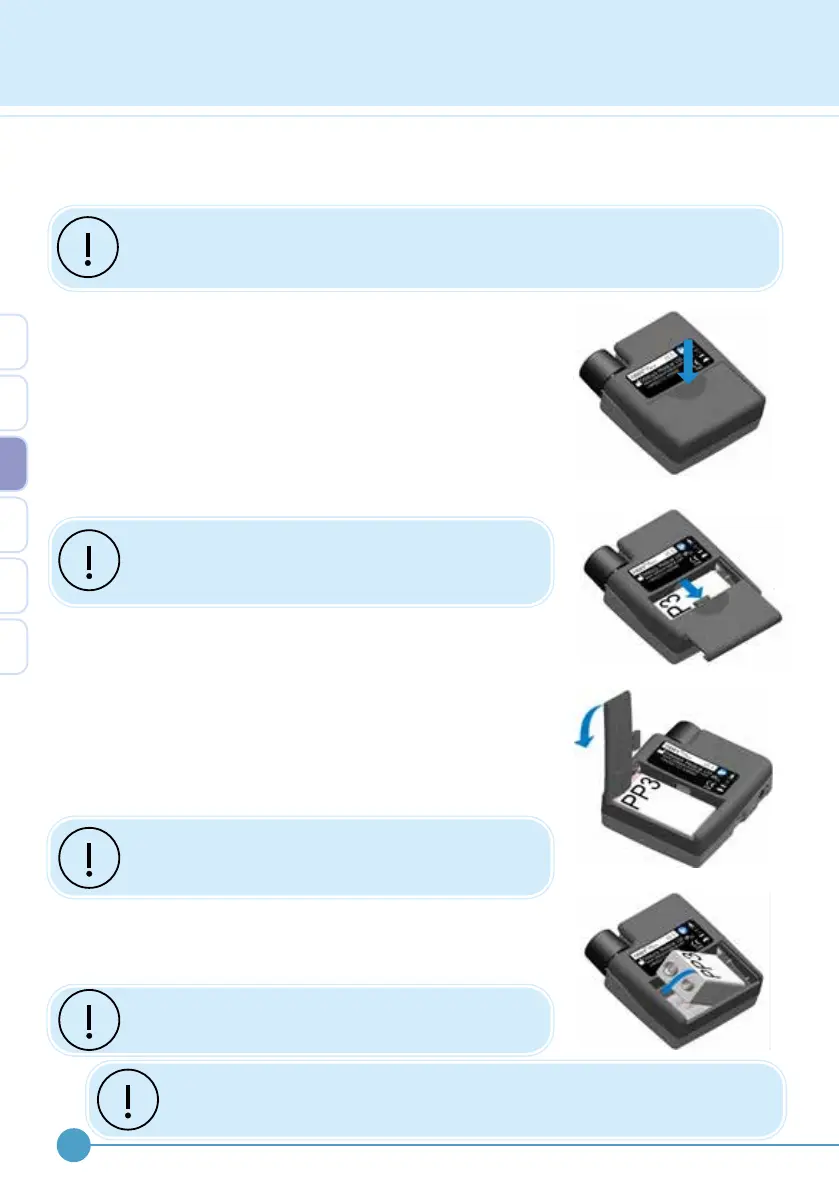
Removing and installing the battery
1. Remove electrode and footswitch leads from the
stimulator.
2. Remove the battery cover by pressing down on the
nger grip and sliding the cover backwards.
3. If a battery is in place then remove by using the corner of
the battery cover to lift the battery.
Do not hit the ODFS
®
Pace (XL) casing in order to
remove the battery as this may result in damage
to internal components.
4. Insert the battery, ensuring that the battery is orientated
in the correct polarity.
Place the non-terminal end of the battery into the ODFS
®
Pace (XL) and rotate the terminal end into the battery
compartment as shown below.
5. Replace the battery cover securely by sliding it on to the
back of the ODFS
®
Pace (XL) casing.
Prior to replacement of the battery cover check
the battery compartment for loose items that may
cause a short circuit or battery disconnection.
The ODFS
®
Pace XL is supplied with a lithium polymer
rechargeable battery. This will need to be recharged at the
end of every, or every other day.
Only recharge the lithium polymer battery using
the charger supplied.
A single PP3 9V, alkaline or rechargeable nickel metal hydride (NiMH) or lithium polymer
(LiPo) battery can be used.
If the device is not going to be used for an extended period of time, remove the
battery. Do not use if the battery cover is missing.
1.
2.
3.
4.
Activity data is stored in the memory only when the device is paused. It
is therefore important to pause and turn o the stimulator before removing
the battery to prevent data loss.
3


 To Next Page