26
User Accessible Menu
To enter the user accessible menu the stimulator should be paused.
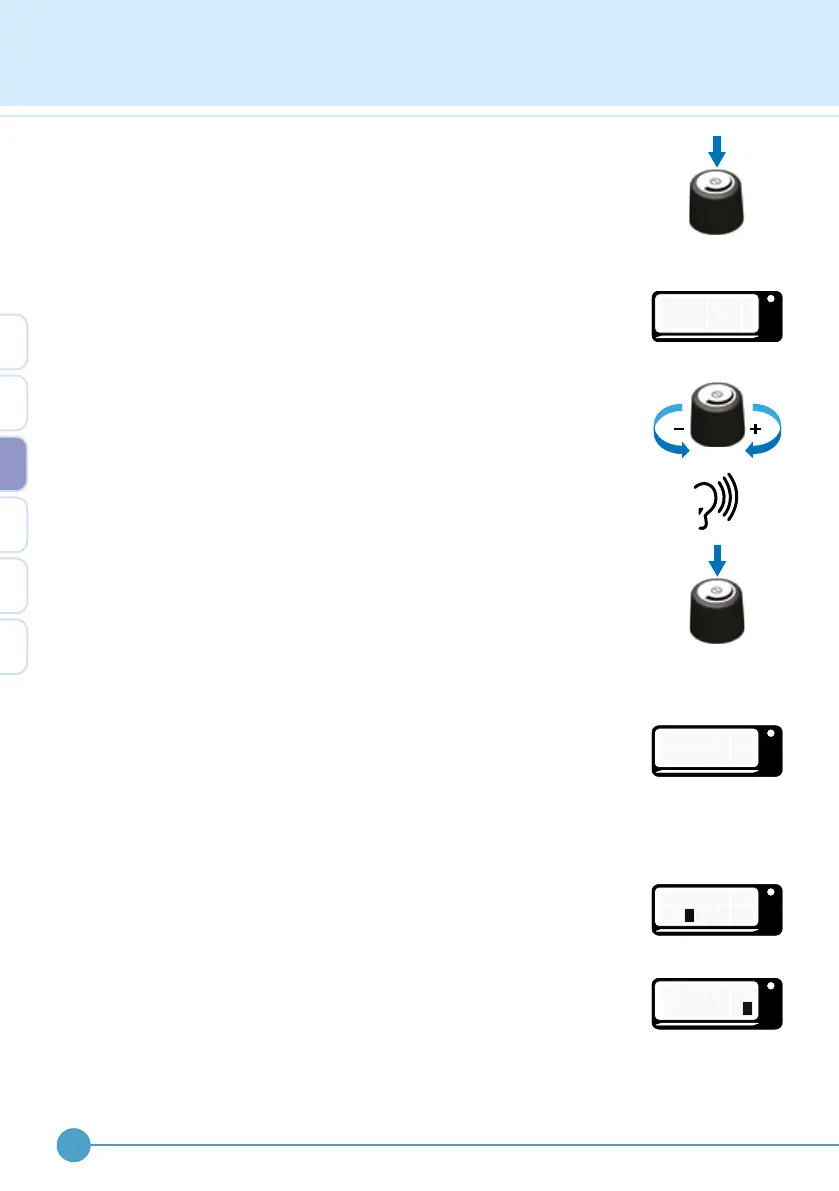
Unlock by clicking the control knob. Press and hold down the control knob
for more than 2 seconds, then release. If control lock has been disabled,
clicking to unlock will not be necessary. If beeps are enabled, a double
descending pattern of beeps is heard and the current mode is displayed,
indicated by a ashing black box.
If you are using a remote control, channel number will be displayed while
the control knob is held down.
Changing between walk and exercise modes
Rotate the control knob to progress along the menu. When “WALK
MODE”, “EXERCISE MODE” or “TURN OFF? I/0” screens are reached
a high, medium and low pitch double beep is given, enabling changing
of modes or turning o without sight of the screen. Click the control
knob to select the chosen options. Note: when the mode is changed from
“WALK” to “EXERCISE” the output level is reduced to 1%. When the mode
is changed from “EXERCISE” to “WALK” the output level is reset to the
percentage set by your clinician. If an ODFS
®
Pace is being used a screen
instructing the user to either insert or remove the footswitch lead will be
shown. The mode will not change until this is completed.
Options
This menu item gives three further choices. “BEEPS”, “SOUNDER” and
“WIRELESS OPTIONS” (ODFS
®
Pace XL only). Click the chosen option
and rotate the control knob and then click to choose “ON” or “OFF”. The
black box indicates the current setting. Use “BACK” to return to the user
accessible menu or “EXIT” to go back to the current user mode.
Beeps
Allows the user to turn on or o the audio beep feedback. For example the
active and paused beeps.
Sounder
Allows the user to turn “ON” or “OFF” stimulation audio feedback.
OML
C H A N N E L
#
2
OML
O P T I O N S
OML
B
O
E
N
E P S
O F F
OML
S
O
O
N
U N D E R
O F F
3


 To Next Page