37
ODFS
®
Pace XL Wireless Set-up
The ODFS
®
Pace XL is capable of accepting a selection of Odstock Medical Limited wireless
accessories. Before a wireless accessory can be used it must first be joined to the ODFS
®
Pace XL. Each accessory may have a different method of enabling ‘joining’ (a procedure to
connect two devices so that they are able to communicate wirelessly with each other). For
each of the accessories please refer to the instructions for use accompanying these devices.
The clinician and user are able to join accessories to the ODFS
®
Pace XL. If your clinician
has provided your accessories, these should have been joined. Some accessories may
require input from a clinician. If you have problems following the joining process please
contact your clinician or Odstock Medical Limited.
Wireless joining of accessories in the user accessible menu
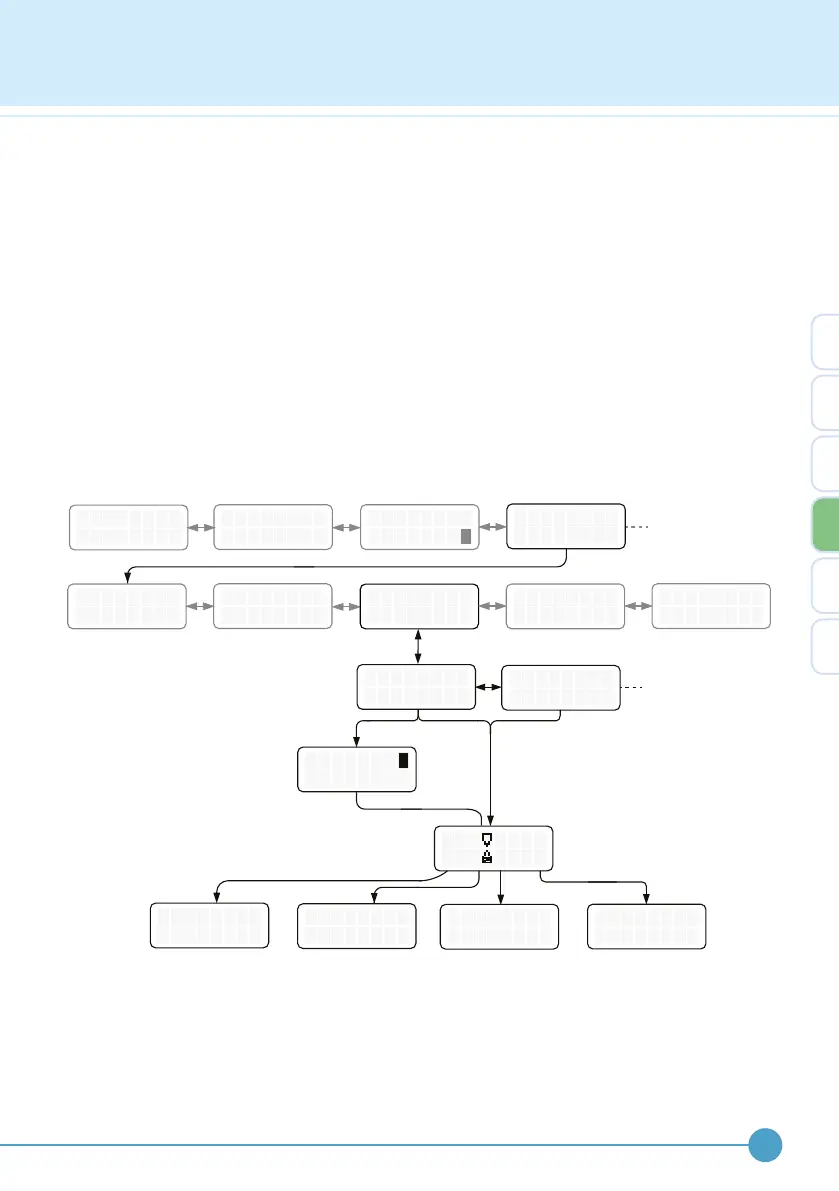
Wireless joining mode is accessed within the user accessible menu. The menu structure is
shown below.
The wireless joining mode can be accessed from the user accessible menu (page 26). To
enter this menu, click and then hold down the control knob for 2 seconds. This presents the
user with the ability to join a wireless footswitch or a remote control. Once the accessory
device starts it’s joining mode, select either JOIN F.SWITCH or JOIN REMOTE on the
ODFS
®
Pace XL. An hour glass will be displayed and may remain on the screen for up to 2
minutes during the joining process.
T
O
U
F
R N
F
E
M
X
O
E R C I S
D E
E W
M
A
O
L K I N G
D E
O P T I O N S
S O U N D E R
B E E P S
W
O
I
P
R E L E S
T I ON S
S
?
I / 0
. . . . B A C K
E X I T
[
[
-
>
J
F
O
A
I N I N G
I L E D
F .
S W
I T C
J O I N E D !
H
J
A
O
B
I N I N G
OR T E
D
J
F
O
.
I N
S W I T C
J
R
O
E
I N
MO T E
H
R
E M
O T
J O I N E D !
E
S
R
P
E
A R E
E
P L A C
Only visible if a wireless
footswitch has previously
or is joined.
4


 To Next Page