39
ODFS
®
Pace XL Wireless Set-up
Create network menu
An additional menu is available for users to allow resetting of a network in case of interference.
If there is strong interference this may result in intermittent operation in one location while
operation is trouble free away from that location. This menu allows access to “CREATE
NETWORK” that is able to select a quieter channel and improve wireless communication.
If this option is selected the wireless accessories currently joined will need to be
re-joined.
This option must be used if the network needs to be reset for use without a
remote control, if a remote control has been previously used. The wireless
footswitch(es) will then need to be re-joined.
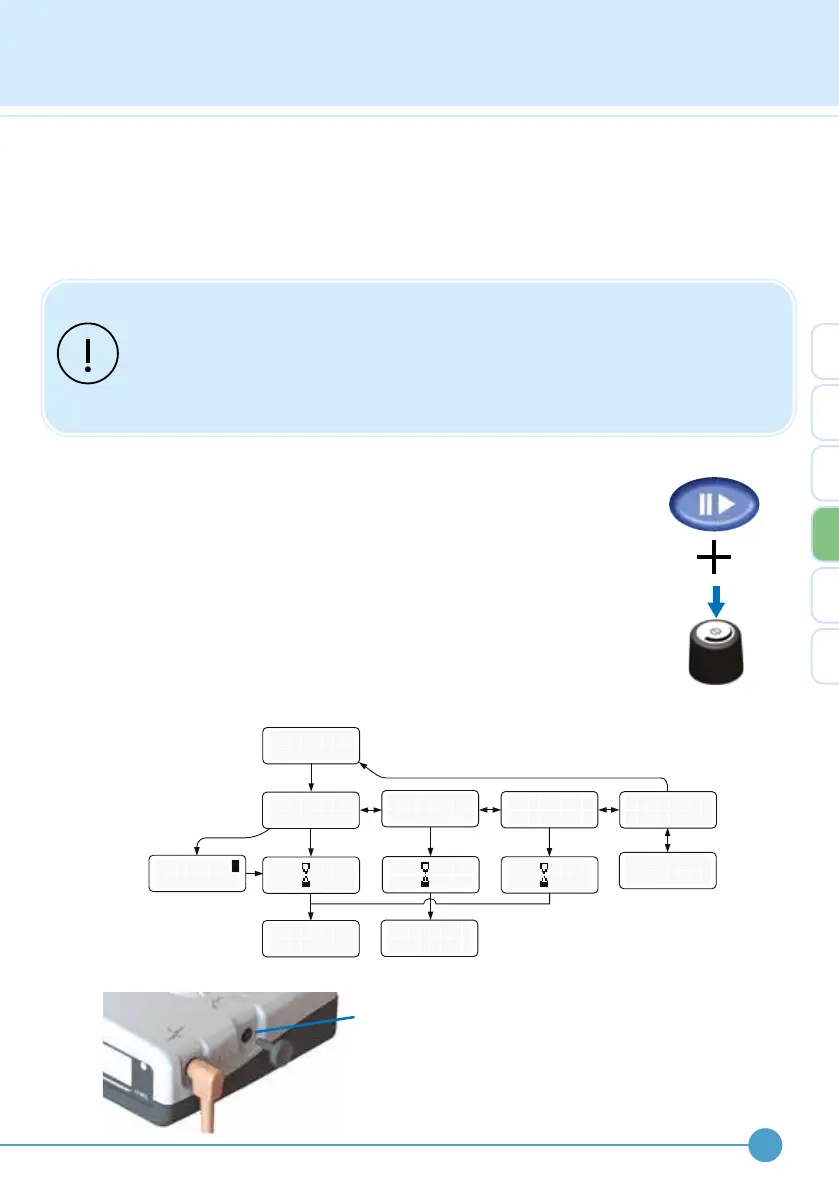
Create network
“CREATE NETWORK” will delete all wireless accessories from the
network and starts the process of joining a new wireless footswitch.
“CREATE NETWORK” is accessed through the advanced wireless
options menu. With the stimulator turned o, press and hold down the
pause button. Whilst holding down the pause button, press the control
knob to turn the ODFS
®
Pace XL on. Keep the pause button pressed until
“WIRELESS OPTIONS” is displayed on the screen. Release all buttons.
Select “WIRELESS OPTIONS” to enter the menu using the control knob.
Rotate the control knob to select “CREATE NETWORK”. The menu
structure is shown below.
Footswitch
Socket Bung
The ODFS
®
Pace XL is supplied with
footswitch socket ‘bung’ to prevent
dust or moisture ingress. This can be
removed allowing a wired footswitch
to be used.
W
O
I
P
R
E
L E S
T I O
C R
E
E A T E
W
OR K
J
F
O
.
I N
S W I T C
. . . . B A C K
F .
S W
I T C
S
N
S
J O I N E D !
H
N
T
E X I T
[
[
-
>
J
R
O
E
I N
MO T E
H
R
E M
O T
J O I N E D !
E
S
R
P
E
A R E
E
P L A C
4


 To Next Page