MENU 4.9.3 - DEGREE MINUTE SETTING
current value
Setting range: -3000 – 3000
start compressor
Setting range: -1000 – -30
Default value: -60
step difference compressors
Setting range: 10 – 2000
Default value: 60
start diff additional heat
Setting range: 100 – 1000
Factory setting: 400
diff. between additional steps
Setting range: 0 – 1000
Factory setting: 30
Degree minutes are a measurement of the current
heating requirement in the house and determine when
the compressor respectively additional heat will
start/stop.
Caution
Higher value on "start compressor" gives more
compressor starts, which increase wear on the
compressor. Too low value can give uneven
indoor temperatures.
MENU 4.9.4 - FACTORY SETTING USER
All settings that are available to the user (including ad-
vanced menus) can be reset to default values here.
Caution
After factory setting, personal settings such as
heating curves must be reset.
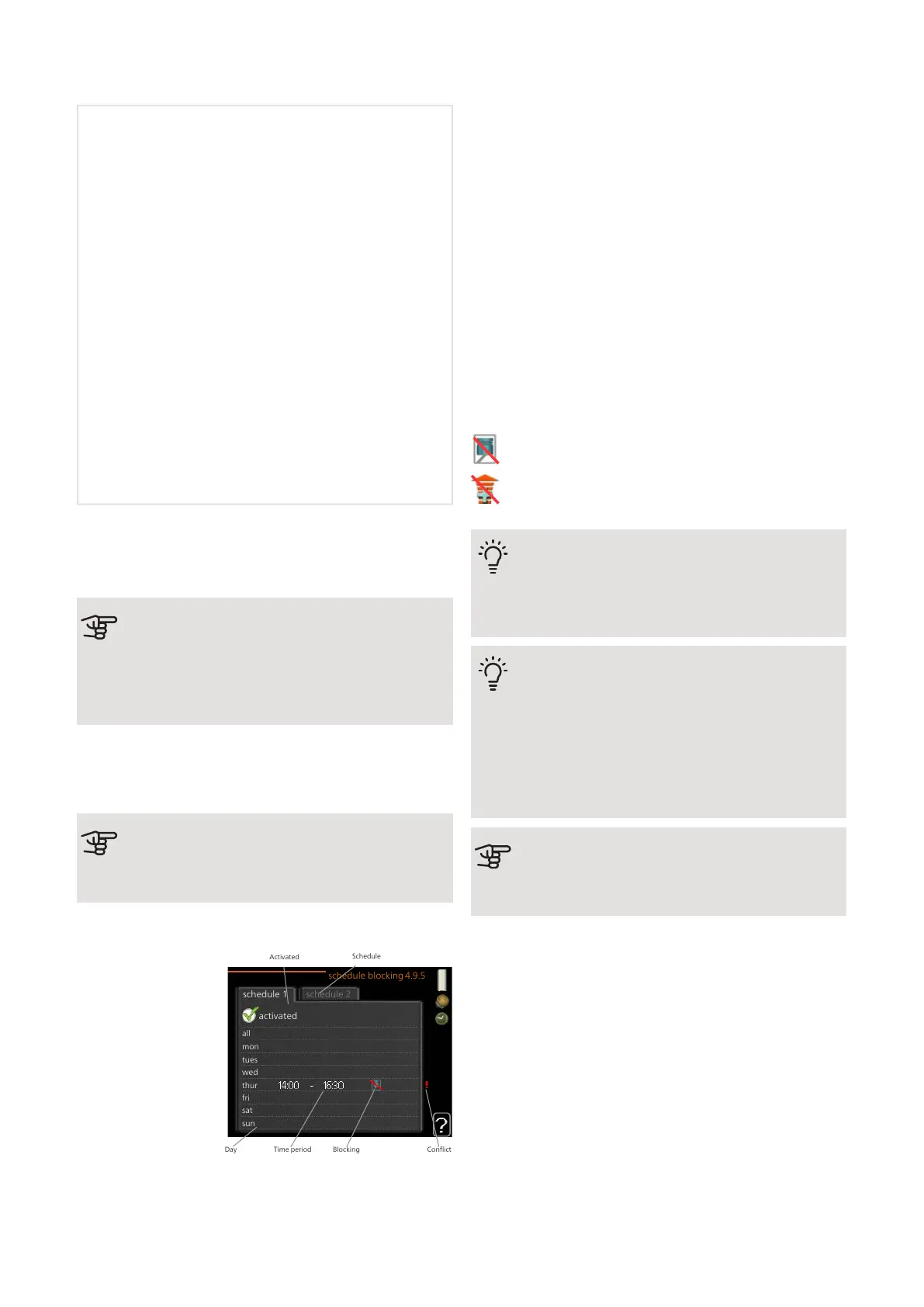
MENU 4.9.5 - SCHEDULE BLOCKING
activated
schedule 2schedule 1
all
mon
tues
wed
thur
fri
sat
sun
schedule blocking 4.9.5
Activated
Schedule
Time period BlockingDay Conflict
The compressors in
the heat pump
and/or connected
additional heating
can be scheduled to
be blocked for up to
two different time
periods here. If sev-
eral heat pumps are
connected as mas-
ter/slave their com-
pressors are blocked
as well.
When scheduling is active the actual blocking symbol
in the main menu on the heat pump symbol is displayed.
Schedule: The period to be changed is selected here.
Activated: Scheduling for the selected period is activated
here. Set times are not affected at deactivation.
Day: Select which day or days of the week the
scheduling is to apply to here. To remove the scheduling
for a particular day, the time for that day must be reset
by setting the start time to the same as the stop time.
If the row "all" is used, all days in the period are set ac-
cording to that row.
Time period: The start and stop time for the selected
day for scheduling are selected here.
Blocking: The desired blocking is selected here.
Conflict: If two settings conflict with each other, a red
exclamation mark is displayed.
Blocking of all available compressors.
Blocking of all available additional heating.
TIP
If you wish to set similar scheduling for every
day of the week start by filling in “all” and then
changing the desired days.
TIP
Set the stop time earlier than the start time so
that the period extends beyond midnight.
Scheduling then stops at the set stop time the
day after.
Scheduling always starts on the date that the
start time is set for.
Caution
Long term blocking can cause reduced comfort
and operating economy.
NIBE F1345Chapter 3 | Control - Menus30



 To Next Page