Usage
Projector
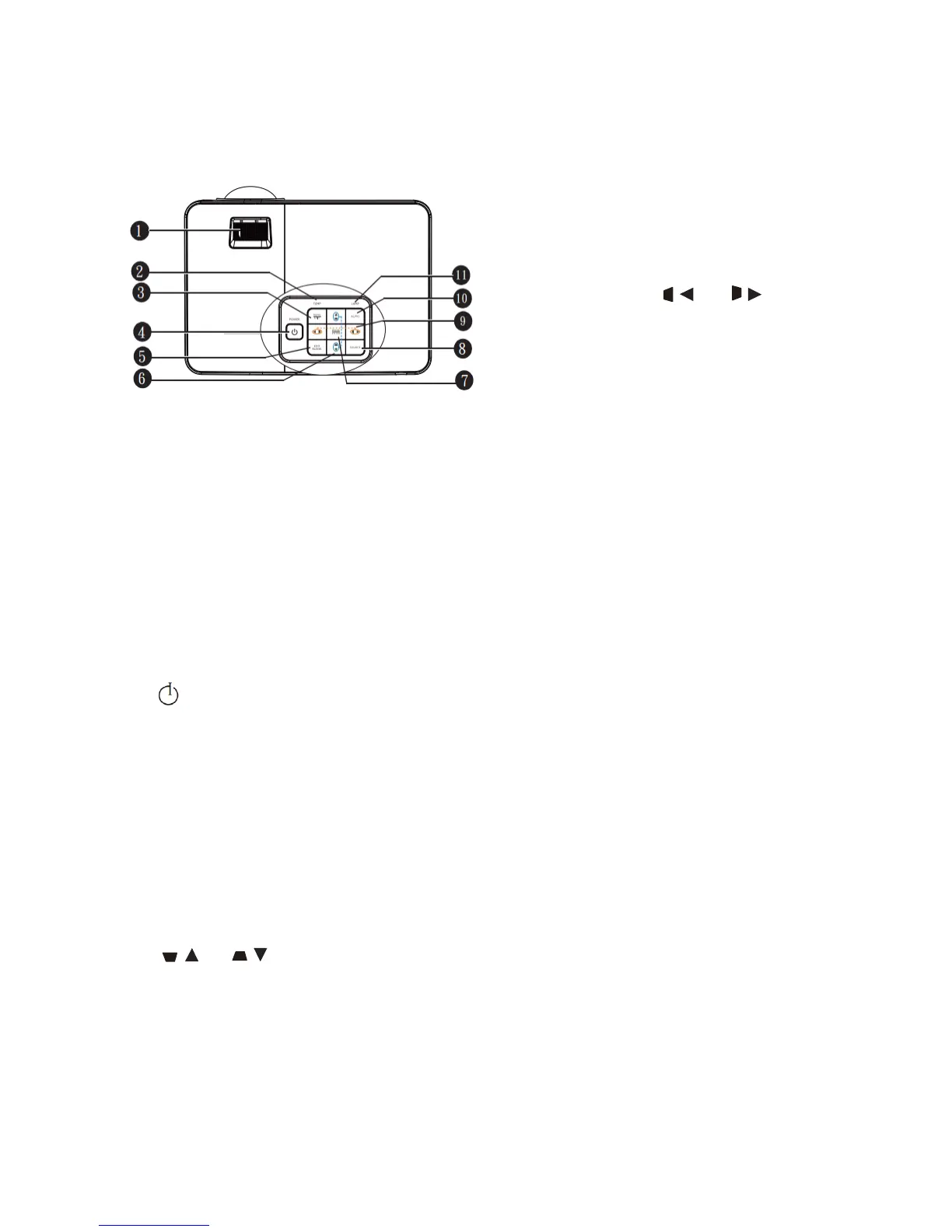
1. Focusing ring. Adjusting focal length of
projection image.
2. Temperature indicator
The indicator will turn red in case of too high
projector temperature.
3. MENU/EXIT
Opening on-screen display (OSD) menu.
Returning to previous OSD menu, exiting
and saving menu setting.
4. Power/power indicator
Indicating bulb state. In case of bulb
problems
Projector switching between standby mode
and operating mode. The indicator is on or
blinks when the projector is in operation.
5. Eco Blank
Press Eco Blank to close the image for a
while to lower bulb power by 70%.
6. Trapezoidal distortion correction/arrow key
( / up, / down)
Displaying 2D trapezoidal distortion
correction page and adjusting vertical
trapezoidal distortion correction value.
The indicator is turned on or blinks.
7. MODE/ENTER
Selecting available image setting
mode. Activating selected on-screen
display (OSD) menu.
8. SOURCE
Displaying signal source selection
bar.
9. Trapezoidal distortion correction
arrow key (
/ left, / right)
Displaying 2D trapezoidal
distortion correction page and
adjusting horizontal trapezoidal
distortion correction value.
In on-screen display (OSD) menu,
#7 and #10 keys serve as direction
arrows to enable the selection of
required menu item and adjustment.
10. Auto
Determining optimal image timing
sequence automatically for the
image displayed.
11. Bulb indicator


 To Next Page