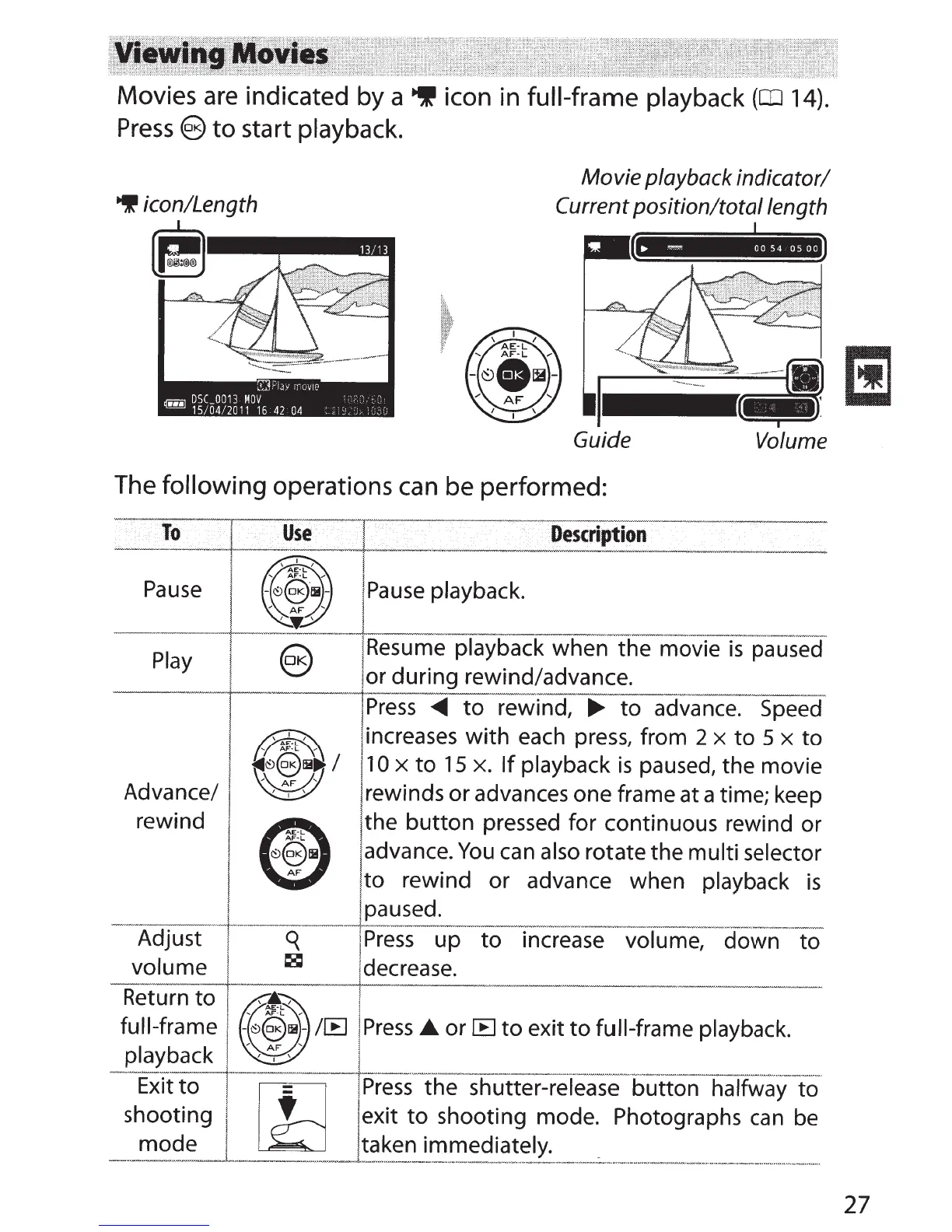
Movies
are
indicated by a
~
icon in
full-frame playback
(rn
14).
Press@)
to
start
playback.
9
icon/Length
~
:1J
y
.........
1e
Movie playback indicator/
Current
position/total length
DSC
0013
MDV
'
- '
~
15/04/2011
16
42
04
-
''
Guide
Volume
The following operations can be performed:
To
Use
D.
esc:ription
---
----~
+-
---------~
~
-t------'-~-
~
~---~~-
--
~--
--
Pause
Play
Advance/
rewind
I
Pause playback.
!
Resume
playback when the movie
is
paused
or during rewind/advance.
1
Press
<111111
to
rewind,
~
to advance.
Speed
!increases with
each
press,
from 2
x
to 5
x
to
10
x
to
15
x.
If
playback
is
paused, the movie
rewinds or advances one frame at a time; keep
the button pressed for continuous rewind or
advance.
You
can
also rotate the multi selector
when playback
is
I
to
rewind or advance
--
--
-+-
---
--·
-tfaused.
Adjust :
q
I
Press
up to - increa-
se
volume-, - down -
to
volume
1
8
'decrease.
Return to
1
AE-L
full-frame
-
~~~~B~-
/IE
j
Press
£.or
IE
to
exit
to
full-frame playback.
playback
--
~
-
·
~
---L---··---
·---
--·----------
-----
--
---
---------
--·
Exit
to
lE-
I
Press
the shutter-release button halfway to
shooting
f
J exit
to
shooting mode. Photographs
can
be
mode
j
taken immediately.
------
·
·---
--
-·-·-
·----
--
-----·-·-
·•••-
• ·
---
•
•••"'''''''-""•"
•
••••""'-'
''""""_:...
..
..
...
.........
....
-•••oo
•
-·--••••
••·----•·••""'
""_""_
'"
27



 To Next Page