62
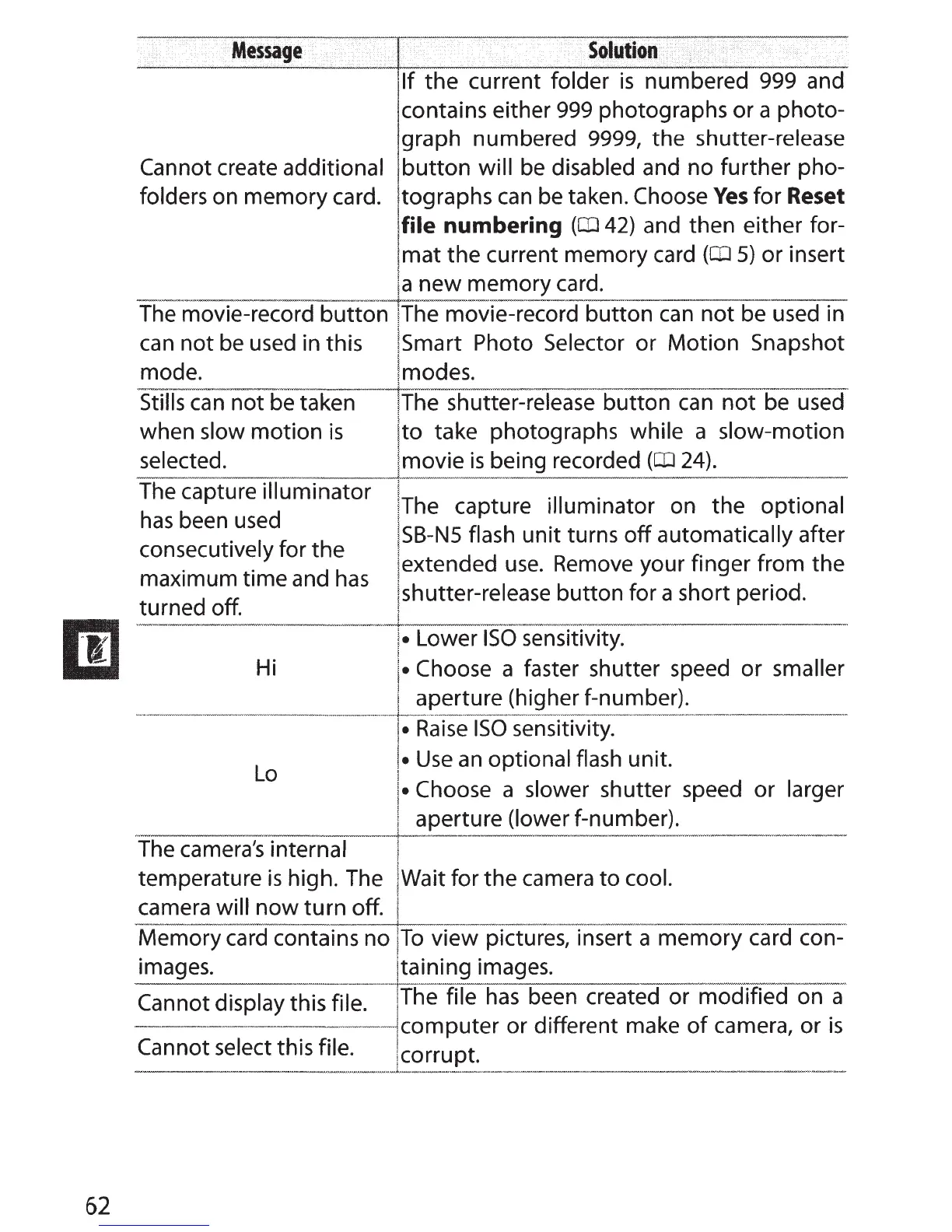
Message
llf
the current
fold~~~m,b~red
999 and
contains either
999
photographs or a photo-
lgraph numbered 9999, the shutter-release
Cannot create additional
I
button
will
be
disabled and no further pho-
'
folders on memory card. ltographs
can
be taken. Choose
Yes
for Reset
!tile numbering
(OJ
42) and then either for-
!mat the current memory card
(OJ
5) or insert
Ia
new memory card.
Themovie-:re<:ord
button
iThe movie-recordblitton
can
not be used in
can
not
be
used
in this !smart Photo Selector or Motion Snapshot
mode. lmodes.
Stills
can
not be taken
!The
shutter-release button
can
not
be used
when slow motion
is
Ito take photographs while a slow-motion
selected.
I movie
is
being recorded
(OJ
24).
The
capture illuminator
has
been
used
consecutively for the
maximum time and
has
turned off.
Hi
Lo
--~------
i
!The
capture illuminator on the optional
ISB-NS
flash unit turns
off
automatically after
!extended
use.
Remove
your finger from the
jshutter-release button for a short period.
~
i•
Lower
ISO
sensitivity.
!·
Choose a faster shutter speed or smaller
1 aperture (higher f-number).
~---··-···----~------~~-
1·
Raise
ISO
sensitivity.
I•
Use
an
optional flash unit.
I•
Choose a slower shutter speed or larger
! aperture (lower f-number).
---------------~---
----------
The
camera's
internal I
temperature
is
high. The !Wait for the camera to cool.
camera will
now
turn
off. I
Memory
card
contains no
ITo
view pictures, insert a memory card con-
i
images. ltaining images.
41--~-~-------------~-------
Cannot display this file.
!The
file
has
been created or modified on a
··
..
-··--···-------1computer
or different make
of
camera, or
is
Cannot select this file. !corrupt.
---~.~
........
c



 To Next Page