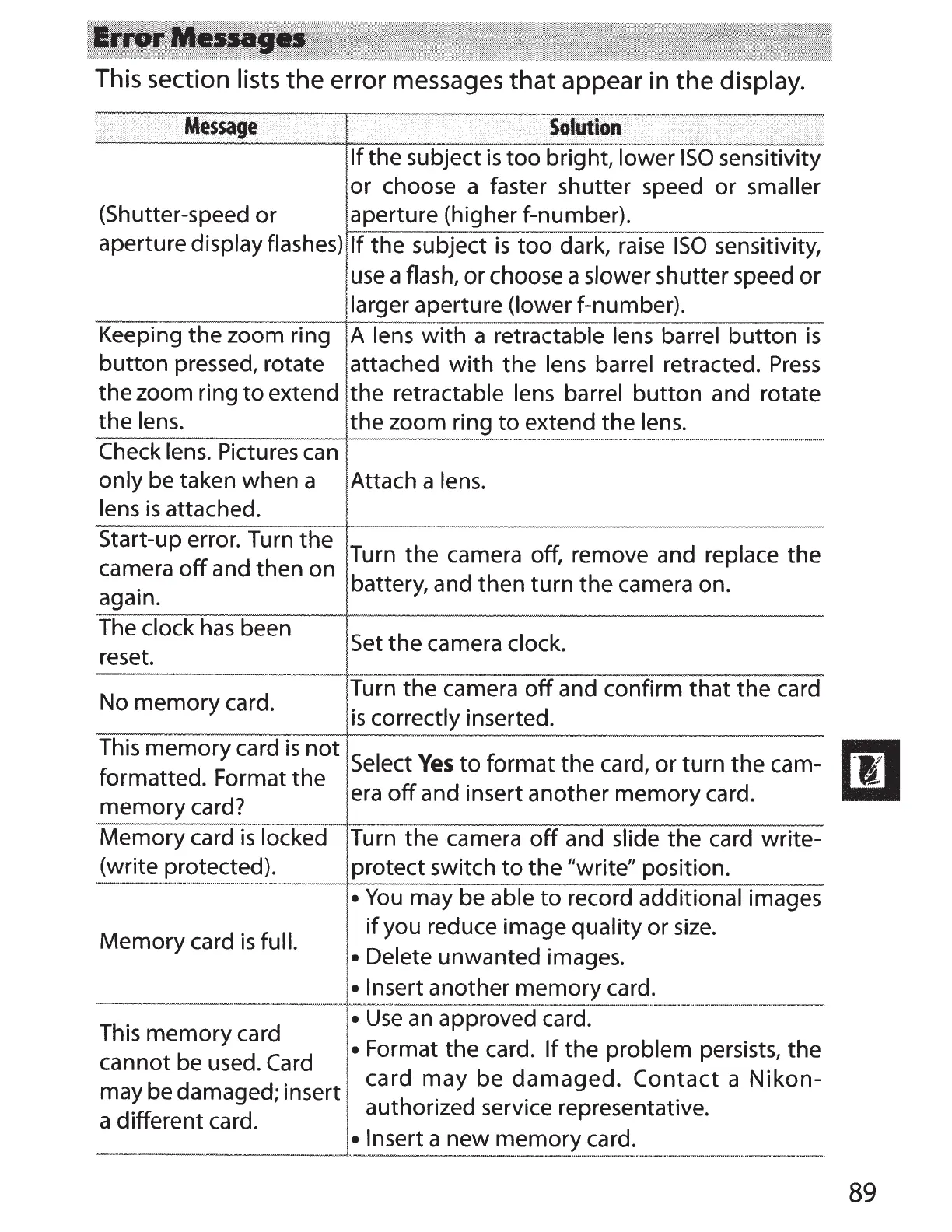
This section
lists
the
error messages
that
appear in
the
display.
·:
i >
Mess41ge
,
'·
'
Solution
' ·
\ >
r
i
<
..
>•.·
<
If
the subject
is
too
bright, lower
ISO
sensitivity
or
choose a faster shutter speed
or
smaller
(Shutter-speed
or
aperture (higher f-number).
aperture display flashes)
If
the subject
is
too
dark, raise
ISO
sensitivity,
use
a flash,
or
choose a slower shutter speed
or
larger aperture (lower
f-number).
Keeping the zoom ring
A
lens
with
a retractable lens barrel
button
is
button
pressed, rotate attached
with
the
lens
barrel retracted.
Press
the zoom ring
to
extend the retractable
lens barrel
button
and rotate
the
lens.
the zoom ring
to
extend the
lens.
Check lens. Pictures
can
only be taken when a
Attach a lens.
lens
is
attached.
Start-up error. Turn the
Turn the camera off, remove and replace the
camera
off
and then on
battery, and then turn the camera on.
again.
The
clock
has
been
Set
the camera
clock.
reset.
.
----
No memory card.
Turn the camera
off
and confirm
that
the card
is
correctly inserted.
This memory card
is
not
Select
Yes
to
format the card, or turn the cam-
formatted. Format the
era
off
and insert another memory card.
memory
card?
Memory card
is
locked Turn
the
camera
off
and slide
the card write-
(write protected).
protect switch
to
the "write" position.
•
You
may be
able
to
record additional images
Memory card
is
full.
if
you reduce image quality or
size.
• Delete unwanted images.
This memory card
______
t__
~n~er_!_~n~!her
~
-
~mory
c~
_
rd
:
__
•
Use
an
approved card.
t b
d
C
d
•
Format the card.
If
the problem persists, the
canno e
use
. ar .
b d
d
. t card
may
be
damaged.
Contact
a
Nlkon-
may e a mage ; mser h . d . .
d
·u
t d aut onze
serv1ce
representative.
a
111eren
car .
• Insert
a new memory card.
----
---
----
--
----
-
Iii
89



 To Next Page