43
M (Manual) Mode
P and M Modes
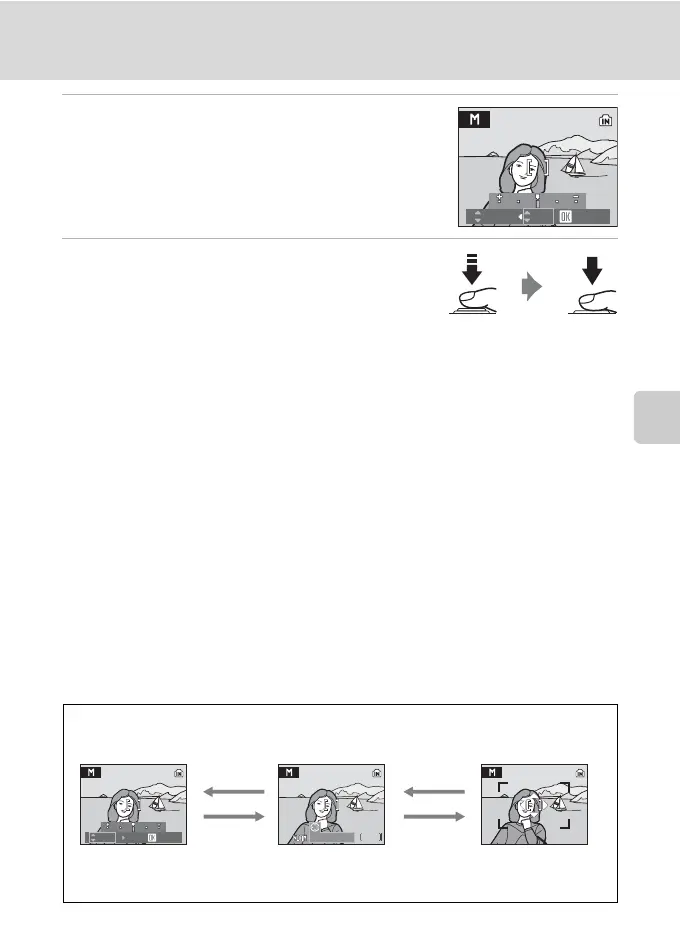
5 Press the multi selector H or I to choose
one of two aperture values.
Repeat steps 2 to 5 to modify shutter speed and aperture
settings until the desired exposure is achieved.
Press k to apply the settings.
6 Focus and shoot.
At default setting, the camera automatically focuses on
the subject in the center focus area (A 93).
B Note on Aperture
The camera’s aperture is electronically controlled with neutral density (ND) filter selection so that
depth-of-field does not change when the aperture value is adjusted.
B Note on Slow Shutter Speed
At speeds slower than 1/4 sec, the shutter speed indicator will turn red to show that selecting [On]
for [Noise reduction] (A 96) is recommended to reduce “noise” in the form of randomly-spaced,
brightly colored dots.
B Notes on Shutter Speed
• At a [Continuous] (A 90) setting of [Continuous], [BSS], or [Multi-shot 16], the slowest shutter
speed available is down to 1/2 sec.
• The slowest shutter speed available is down to 4 sec. at an [ISO sensitivity] (A 88) setting of [800],
and 2 sec. at [1600] or higher.
B Note on ISO Sensitivity
At an [ISO sensitivity] (A 88) setting of [Auto], sensitivity is set to ISO 64.
D Functions Available in M (Manual) Mode
• Flash mode (A 26) and focus mode (A 29) can be adjusted, and self-timer (A 28) can be
enabled.
• Press d in M (manual) mode to adjust shooting menu settings (A 80).
1/60 F5.6
Confirm
Switching between
shutter speed and
aperture: J or K
Flash mode :H
Self-timer :J
Focus mode :I
Selecting a focus
area:
H, I, J, or K
When [Manual] is selected for [AF area mode] (A 93)
k
K
k
k
26
26
E
1/125
1/125 F2.8
F2.8
Confirm
1/125 F2.8
Changing Camera Settings
Use the multi selector to change settings as follows.













 To Next Page