151
Transferring Pictures
Wireless Transfer Mode
Transferring Pictures Taken on Selected Date - Shooting
Date
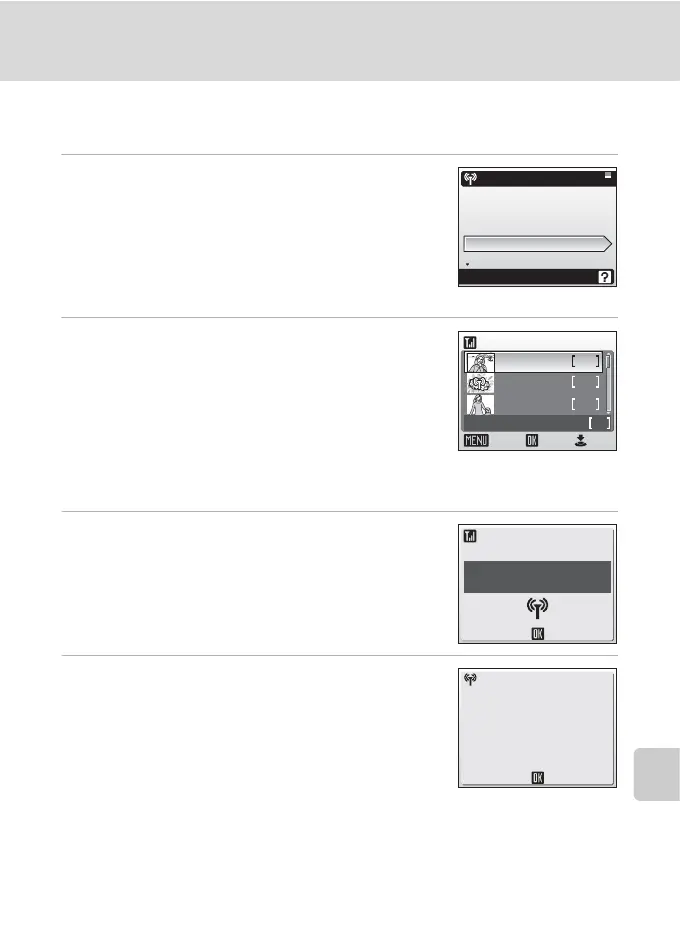
1 Use the rotary multi selector to choose
[Shooting date] in step 3 of “Establishing
a Wireless Connection” (c 143) and
press d.
When multiple computers are set as profiles for the
infrastructure network, the profile selection screen is
displayed. Choose a profile and press d.
2 Select the shooting date.
The shooting date menu will be displayed.
• Select the desired shooting date and press d to
apply selection. Multiple shooting dates can be
selected.
• The selected shooting date will be marked with the
n (wireless transfer) icon. Press d again to cancel
the selection (the n icon will disappear).
• Press N to complete selection.
3 Transfer pictures taken on the selected
dates.
4 When transfer is complete, press d to
return to the SSID selection menu.
To end wireless transfer mode, see “When Transfer is
Complete” (c 144).
j Note on Transferring Pictures with [Shooting Date]
Pictures taken without the date and time set (c 20, 117) cannot be chosen for transfer with
[Shooting date].
Function selection menu
COOLPIX CONNECT
Easy Transfer (PM)
Easy Trans. (no PM)
Shooting date
Selected Images
Shooting date
Confirm
ON/OFF
10.10.2006 3
2
5
09.10.2006
08.10.2006
End
images total
5
Cancel
My Network
Connecting to
Profile-A
Select SSID
Transfer completed.
Connection terminated.



 To Next Page