81
Voice Recordings
Copying Voice Recordings
Copy voice recordings between the internal memory and a memory card.
This option is available only when a memory card is inserted.
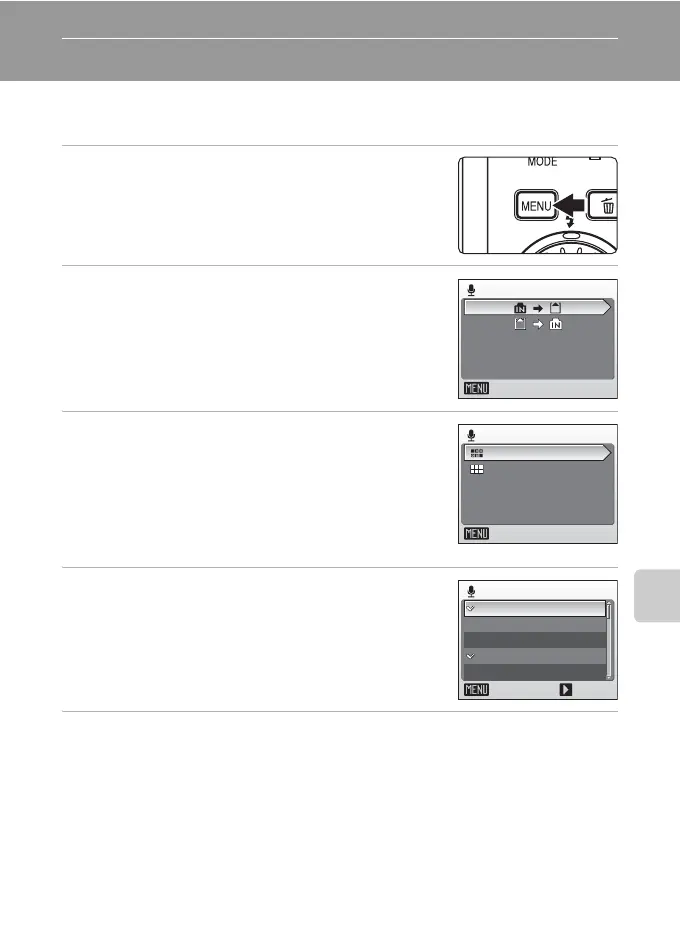
1 Press m in the select sound file screen
(c 79, step 2).
2 Use the rotary multi selector to choose
the option and press d.
MNO: Copy recordings from internal memory to
memory card
ONM: Copy recordings from memory card to inter-
nal memory
3 Choose the copy option and press d.
[Selected files]: Proceed to step 4
[Copy all files]: Proceed to step 5
4 Choose the desired file and press d.
Choose the desired file and press J to mark.
A confirmation dialog will be displayed.
5 Choose [Yes] and press d.
Copying starts.
k Voice Recordings
The COOLPIX S7c may be unable to play or copy sound files created with other make of cam-
era.
Copy sound files
Exit
Camera to card
Copy all files
Exit
Selected files
Select sound files
Exit Select
003 10:0515.10.06
001 10:3010.10.06
002 11:0510.10.06
004 13:2325.10.06
005 15:0025.10.06
N
N
N



 To Next Page