Chapter 2 How to Use the Parts
5
Chapter 2 How to Use the Parts
2
How to Use the Parts
2.1 Controlling the Power
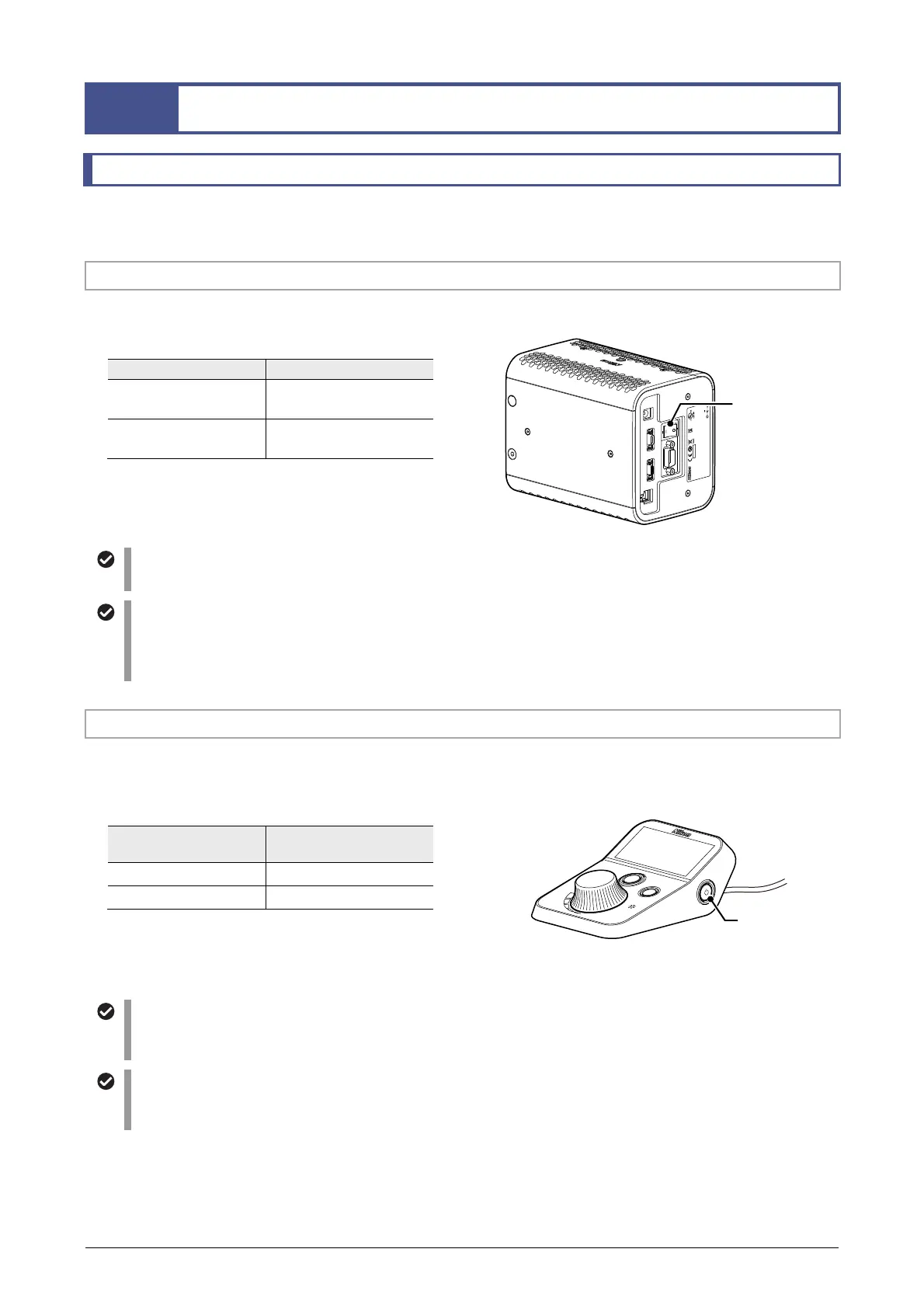
The main power switch on the back side of the D-LEDI main body and the standby button on the right side of
the remote control pad are used to control the power of this product.
2.1.1 Turning the Main Power On or Off
Use the main power switch on the back of the D-LEDI main body to control the main power of this product.
Turning the main power on or off
Main power switch Main power
Set to the “I” side.
The main power is turned
on.
Set to the “O” side.
The main power is turned
off.
In normal operation, keep the main power switch on,
and use the standby button on the remote control pad
to turn the D-LEDI on or off.
D
-
LEDI
4N75
INSPECTION
EQUIPMENT
R
-
R
-
NEc
-
SD
-
LEDI
INPUT
12VDC , 3.3A
830001
This device complies with Part 15 of the FCC Rules.
Operation is subj ect to the following t wo consitions :
(1) this device may not cause harmful interference, and
(2) this device must accept any interference received,
including inter ference taht may caus e undesired opera tion.
CAN ICES-3(A)/ NMB-3(A)
MADE IN JAPAN
TOKYO JAPAN
USB
REMOTE CONTROL
DC
TRIGGER
Turning the main power off during assembling or connection
When attaching or connecting this product, set the main power switch to the “O” side to turn off the main power.
Standby state
Standby refers to a state in which only the main power is on, while the D-LEDI main body is turned off.
To turn off this product in normal operation, press and hold the standby button on the remote control pad to put
this product in a standby state.
2.1.2 Turning the D-LEDI Main Body On or Off
To turn the D-LEDI on or off, check that the main power switch is on, and then press the standby button on the
remote control pad.
Turning the D-LEDI main body on or off
Standby button
Power of the D-LEDI
main body
Momentarily press Turned on
Press and hold Turned off
PUSH
ON/OFF
S
E
L
E
C
T
Fn
When the D-LEDI main body is turned on, the display of the remote control pad lights up.
Saving the settings in the standby state
If you use the standby button to turn off the product, the brightness and other settings at that time are saved
automatically. If you use the standby button to turn on the product, the settings are restored.
Turning the display on or off
The display of the remote control pad can be turned off by using the DISP switch on the left side.
You can also configure in the MENU screen to automatically turn off the display after the operation (see 2.4.3).
Main power switch
Standby button



 To Next Page