Chapter 5 Assembling and Connection of the System
24
5.4 Connecting Cables
5.4.1 Connecting a PC (USB Connector)
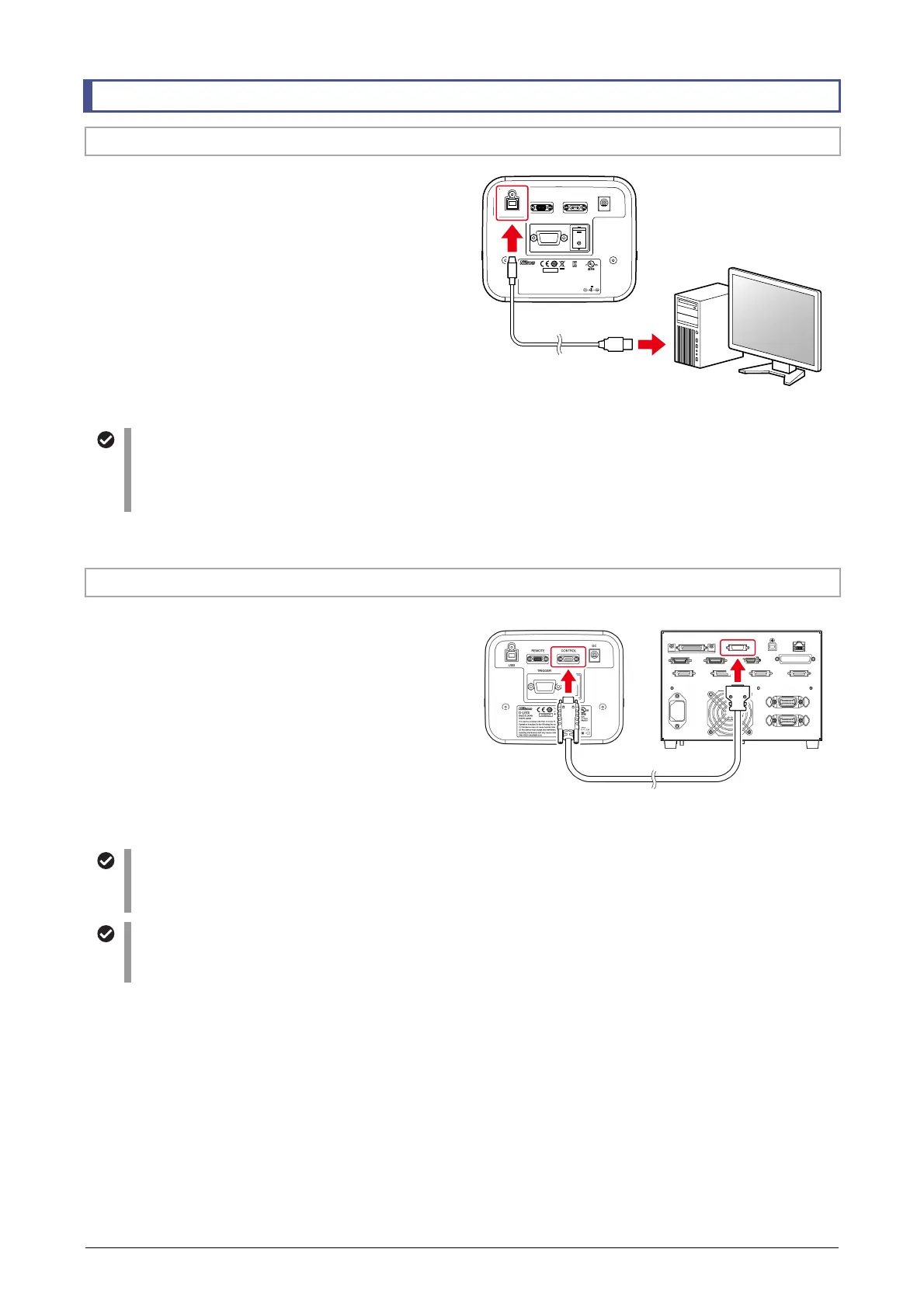
To use this product connected to a PC and controlled
by NIS-Elements, use a commercially available USB
cable to connect the USB connector of this product to
a USB connector of the PC.
The USB terminal of this product is USB Type B.
For connection, use a USB 2.0 cable (shielded type)
with an A connector on one end and a B connector on
the other end.
USB
REMOTE CONTROL
DC
TRIGGER
D
-
LEDI
4N75
INSPECTION
EQUIPMENT
R
-
R
-
NEc
-
SD
-
LEDI
INPUT
12VDC , 3.3A
830001
This device c omplies with Part 15 of t he FCC Rules.
Operation i s subject to the follo wing two consiti ons:
(1) this device may not cause harmful interference, and
(2) this device must accept any interference received,
including i nterference taht m ay cause undesired o peration.
CAN ICES-3 (A)/NMB-3 (A)
MADE IN JAPAN
TOKYO JAPAN
Connecting a PC
Cautions when connecting a PC
To prevent a malfunction when connecting this product to a PC, observe the following precautions:
• Use a USB cable of 5 m or less.
• Do not use a USB hub. Connect with a PC directly with a USB cable.
5.4.2 Connecting the Ti2-E (CONTROL Connector)
When this product is used as an epi-illuminator for
microscope Ti2-E, use a D-LEDI connection cable for
Ti2 (D-LEDI Ti2 connection cable) to connect this
product to the Ti2-E system.
Connect the CONTROL connector of this product and
the RMT connector of the TI2-CTRE controller for
Ti2-E.
Connecting to the Ti2
Registration of setup information
In the Ti2-E, you need to register the parts attached to the microscope using a Ti2 Control tablet application.
For details on how to use the Ti2 Control application, refer to the instruction manual of the Ti2 Control.
Restriction on the assignment to function buttons on the Ti2-E main body
D-LEDI actions cannot be assigned to function buttons and switches on the Ti2-E main body connected to the
D-LEDI using the D-LEDI Ti2 connection cable.
PC
(For running NIS-Elements)
USB 2.0 cable
(commercially available)
Controller for Ti2-E
D-LEDI Ti2 connection cable



 To Next Page