3
Introduction—Getting to Know the Camera
Take a few moments to familiarize yourself with camera controls and dis-
plays. You may fi nd it helpful to bookmark this section and refer to it as you
read through the rest of the manual.
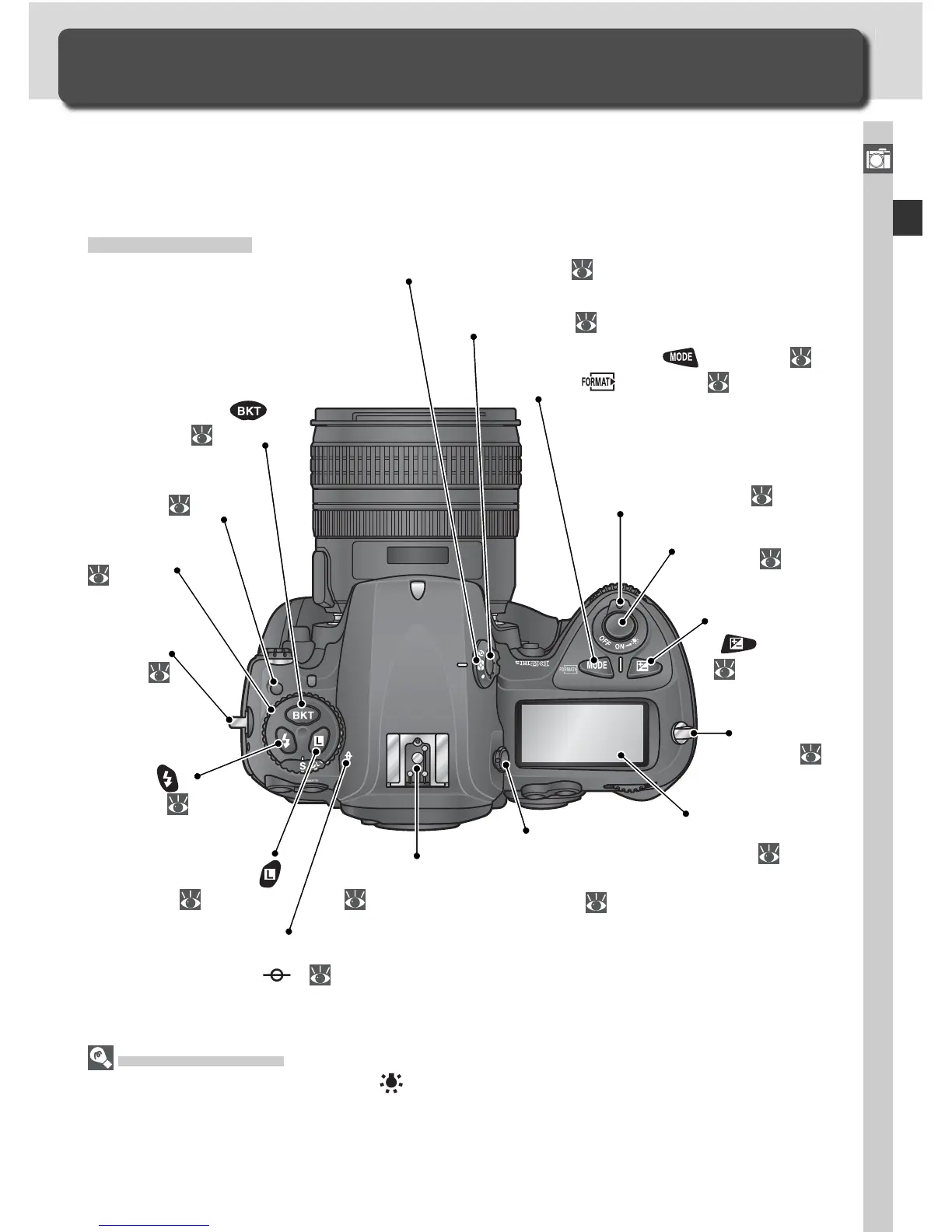
Camera Body
LCD Illuminators
Holding the power switch in the position activates the exposure meters and control
panel backlights (LCD illuminators), allowing the display to be read in the dark. After
the power switch is released, the illuminator will remain lit while the camera exposure
meters are active or until the shutter is re leased.
Getting to Know the Camera
Camera Controls and Displays
Eyelet for
camera
strap:
15
Mode dial lock
release:
42
Mode dial:
42
Bracketing (
)
button: 96, 101
Flash sync
mode (
)
button: 111
Command lock (
)
button: 92
Accessory shoe:
114
Diopter
adjustment
knob: 31
Top control
panel:
6
Exposure mode (
) button: 83
Format ( ) button: 21
Exposure
compensation
(
) button:
95
Shutter-release
button:
32, 34
Power switch: 27
Metering selector:
82
Metering selector
lock button: 82
Focal plane mark
(
): 81
Eyelet for
camera
strap:
15



 To Next Page