EasyManua.ls Logo

Nikon D3100 - Page 44

Nikon D3100
318 pages
Print Icon
To Next Page IconTo Next Page

To Previous Page IconTo Previous Page
Loading...
II
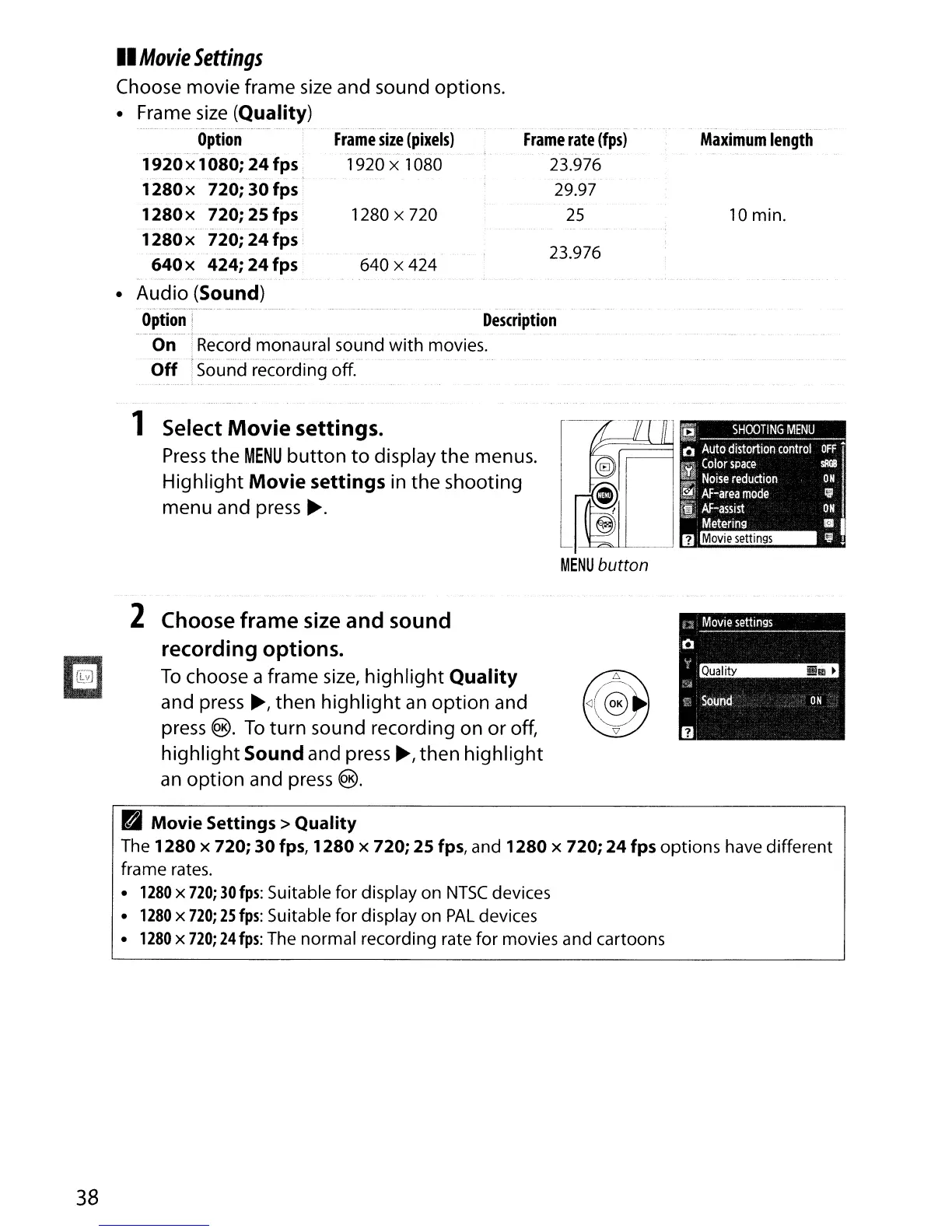
Movie
Settings
Choose movie frame
size
and sound options.
10
min.
Maximum
length
23.976
Frame
rate
(fps)
23.976
29.97
25
640 x 424
1280
x 720
Frame
size
(pixels)
1920 x 1080
Frame
size
(Quality)
Option
1920
xl
080;
24
fps
1280x
720;
30
fps
1280x
720;
25
fps
1280
x
720;
24
fps
640
x
424;
24
fps
Audio (Sound)
.
,,·'''·''
__
0_._·_.,".,
__
,
Option
I
Description
OnTRecord
monaural sound
with
movies.
Off
iSound recording off.
1 Select
Movie
settings.
Press
the
MENU
button
to
display the menus.
Highlight
Movie
settings
in the shooting
menu and press
~.
2 Choose frame size and sound
recording options.
To
choose a frame
size,
highlight
Quality
and press
~,
then
highlight
an
option
and
press
€B).
To
turn sound recording on or off,
highlight
Sound
and press
~,
then
highlight
an
option
and
press
€B)
.
Movie
Settings>
Quality
The
1280
x
720;
30
fps,
1280
x
720;
25
fps, and
1280
x
720;
24
fps
options
have different
frame rates.
1280
x
720;
30
fps:
Suitable
for
display on
NTSC
devices
1280
x
720;
25
fps:
Suitable
for
display on
PAL
devices
1280
x
720;
24
fps:
The normal recording rate
for
movies and cartoons
38

Table of Contents

Other manuals for Nikon D3100

Related product manuals