Error Messages
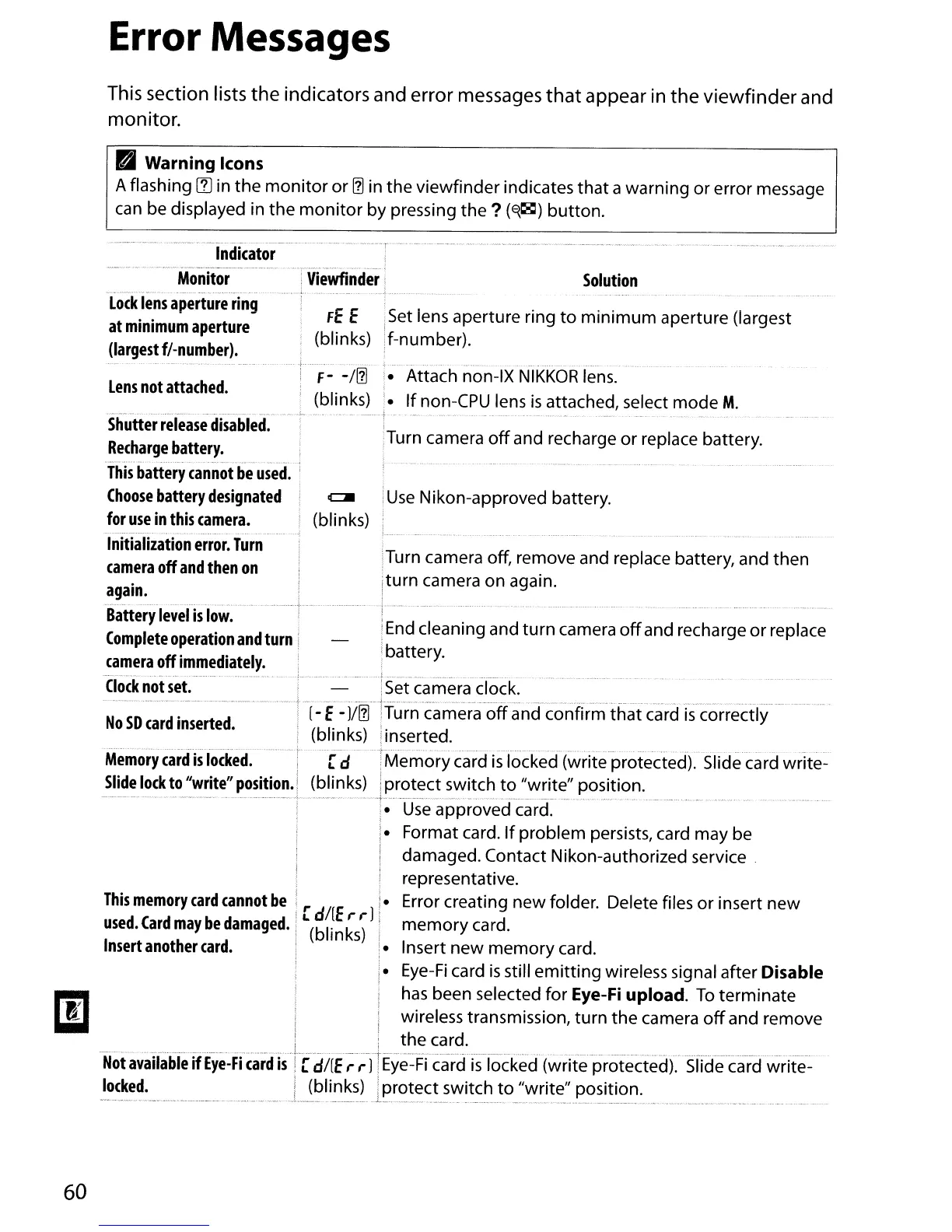
This section lists the indicators and error messages
that
appear in the
viewfinder
and
monitor.
PI
Warning Icons
A flashing
~
in
the
monitor
or
[]
in the viewfinder indicates that a warning or error message
can
be displayed in the
monitor
by pressing the ?
(E{~)
button.
.~
. - .'....-.'....
f-
-/[]
• Attach non-IX
NIKKOR
lens.
(blinks) •
If
non-CPU lens
is
attached, select mode M.
fE
E ,Set lens aperture ring
to
minimum
aperture (largest
(blinks) if-number).
Indicator
-----.--,-
,".
'--'-'-'-.>'
•.
,
..
_
..
__
._,"",~
-
..
>
Monitor
:
Viewfinder
-.-------.-
..
-.
.-.-
·--c-- -
...
---.--.-
·--·---7-
.-.'.0---
..
---.--
...
-.-.
Lock
lens
aperture
ring
at
minimum
aperture
(largest
f/-number).
Lens
not
attached.
Solution
Use
Nikon-approved battery.
iTurn camera
off
and recharge
or
replace battery.
!Turn camera off, remove and replace battery, and then
,turn camera on again.
!
I
End
cleaning and
turn
camera
off
and recharge
or
replace
!battery.
I
····r····-----····-·-··-·--··-
(blinks)
This
memory
card
cannot
be
[d/(E,.,. ]
used.
Card
may
be
damaged.
(blinks)
Insert
another
card.
...---,. .
.•••
_
•.••
•..
_
.....
..••.•
_1_
--~
..
Shutter
release
disabled.
:
Recharge
battery.
--_._-_..
_-
-
.--.--
_--_.
__
._---.-.-
---
This
battery
cannot
be
used.
Choose
battery
designated
for
use
in
this
camera.
----_.-
..
-.-,
..
--_
..
_...
-
_._
..
__
- -
--
Initialization
error.
Turn
camera
off
and
then
on
again.
_
..
_-----_._----_.-
...
Battery
level
is
low.
Complete
operation
and
turn
camera
off
immediately.
-Clock-not"set.
-----
--------.--
..
--.--
..
':
...
--
..
---.-
...
or
s-e-i-camera
clock. -------- -
----------
_.
.
.+
_
....
_.
_.
__
._+
._._.
~
•.
•.
_
••
M.
~.
_ _ , " •
__
••
.
__
• •
__
• •
••
_.
."
N
SD
d
· d
! [- E-
JI[]
ITurn camera
off
and confirm
that
card
is
correctly
o
car
mserte
. (bl'
k)
'.
t d
In
S
i1nser
e .
,
.. - - - -
.---
t·
--
-.-
..
.
Memory
card
is
locked.
[ d :
Memory
card
is
locked (write protected). Slide card write-
Slide
lock
to
"write"
position.
(blinks) iprotect switch
to
"write" position.
---
----.-----.----
-
·-----1~--
-Us·e-ap-proveci"ca
ref
..
_------.
--
--
-- ---
---
--.--.
--
----_.-
j.
Format card.
If
problem persists, card may be
! damaged. Contact Nikon-authorized service.
representative.
• Error creating new folder. Delete files
or
insert
new
memory
card.
• Insert
new
memory
card.
i.
Eye-Fi
card
is
still
emitting
wireless signal after Disable
has
been selected for
Eye-Fi
upload.
To
terminate
wireless transmission, turn
the
camera
off
and remove
I ' the card.
--.---.
-.
-- _
..
---.--.----
..
-
--
--
----
-..
. c
----.---.
--
.--
..
t
--_.
-.--.-
..
--.-
..
-----
..
----.---.--
----
0.. . - .
--
..
---
......•
-.-
..
-
••
---
-
-.-
---
-
------.---
-----.-
--.-
•.
---.---
..
--.
-
-----
Not
available
if
Eye-Fi
card
is
i[
d/[E
,.,.]!
Eye-Fi
card
is
locked (write protected). Slide card write-
locked.
I (blinks) !protect switch
to
"write" position.
_.
..
.
__
..
._
..
_.
1 .
__
._._1_
..
. .
__
.
._.
..
..
_
..
._._
...
_
._
..
._
.....
_
..
_.
.
._
60



 To Next Page