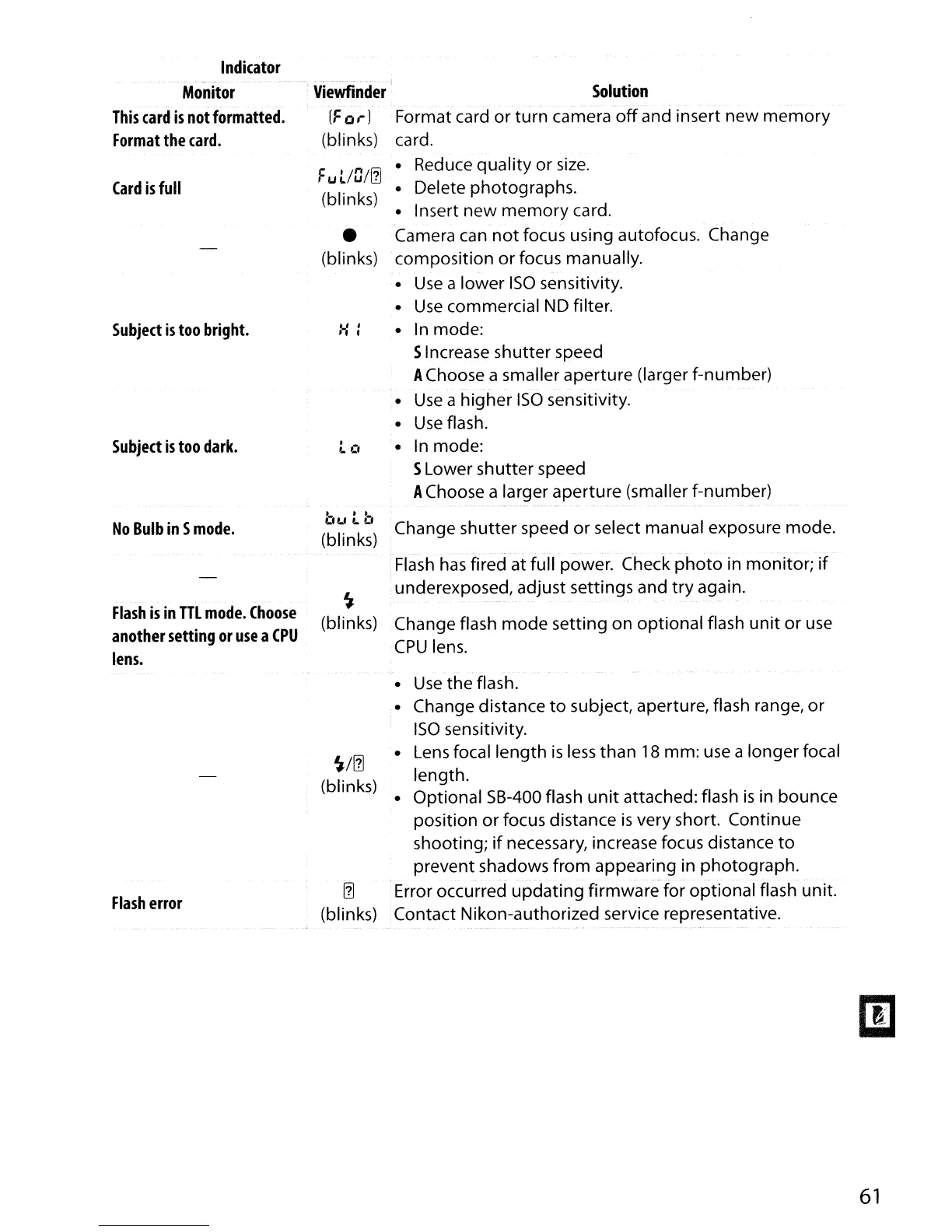
Indicator
Monitor
This
card
is
not
formatted.
Format
the
card.
Card
is
full
Subject
is
too
bright.
Subject
is
too
dark.
.
Viewfinder
(For)
(blinks)
F
u
UO/!1l
(blinks)
•
(blinks)
H:
.-
L L'
Solution
Format card
or
turn
camera
off
and insert
new
memory
card.
• Reduce
quality
or
size.
• Delete photographs.
• Insert
new
memory
card.
Camera can
not
focus using autofocus. Change
composition or focus manually.
•
Use
a lower
ISO
sensitivity.
•
Use
commercial ND filter.
•
In
mode:
SIncrease shutter speed
AChoose a smaller aperture (larger f-number)
•
Use
a higher
ISO
sensitivity.
•
Use
flash.
• In mode:
SLower shutter speed
AChoose a larger aperture (smaller f-number)
Flash
has
fired at full power. Check
photo
in monitor;
if
underexposed, adjust settings and
try
again.
No
Bulb
in
S
mode.
Flash
is
in
TTL
mode.
Choose
another
setting
or
use
a
CPU
lens.
bu
tb
Change shutter speed
or
select manual exposure mode.
(blinks)
~
(blinks) Change flash
mode
setting on optional flash
unit
or
use
CPU
lens.
Flash
error
~/!1l
(blinks)
!1l
(blinks)
•
Use
the flash.
• Change distance
to
subject, aperture, flash range, or
ISO
sensitivity.
•
Lens
focal length
is
less
than
18
mm: use a longer focal
length.
• Optional 5B-400 flash
unit
attached: flash
is
in bounce
position
or
focus distance
is
very short. Continue
shooting;
if
necessary, increase focus distance
to
prevent shadows
from
appearing in
photograph
.
.-
....
-_....
~.-
- -
Error occurred
updating
firmware for optional flash unit.
Contact Nikon-authorized service representative.
61



 To Next Page