8
Step 2: Enabling the Ethernet
Select the Ethernet as the network device used by the camera.
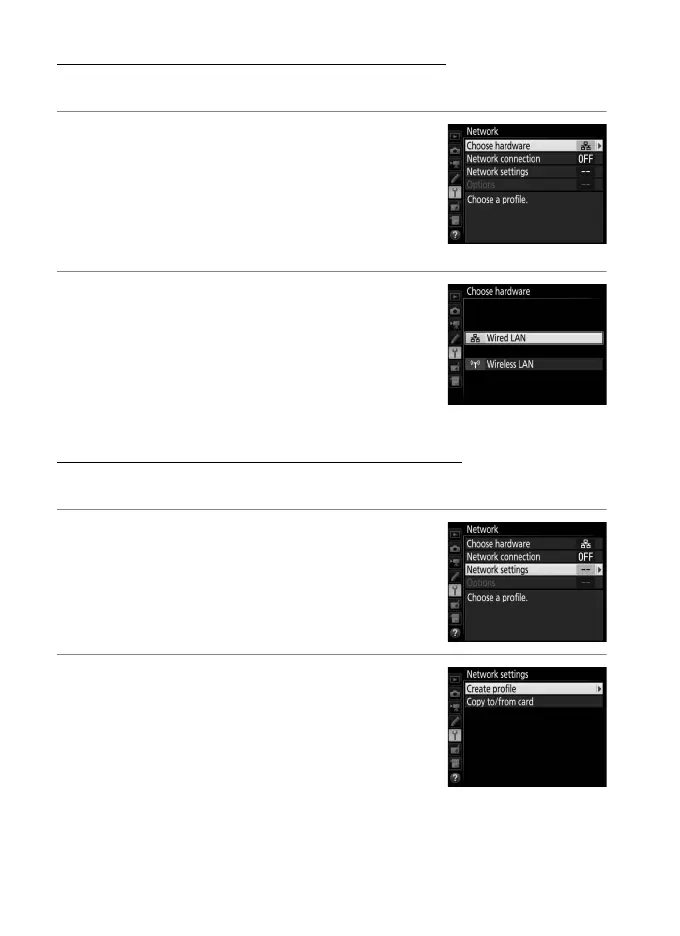
1 Select Choose hardware.
In the setup menu, select Network, then
highlight Choose hardware and press 2.
The menu offers a choice of Wired LAN
and Wireless LAN.
2 Select Wired LAN.
Highlight Wired LAN and press J to
select the highlighted option and return
to the network menu.
Step 3: The Connection Wizard
Follow the on-screen instructions to create a network profile.
1 Display network profiles.
In the network menu, highlight Network
settings and press 2 to display the
profiles list and other network settings.
2 Select Create profile.
Highlight Create profile and press 2.
Note that if the list already contains nine
profiles, you will need to delete an
existing profile using the O (Q) button
before proceeding (057).



 To Next Page