92
Custom SettingsSetup
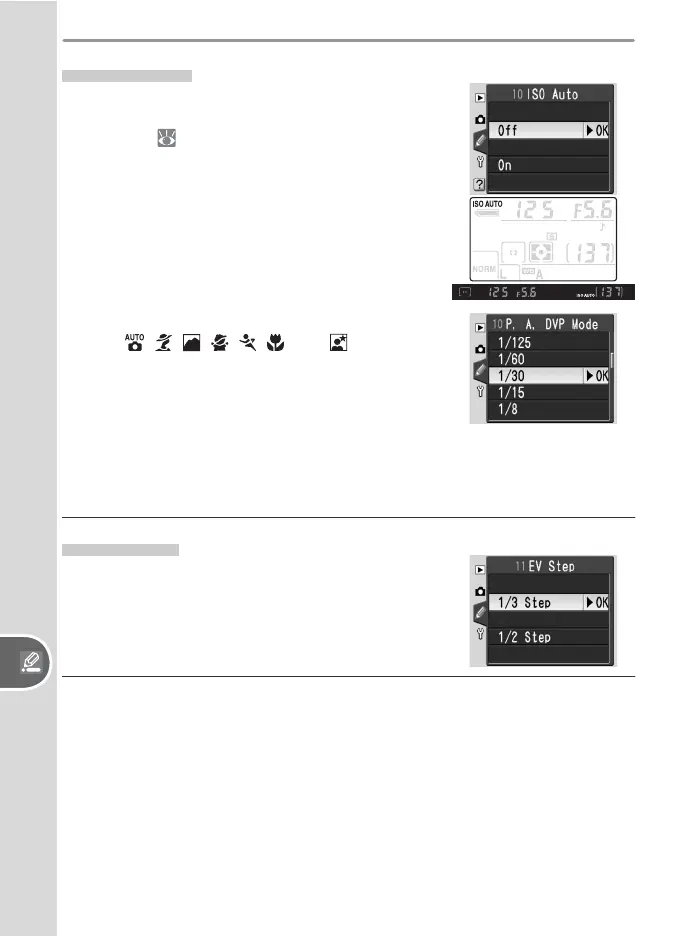
Selecting On displays the menu shown at right.
In P, A, , , , , , , and modes, the
user can choose a maximum shutter speed. If
the shutter speed would exceed this value at the
sensitivity selected by the user, the camera will au-
tomatically raise sensitivity to compensate. Select
P, A, DVP mode to choose a maximum shutter
speed (the default is
1
/
30 s). Select Done to exit to
the CSM menu.
11: EV Step
Choose whether the camera makes adjustments
to shutter speed, aperture, exposure compensa-
tion, bracketing, and fl ash compensation in incre-
ments equivalent to
1
/
3 EV (1/3 Step, the default
option) or ½ EV.
10: ISO Auto
At the default setting of Off, sensitivity (ISO
equivalency) will remain fi xed at the value selected
by the user ( 39). If On is selected, the camera
will automatically choose a sensitivity between
ISO 200 and 1600 if optimal exposure can not be
achieved at current settings. An ISO AUTO icon is
displayed in the control panel and viewfi nder; this
icon will blink when sensitivity is altered from the
value selected by the user.



 To Next Page