97
Setup Custom Settings
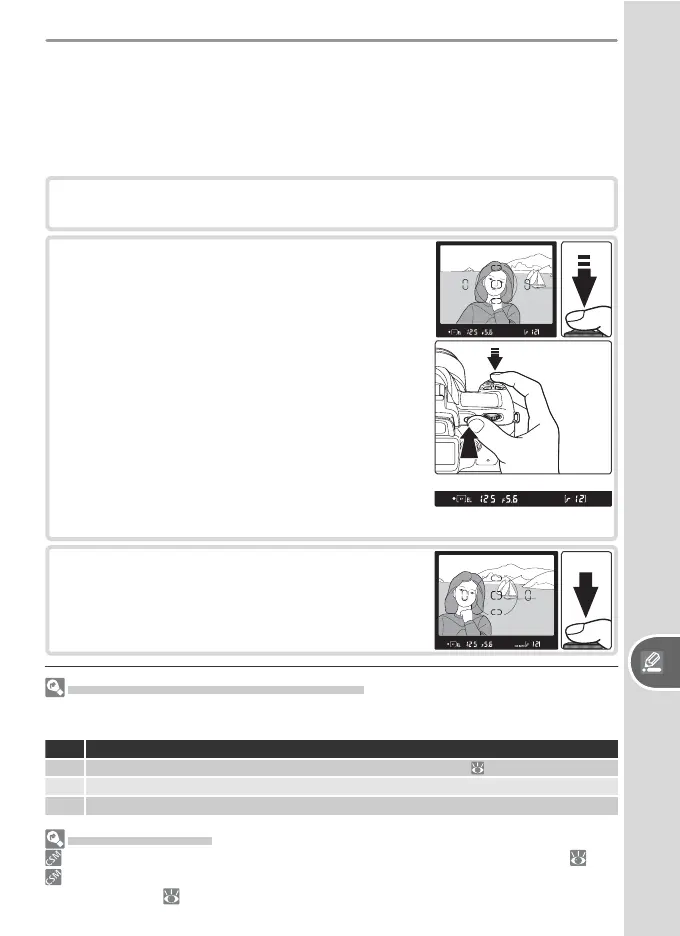
1
Rotate the mode dial to P, S, or A and select center-weight ed or spot
metering (exposure lock has no effect in mode M).
2
Position the sub ject in the selected focus area
and press the shutter-release button halfway
(when using center-weighted metering, po-
sition the subject in the center focus area).
With the shut ter-release button pressed
halfway and the subject still po si tioned in
the fo cus area, press the AE-L/AF-L button
to lock exposure. Confi rm that the in-focus
in di ca tor (●) appears in the viewfi nder.
While ex po sure lock is in effect, an EL in di -
ca tor will ap pear in the viewfi nder.
3
Without releasing the AE-L/AF-L but ton, re-
com pose the pho to graph and shoot.
Adjusting Shutter Speed and Aperture
While exposure lock is in effect, the following settings can be changed without alter-
ing the metered value for exposure:
Mode Description
P Shutter speed and aperture (fl exible program;
42)
S Shutter speed
A Aperture
Advanced Settings
14: AE-L/AF-L controls the function performed by the AE-L/AF-L button ( 98).
15: AE Lock controls whether exposure locks when the shutter-release button is
pressed halfway ( 99).
Autoexposure Lock
If the subject is not in the metered area when center-weighted or spot
metering is used, exposure will be based on lighting conditions in the back-
ground, and the main subject may not be correctly exposed. This can be
prevented using autoexposure lock:



 To Next Page