164
y
Using the P Button
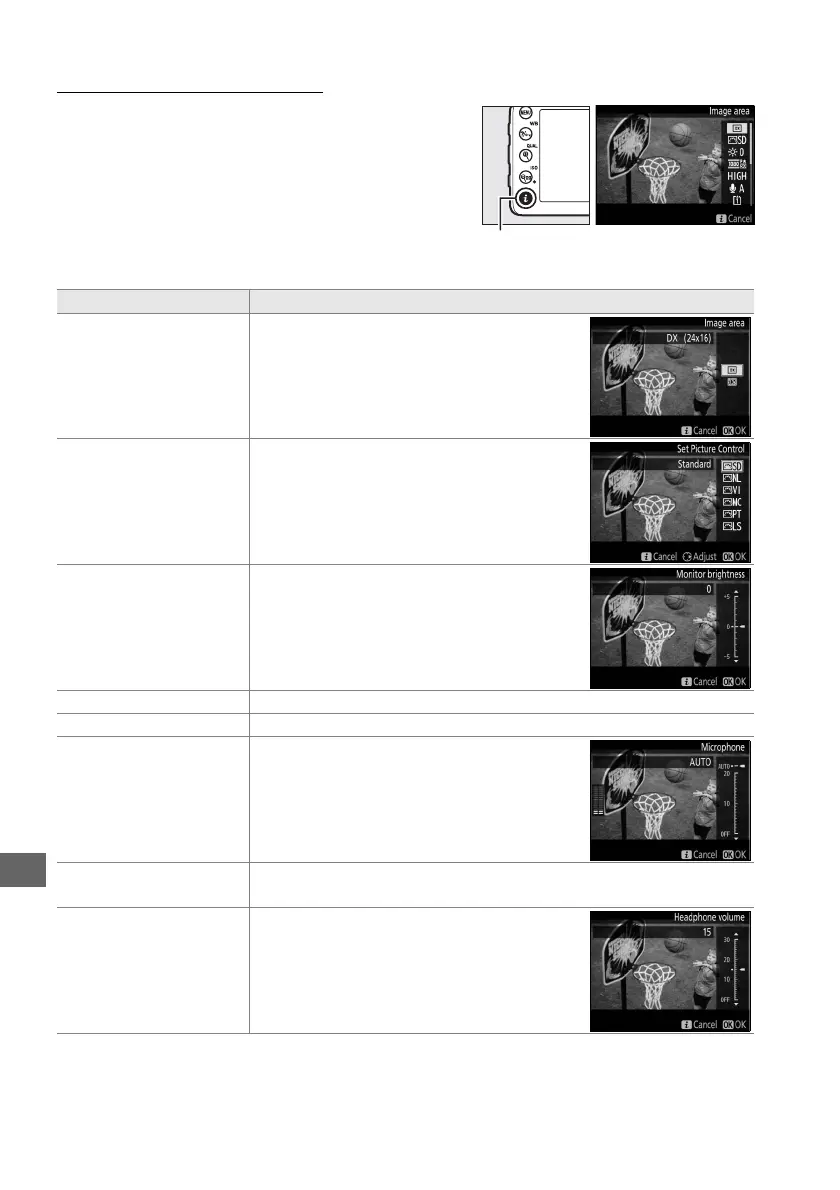
The options listed below can be accessed by
pressing the P button before recording begins in
movie live view (pressing the P button while
recording is in progress has no effect).
Highlight
items using the multi selector and press 2 to view
options for the highlighted item.
After choosing
the desired setting, press J to exit.
Option Description
Image area
Choose from the DX (24×16) and 1.3×
(18×12) image areas (0 63).
Set Picture Control
Choose a Picture Control (0 105).
Monitor brightness
Press 1 or 3 to adjust monitor brightness
for movie live view.
Changes to monitor
brightness have no effect on movies
recorded with the camera.
Frame size/frame rate Select a frame size and rate (0 169).
Movie quality Choose movie quality (0 169).
Microphone
Press 1 or 3 to adjust microphone
sensitivity (0 169).
Both the built-in
microphone and optional ME-1 stereo
microphones are affected.
Destination
When two memory cards are inserted, you can choose the card to
which movies are recorded (0 169).
Headphone volume
Displayed only when third-party
headphones are plugged into the
headphone connector.
Press 1 or 3 to
adjust headphone volume (0 165).
P button



 To Next Page