174
y
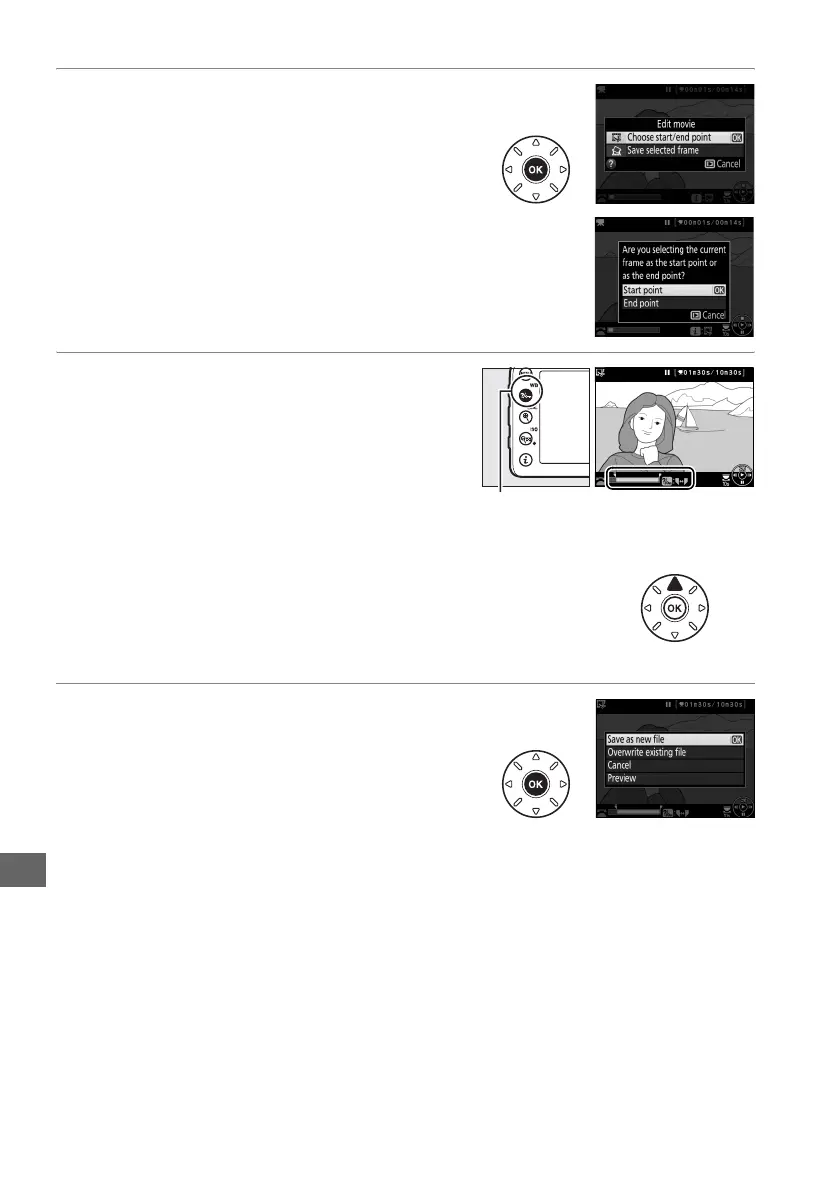
4 Select Choose start/end point.
Highlight Choose start/end point and press
J.
The dialog shown at right will be displayed;
choose whether the current frame will be
the starting or end point of the copy and
press J.
5 Delete frames.
If the desired frame is not currently
displayed, press 4 or 2 to advance or
rewind (to skip to 10 s ahead or back, rotate
the main command dial; to skip to the first or
last frame, rotate the sub-command dial).
To
switch the current selection from start point
(w) to end point (x) or vice versa, press L (U).
Once you have selected the start point and/or end point,
press 1.
All frames before the selected start point and
after the selected end point will be removed from the
copy.
6 Save the copy.
Highlight one of the following and press J:
• Save as new file: Save the copy to a new file.
• Overwrite existing file: Replace the original
movie file with the edited copy.
• Cancel: Return to Step 5.
• Preview: Preview the copy.
Edited copies are indicated by a 9 icon in full-frame playback.
L (U) button



 To Next Page