182
%
❚❚ u Selective Color
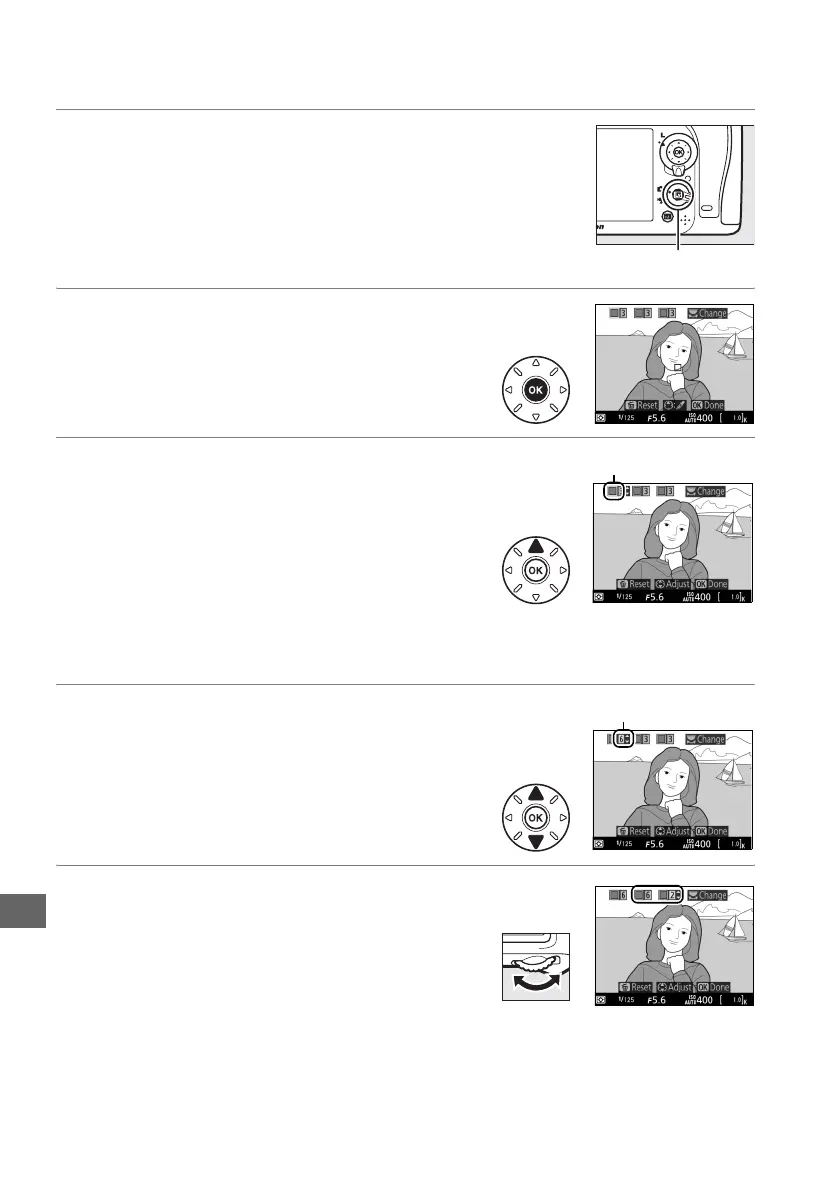
1 Press the a button.
The mirror will be raised and the view through
the lens will be displayed in the camera
monitor.
2 Display options.
Press J to display selective color options.
3 Select a color.
Frame an object in the white square in the
center of the display and press 1 to choose the
color of the object as one that will remain in
the final image (the camera may have difficulty
detecting unsaturated colors; choose a
saturated color).
To zoom in on the center of
the display for more precise color selection, press X (T).
Press W (S) to
zoom out.
4 Choose the color range.
Press 1 or 3 to increase or decrease the range
of similar hues that will be included in the final
image.
Choose from values between 1 and 7;
note that higher values may include hues from
other colors.
5 Select additional colors.
To select additional colors, rotate the main
command dial to highlight another of the 3
color boxes at the top of the display and repeat
Steps 3 and 4 to select another color.
Repeat
for a third color if desired.
To deselect the
highlighted color, press O/Q (To remove all colors, press and hold O/Q.
A
confirmation dialog will be displayed; select Ye s ).
a button
Selected color
Color range



 To Next Page