188
I
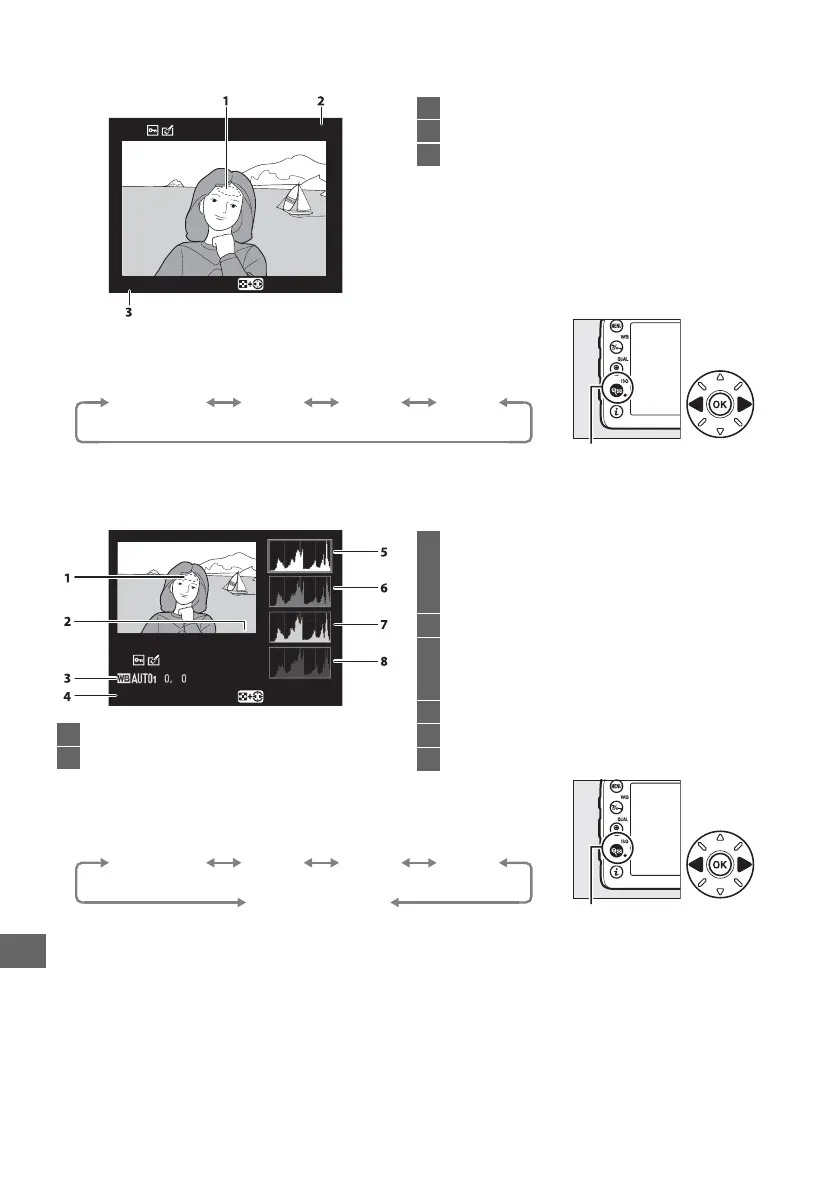
❚❚ Highlights
❚❚ RGB Histogram
100
-
1
RGB
Highlights
Select R, G, B
1
Image highlights
*
2
Folder number—frame number ............... 225
3
Current channel
*
* Flashing areas indicate highlights (areas that may be overexposed) for the
current channel.
Hold W (S) button and press 4 or 2 to cycle through
channels as follows:
W (S) button
RGB
(all channels)
R
(red)
G
(green)
B
(blue)
1
Image highlights
*
2
Folder number—frame number................ 225
100
-
1
RGB
Select R, G, B
Highlights
3
White balance .....................................................89
Color temperature..........................................94
White balance fine-tuning ..........................91
Preset manual ..................................................95
4
Current channel
*
5
Histogram (RGB channel).
In all histograms,
horizontal axis gives pixel brightness,
vertical axis number of pixels.
6
Histogram (red channel)
7
Histogram (green channel)
8
Histogram (blue channel)
* Flashing areas indicate highlights (areas that may be overexposed) for the
current channel.
Hold W (S) button and press 4 or 2 to cycle through
channels as follows:
W (S) button
RGB
(all channels)
R
(red)
G
(green)
B
(blue)
Highlight display off



 To Next Page