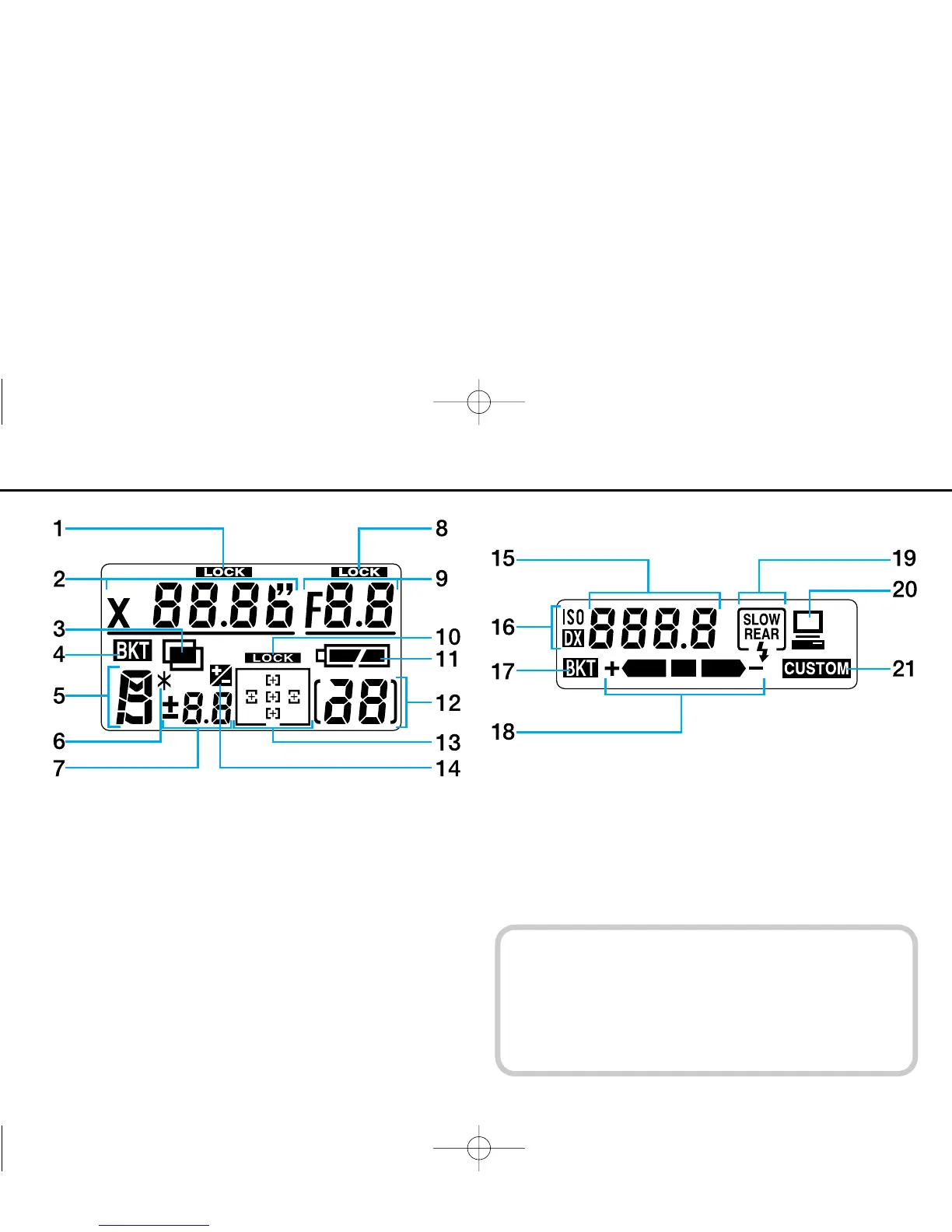
Top LCD panel indications
1. Shutter speed lock
2. Shutter speed
3. Multiple exposure
4. Auto Exposure/Flash Exposure Bracketing
5. Exposure mode
6. Flexible Program
7. Exposure compensation value
8. Aperture lock
9. Aperture
10. Focus area lock
11. Battery level
12. Frame counter
13. Focus area/AF area mode
14. Exposure compensation
Rear LCD panel indications
15. Film speed/Bracketing information/Custom Setting
16. Film speed setting mode
17. Auto Exposure/Flash Exposure Bracketing
18. Bracketing bar graphs
19. Flash sync mode
20. Personal computer connection
21. Custom Setting
12
LCD Panels
• At high temperature (60°C/140°F or above), the entire
display turns black, making it hard to read display infor-
mation. When the temperature drops, the display can
again be read normally.
• When the temperature drops below freezing, the LCD
response time slows. When the temperature rises, the
display works normally again.
P400 (E) 02.12.27 6:42 PM Page 12



 To Next Page