9392
FLASH PHOTOGRAPHY
Flash can be used not only in dim light, but also in bright
conditions to fill in shadows with extra light. This technique is
called "fill-flash."
With the F70/F70D's built-in flash or any dedicated Nikon
Speedlight, you can perform advanced fill-flash technique,
Automatic Balanced Fill-Flash with TTL Multi-Sensor. This assures
a correct and well-balanced exposure of both the main subject
and the background. Make fill-flash a standard part of your
photography. You can make better flash pictures than ever
before.
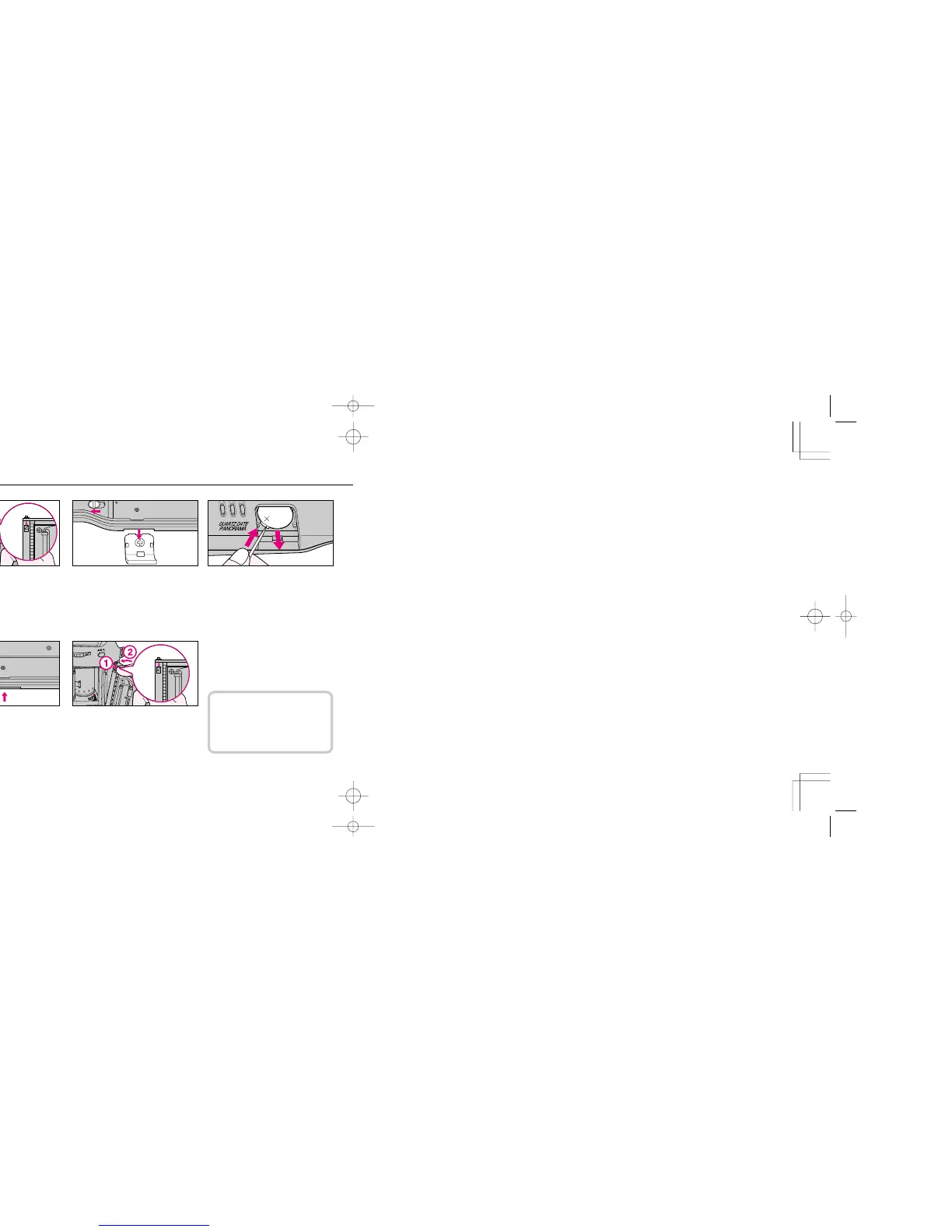
REPLACING BATTERY FOR IMPRINTING FUNCTION
1
Make sure that film is not loaded
and open camera back. Push the
camera back's locking catch on the
hinge to remove the back.
2
Slide battery chamber cover lock
lever to left and remove battery
chamber cover.
3
Remove used battery and insert
new one with "+" terminal facing
upward.
4
Attach battery chamber cover and
slide the lock lever to the right to
lock the cover.
5
Attach camera back.
When replacing battery for
imprinting function, always adjust
date and time (see previous page).
F70D I/MêÊçsâ¸í˘ 03.1.16 5:33 PM Page 92













 To Next Page