127126
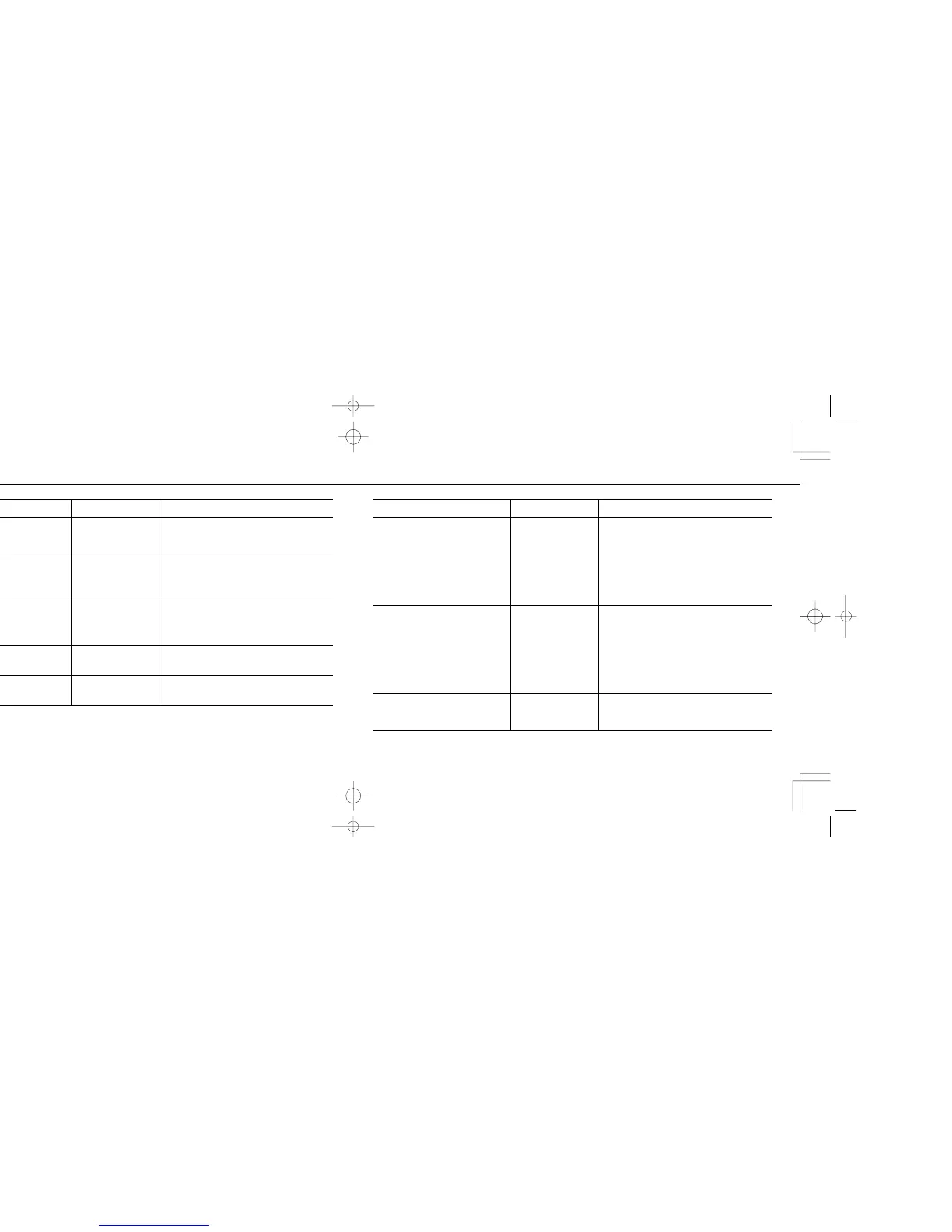
LCD Panel/Viewfinder Shutter Cause and Remedy
⁄ blinks in Auto exposure mode. Can be released. Overexposure possible.
˚ or blinks.
Locked.
Focus mode selector is set at AF even though a
non-AF Nikkor lens is attached. Set focus mode
selector to M.
¤ blinks in Auto exposure mode. Can be released. Underexposure possible.
y blinks in the viewfinder.
Depends on AF mode.
Locked in Single Servo
AF or can be released in
Continuous Servo AF.
Autofocus is impossible with the subject. Set focus
mode selector to M and focus manually using clear
matte field.
† stays in the viewfinder in AF mode.
Depends on AF mode.
Locked in Single Servo
AF or can be released in
Continuous Servo AF.
Subject is located closer than the closest focusing
distance of the lens. Move away from subject and
refocus.
LCD Panel/Viewfinder Shutter Cause and Remedy
Shutter speed indication in the LCD
panel and viewfinder blinks.
Can be released.
You are performing All Mode Exposure Bracketing
in Manual exposure mode.
Shutter speed indication blinks inside
viewfinder in Programmed Auto or
Aperture-Priority Auto Exposure mode.
Can be released.
Automatically selected shutter speed is 1/50 sec. or
slower and picture blur may occur due to camera
shake. To reduce possibility of blur, hold camera
very steady, use a tripod or use the built-in flash or
an accessory Nikon Speedlight. Selecting a wider
aperture (smaller f-number) results in a faster shutter
speed.
fi blinks. Locked.
a) "Bulb" is set in the Shutter-Priority Auto exposure
mode. Set exposure mode to Manual or set
another shutter speed.
b) You set All Mode Exposure Bracketing with a
shutter speed set at "Bulb". To use All Mode
Exposure Bracketing, select another shutter
speed setting.
F70D I/MêÊçsâ¸í˘ 03.1.16 5:33 PM Page 126













 To Next Page