EasyManua.ls Logo

Nikon J3 - Page 18

Nikon J3
350 pages
Print Icon
To Next Page IconTo Next Page
To Previous Page IconTo Previous Page
Loading...
El
16
The
Camera
Body
(Continued)
1
---:'---:--:--=---3
~~-4
~--5
@button
Press
the
multi
selector
up, down, left,
or
right
(_.,T,
~'or~),
or
rotate
it
as
shown
above.
-~~--6
~~~~~~~
7
'"----8
10
'-----9
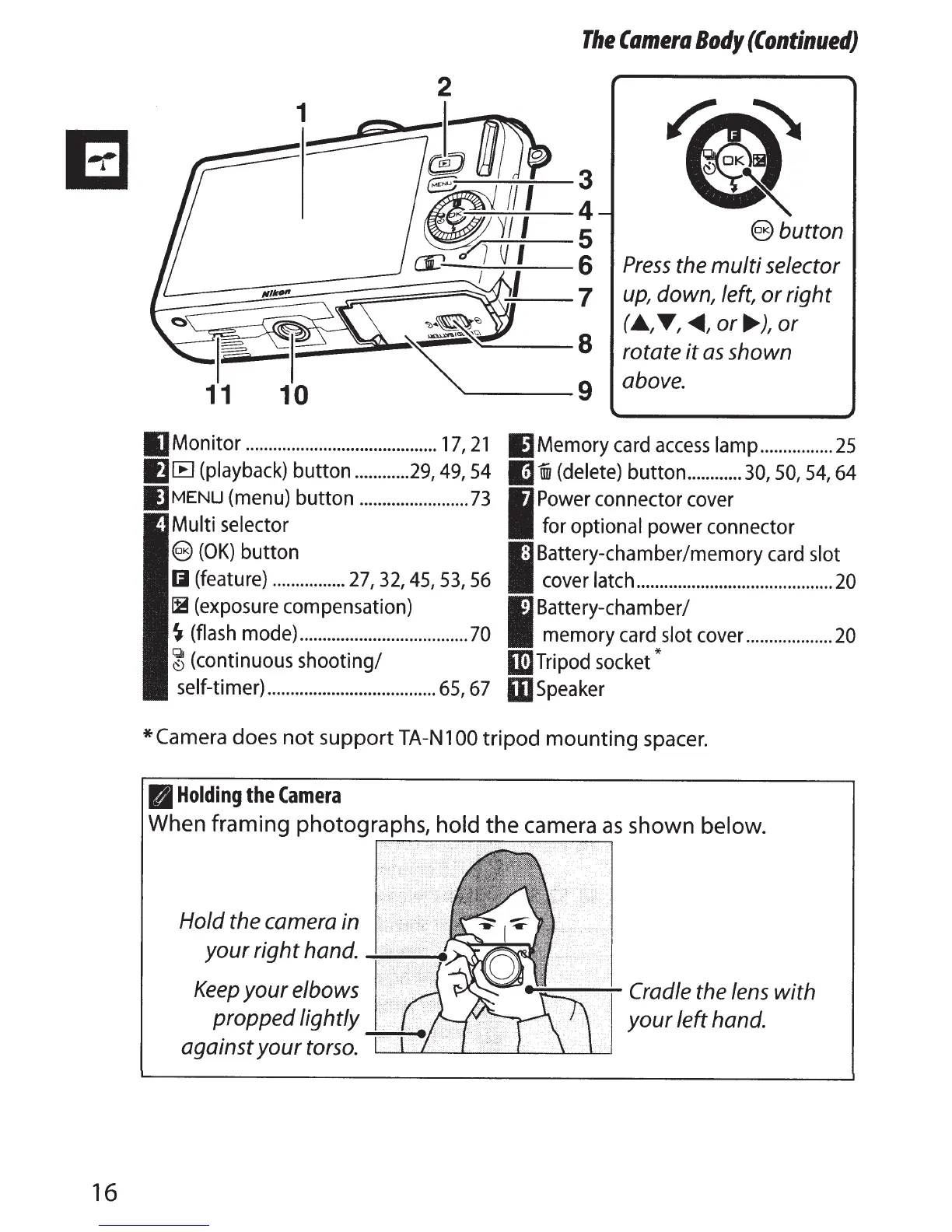
IJMonitor
..........................................
17,
21
I)
Memory card
access
lamp
................
25
IJ[B
(playback) button
............
29,
49,54
m i
(delete)
button
............
30,
50,
54,
64
I]
MENU
(menu) button
........................
73
Multi selector
I
Power connector cover
for
optional power connector
@
(OK)
button
Iii
(feature)
................
27,
32,
45,
53,
56
I
8
c:~:;~~~~~~-~-~.::.:.~~-~~.:..~~~-~--~-~-~~O
~(exposure
compensation)
~
(flash mode)
.....................................
70
~
(continuous shooting/
I
Battery-chamber/
memory card
slot
cover
...................
20
1m
Tripod socket*
self-timer)
.....................................
65,
67
mspeaker
*Camera
does
not
support
TA-N
100
tripod
mounting
spacer.
B
Holding
the
Camera
When framing photographs,
hold
the camera
as
shown
below.
Hold the camera in
your
right
hand.
~~
...
Keep
your
elbows
propped lightly
against
your
torso.
~~/.
<<>
1
~-..-::-
........
--:-Cradle
the lens
with
your
left hand.

Table of Contents

Related product manuals