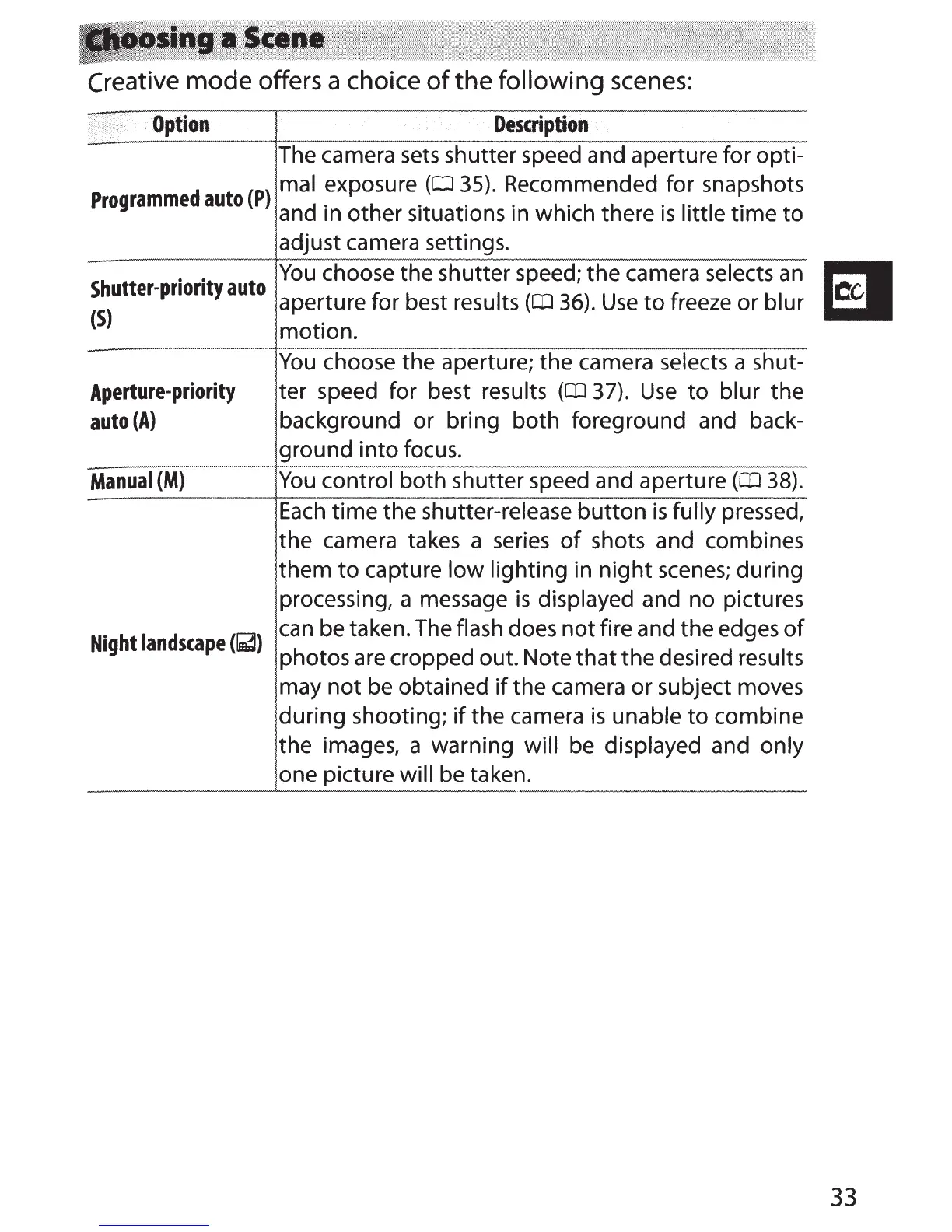
Creative
mode
offers a choice
of
the
following scenes:
Option
Description
The camera
sets
shutter speed and aperture for opti-
d t P
mal exposure
(CIJ
35).
Recommended for snapshots
Programme
au
o ( ) d . h . . · h' h h ·
1·
1 ·
Shutter-priority
auto
(S}
Aperture-priority
auto
(A)
Manual
(M)
Night
landscape
(~)
an
m
ot
er
s1tuat1ons
m w
1c
t ere
1s
1tt
e
t1me
to
adjust camera settings.
You
choose the shutter speed; the camera selects
an
aperture for best results
(CIJ
36).
Use
to
freeze or blur
motion.
You
choose the aperture; the camera selects a shut-
ter speed for best results
(CIJ
37).
Use
to
blur the
background or bring both foreground and back-
ground
into
focus.
You
control both shutter speed and aperture
(QJ
38).
Each
time
the shutter-release
button
is
fully pressed,
the camera takes a
series
of
shots and combines
them
to
capture
low
lighting in
night
scenes;
during
processing, a message
is
displayed and no pictures
can
be taken. The flash does
not
fire and the edges
of
photos are cropped out. Note
that
the desired results
may
not
be obtained
if
the camera or subject moves
during shooting;
if
the camera
is
unable
to
combine
the images, a warning will be displayed and only
one picture will be taken.
El
33



 To Next Page