EasyManua.ls Logo

Nikon J3 - Page 67

Nikon J3
350 pages
Print Icon
To Next Page IconTo Next Page
To Previous Page IconTo Previous Page
Loading...
§t
More
on
Photography
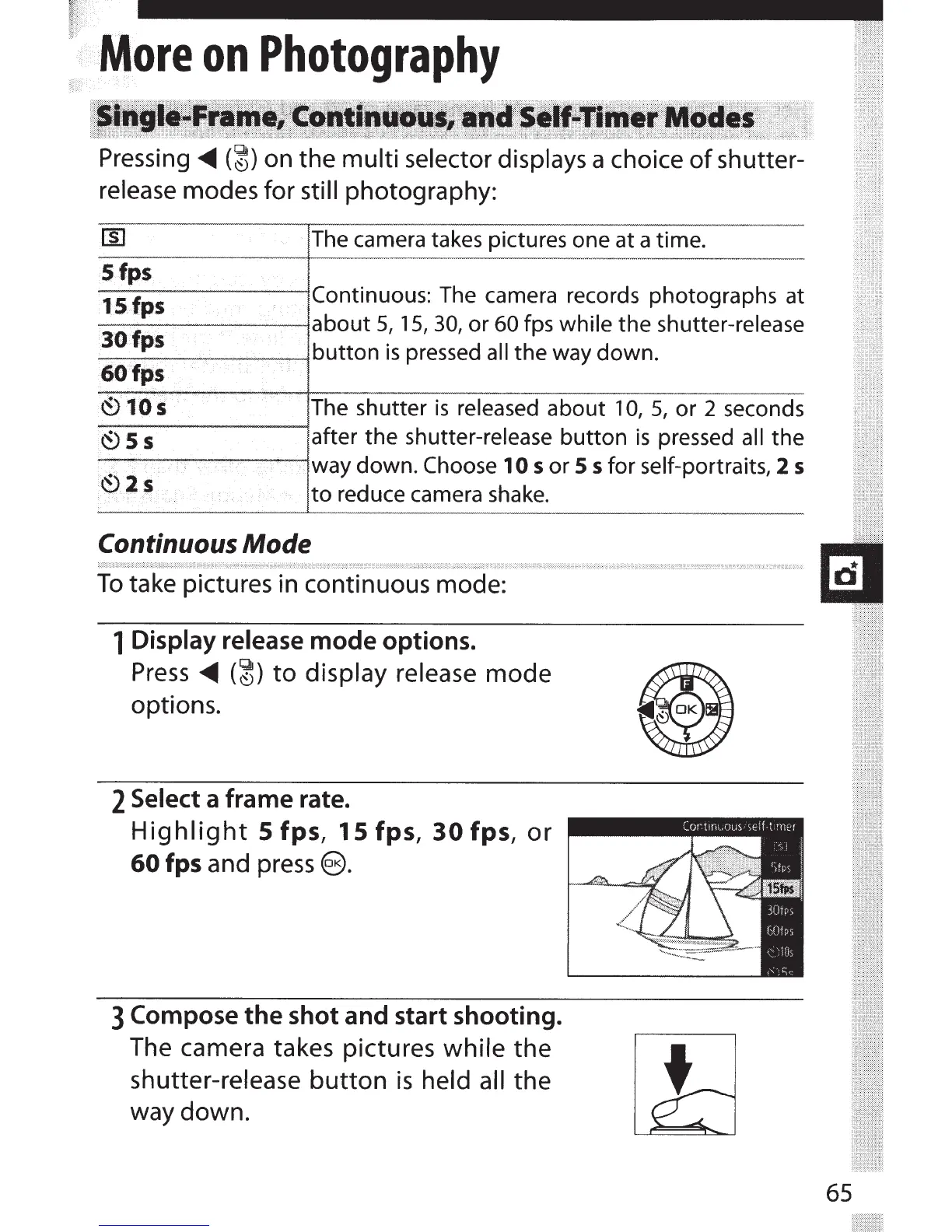
Pressing
<111111
(~)
on the
multi selector displays
a choice
of
shutter-
release
modes for
still
photography:
The
camera takes pictures one at a time.
Sfps
15
fps
Continuous:
The
camera records photographs at
--~-----J
about
5, 15,
30,
or
60
fps
while
the
shutter-release
_3_0~fP_
5
____________
~button
is
pressed
all
the
way
down.
60fps
~)
10
s
The shutter
is
released
about
10,
5,
or 2 seconds
-
~
-
5
-
s
--------l
after
the shutter-release
button
is
pressed
all
the
way down. Choose
10
5
or
55
for
self-portraits,
2
5
·
~
.
2 s
to reduce camera shake.
Continuous
Mode
To
take pictures in continuous mode:
1 Display release
mode
options.
Press
<111111
(~)
to
display release
mode
options.
2
Select
a frame rate.
Highlight
5
fps,
15
fps,
30
fps,
or
60
fps
and
press@).
3 Compose
the
shot and start shooting.
The camera takes pictures
while
the
shutter-release
button
is
held all
the
way down.
65

Table of Contents

Related product manuals