15
5
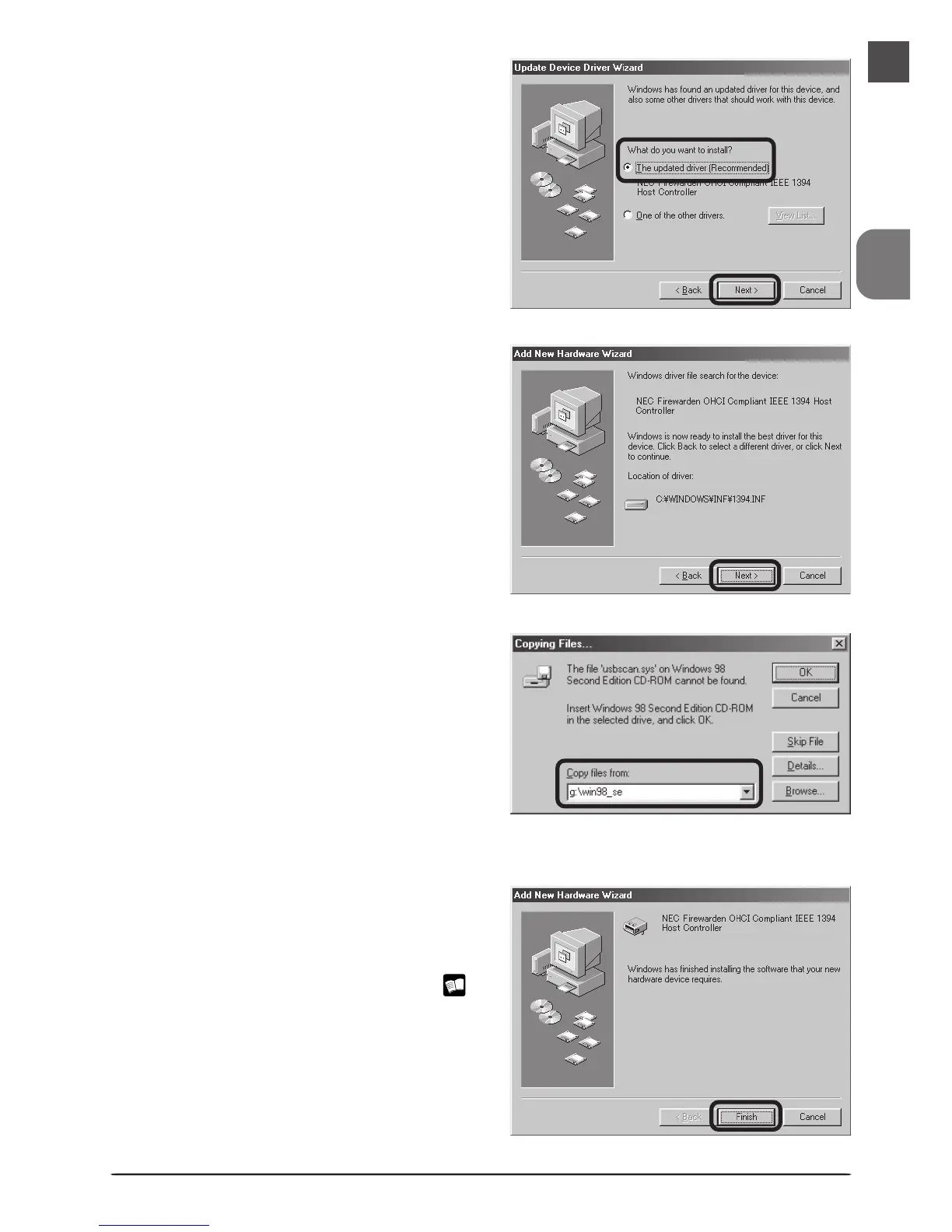
The dialog shown at right will be dis-
played. Click Next.
6
If the Insert Disk dialog is displayed, in-
sert the Windows 98 Second Edition CD
into the CD-ROM drive and click OK. If
the computer displays the message,
“The file (file name) on Windows 98
Second Edition CD-ROM could not be
found,” enter g:\win98_se (substitute
the drive letter of your CD-ROM drive
for “g”) in the Copy files from text box
and click OK.
4
Select The updated driver (Recom-
mended) NEC Firewarden OHCI Com-
pliant IEEE 1394 Host Controller and
click Next.
7
The dialog shown at right will be dis-
played. Click Finish. After the installa-
tion has been completed, refer to the
“Installing the IEEE 1394 Update for
Windows 98 Second Edition” (
17)and install the update program.












 To Next Page