12
En
Fr
Type of battery
3V CR2 lithium battery ×1
Inserting/Replacing battery
1. Open the battery-chamber cover.
Rotate the battery-chamber cover counterclockwise and remove it.
2. Insert the battery.
To replace the battery, take out the old battery before inserting a new one.
Follow the battery insertion mark inside the battery chamber to insert the + and - ends of the battery in
the correct orientation (insert so that the - end faces outward). If the battery is not inserted correctly,
the Laser Rangefinder will not operate.
3. Attach the battery-chamber cover.
Rotate the battery-chamber cover clockwise and secure it firmly. When attaching the battery-chamber
cover, securely screw it all the way and check that it is secured.
• The battery-chamber cover may be difficult to rotate because this product uses a rubber seal to
maintain its waterproof capabilities.
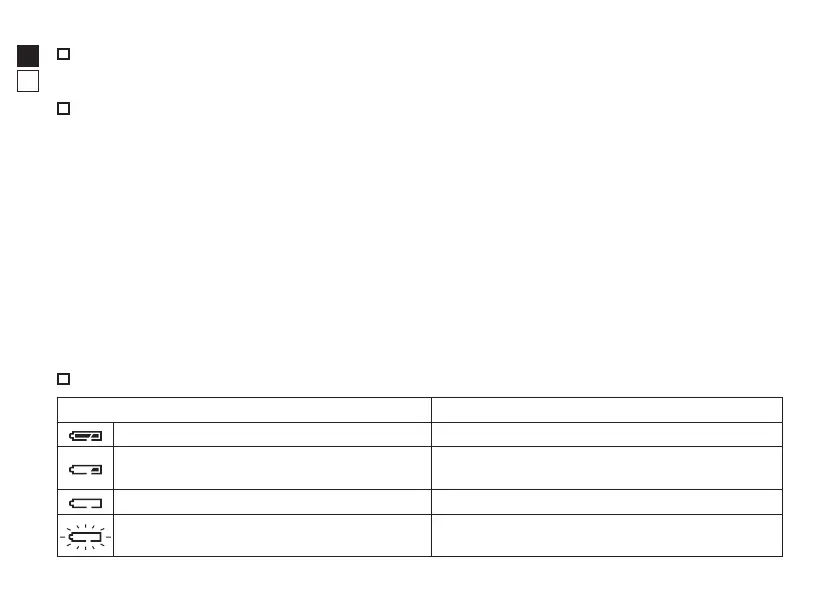
Battery level indicator
Display Description
After power on, displays for 2 seconds only. Sufficient power available.
After power on, displays for 2 seconds only.
Power getting low.
Prepare to replace the battery.
Displayed continuously. Low. Battery should be replaced with a new one.
Blinks. After blinking 3 times, automatically
powers off.
The battery is empty.
Replace the battery.
Inserting/Replacing battery










 To Next Page