18
En
Fr
Measurement
Caution — Controls, adjustments or usage of procedures other than those specified herein may produce
negative effects or damage to your health due to laser radiation.
• Before measuring, be sure to confirm each menu setting. Refer to “Navigating the menus” for menu details
and how to change the settings.
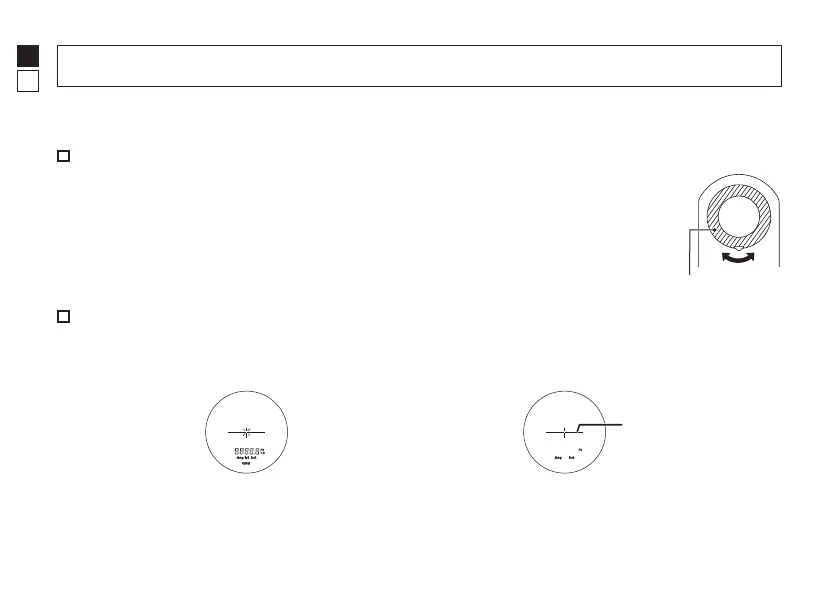
Adjusting the focus of the internal display
If the internal display is difficult to see, adjust the focus with the following
procedure.
1. Press the PWR button to turn on the power.
2. Look through the eyepiece and rotate the diopter adjustment ring until the
internal display comes into focus.
Diopter adjustment ring
Measuring
1. Press the PWR button to turn on the power.
• If you do not operate the button for about 8
seconds, the power turns off automatically.
2. Aim at the target.
Position the center of the target mark on the
target.
Immediately after power-on
Target mark
3. Press the PWR button to measure.
After measurement, the result is displayed for approx. 8 seconds, then power automatically turns off.
Press the PWR button while the power is on to measure again.










 To Next Page