EasyManua.ls Logo

Nikon N55 - Troubleshooting Common Issues

Nikon N55
120 pages
Print Icon
To Next Page IconTo Next Page
To Previous Page IconTo Previous Page
Loading...
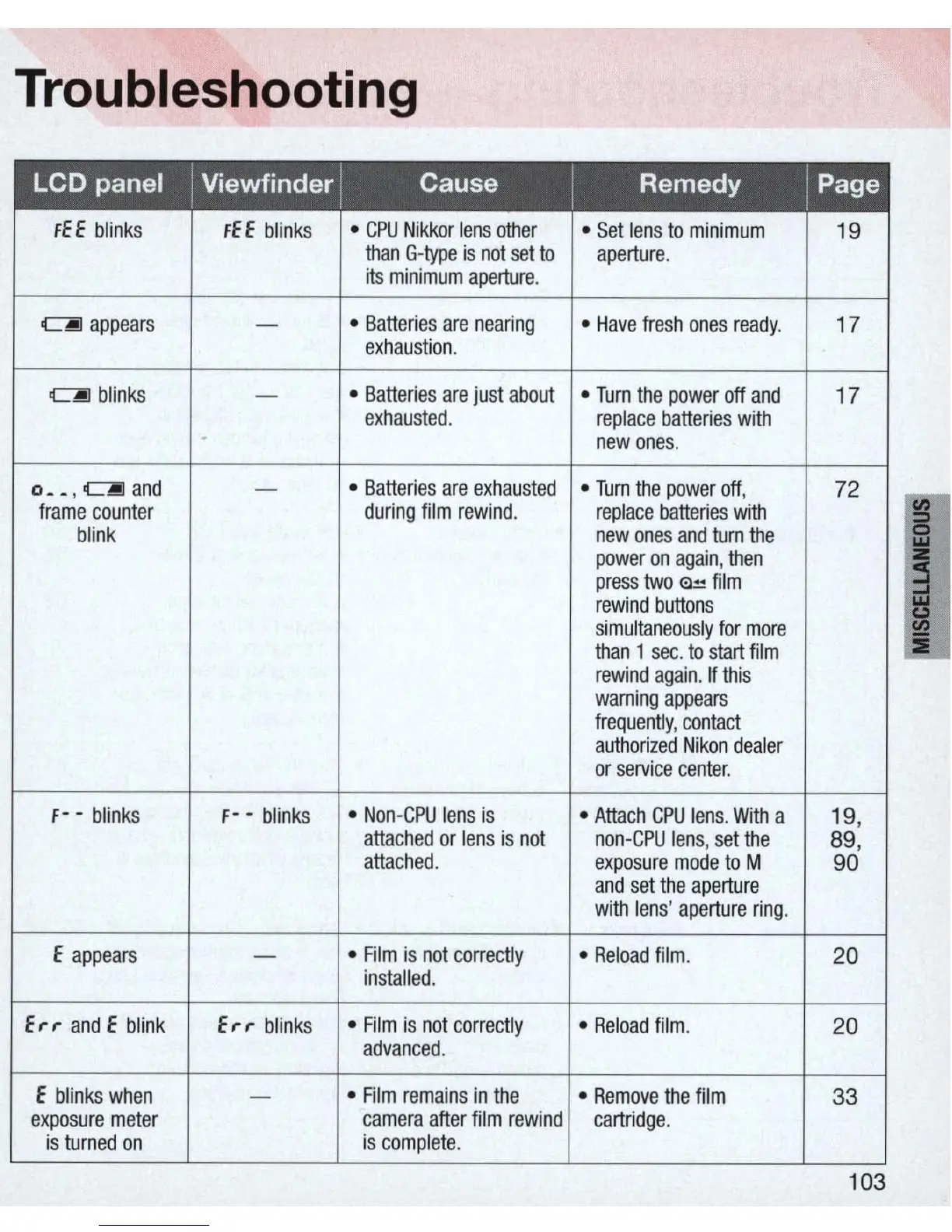
Troubleshooting
FEE
blinks
FEE
blinks
CPU
Nikkor
lens
other
Set
lens
to
minimum
19
than
G-type
is
not
set
to
aperture
.
i
ts
minimum
aperture
.
c.J
appears
Batteries
are
nearing
Have
fresh
ones
ready
. 17
exhaustion
.
c.J
blinks
Batteries
are
just
about
Turn
the
power
off
and
17
exhausted
.
replace
batteries
with
newones
.
0 _ _ ,
c.I
and
Batteries
are
exhausted
Tum
the
power
off
,
72
frame
counter
during
film
rewind
.
replace
batteries
with
;
blink
new
ones
and
turn
the
power
on
again
,
then
i
press
two
~
film
rewind
buttons
simultaneously
for
more
than
1
sec.
to
start
film
:IE
rewind
again
.
If
this
warning
appears
frequently
,
contact
authorized
Nikon
dealer
or
service
center.
F-
-
blinks
F-
-
blinks
Non
-
CPU
lens
is
Attach
CPU
lens
.
With
a 19,
attached
or
lens
is
not
non
-
CPU
lens
,
set
the
89,
attached
.
exposure
mode
to
M
90
and
set
the
aperture
with
lens
'
aperture
ring
.
E
appears
Film
is
not
correctly
Reload
film
.
20
installed
.
Er-r-
and
E
blink
Er-r-
blinks
Film
is
not
correctly
Reload
film
.
20
advanced
.
E
blinks
when
Film
remains
in
the
Remove
the
film
33
exposure
meter
camera
after
fi
lm
rewind
cartridge.
is
turned
on
is
complete
.
103

Related product manuals