Set Focus Mode to
AF
-------I
Set focus mode to AF (autofocus).
(See
page 46 for details.)
.....................................................
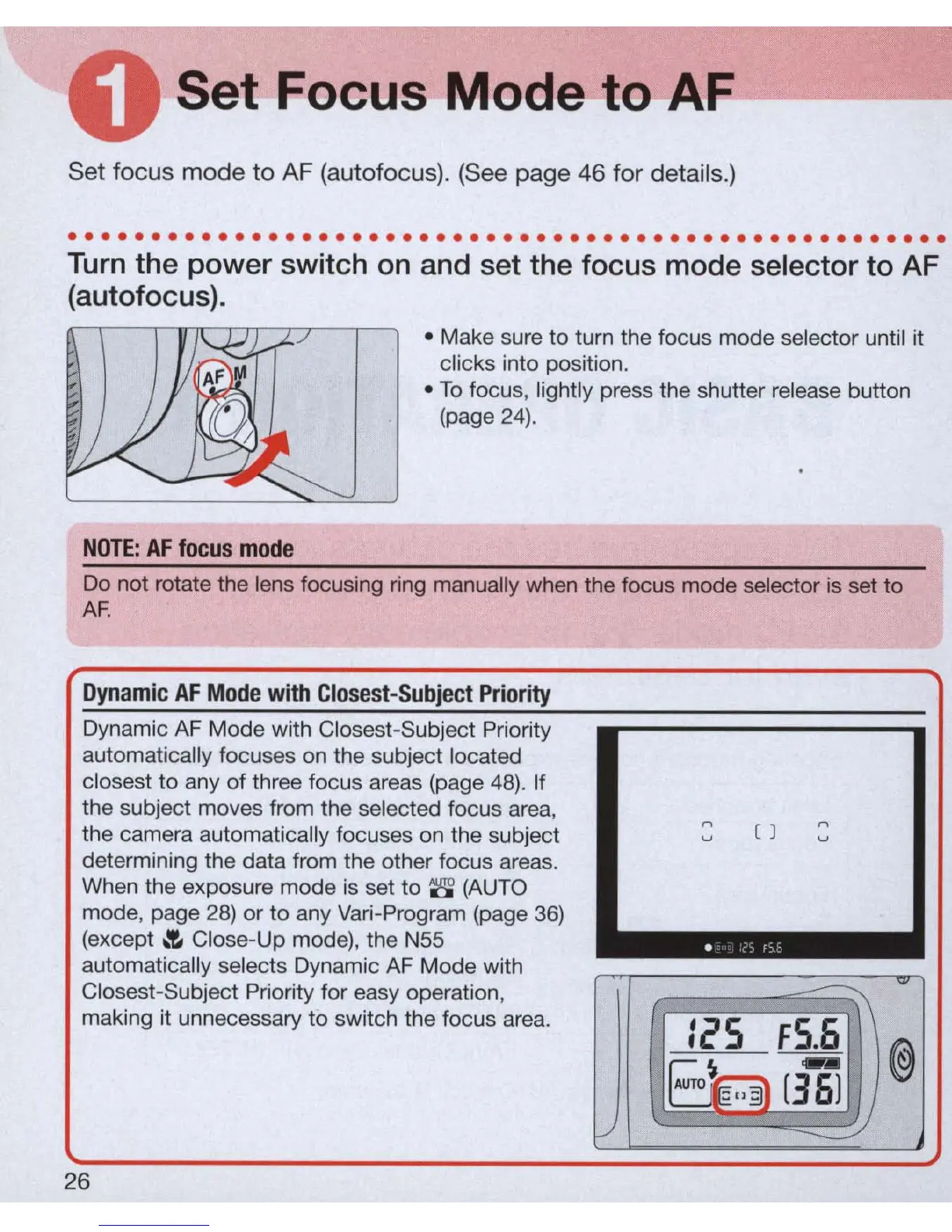
Turn
the power switch
on
and set the focus mode selector to AF
(autofocus).
• Make sure
to
turn the focus mode selector until it
clicks into position .
• To focus, lightly press the shutter release button
(page
24).
NOTE:
AF
focus
mode
Do not rotate the lens focusing ring manually when the focus mode selector is set to
AF
.
Dynamic
AF
Mode
with
Closest-Subject
Priority
Dynamic AF Mode with Closest-Subject Priority
automatically focuses on the subject located
closest to any
of
three focus areas (page
48)
. If
the subject moves from the selected focus area,
n
n
the camera automatically focuses
on
the subject
u
( )
u
determining the data from the other focus areas.
When the exposure mode is set to
8
(A
UTO
mode, page
28)
or
to
any Vari-Program (page
36)
(except
.!.
Close-Up mode), the N55
automatically
se
lects Dynamic AF Mode with
Closest-Subject Priority for easy operation,
:~S
FS
~
@
making it unnecessary to switch the focus area.
im
[36J
f-/
~
26



 To Next Page