Install
Batteries
and
Check
Battery
Power
Use
two
CR2-type
3V
lithium batteries .
. . . . . . . . . . .
..
. . . .
..
. . . .
...
. . . . . . . .
..
. . . . . . . . . . .
..
. .
..
1
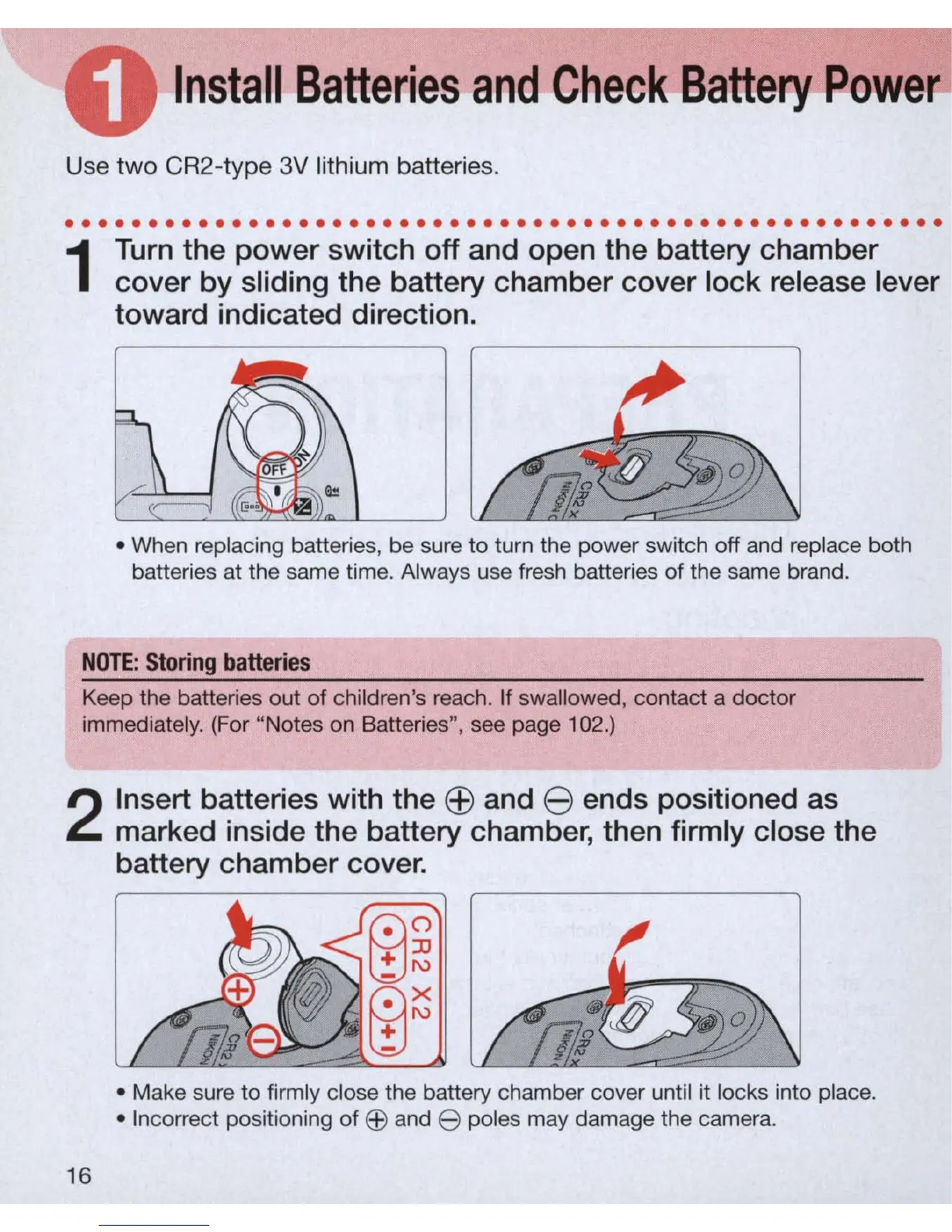
Turn
the power switch off and open the battery
ch
amber
cover by slidi
ng
the battery chamber cover lock release lever
toward indicated direction.
• When replacing batteries, be sure
to
turn the power switch off and replace both
batteries at the same time. Always use fresh batteries of the same brand.
N
OTE:
Stor
in
g
batter
i
es
Keep the batteries out of children's reach. If swallowed, contact a doctor
immediately. (For "Notes on Batteries
",
see page 102.)
2
16
Insert batteries with the
EB
and 8 ends positioned as
marked i
ns
ide the battery chamber, then firmly close the
battery chamber cover.
• Make sure
to
firmly close the battery chamber cover until it locks into place.
• Incorrect positioning of
EEl
and e poles may damage the camera.



 To Next Page