Set
Date
and
Time
(QD
model
only)
This camera a
ll
ows you to imprint Year/Month/D
ay,
Day/Hour/Minute (24-hour
clock), Month/DaylYear or Day/MonthlYear
on
your picture
in
any exposure
mode. (For imprinting date/time, see page 44.)
.....................................................
• Adjusting
date
and time
(E
xample: year 2002, January 15)
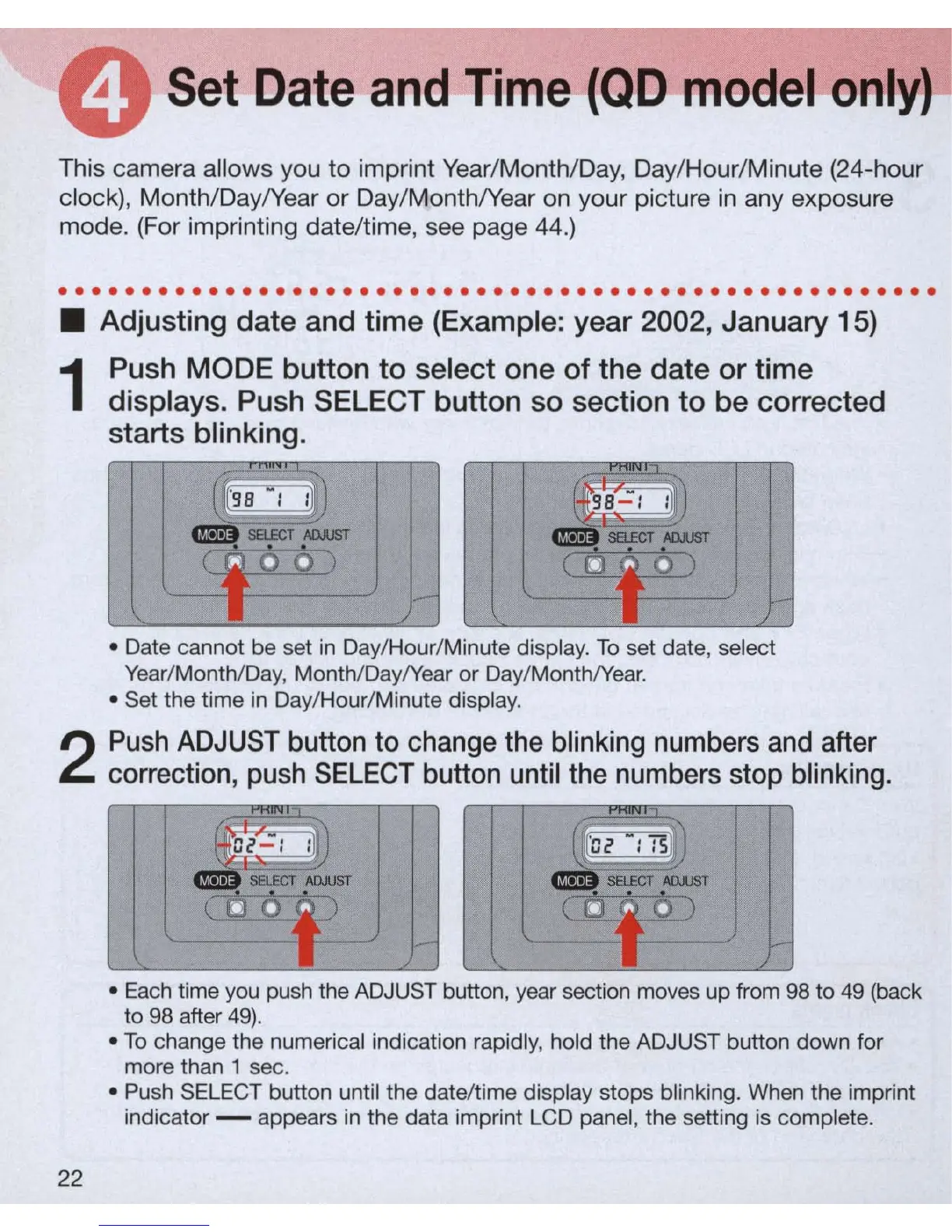
1
Push
MODE
button
to
select one of the
date
or time
displays. Push
SELECT
button so section
to
be corrected
starts blinking.
• Date cannot be set
in
Day/Hour/Minute display.
To
set date, select
Year
/Month/Day, Month/Day/Year
or
Day/ MonthlYear .
• Set the time
in
Day/Hour/Minute display.
2
Push
ADJUST button
to
change
the
bl
i
nking
numbers
and
after
correction,
push
SELECT
button
until
the
numbers
stop
blinking
.
22
•
Each
time you push the ADJUST button, year section moves up from 98 to
49
(back
to 98 after
49)
.
•
To
change the numerical indication rapidly, hold the
AD
JUST button down for
more than 1 sec.
• Push SELECT button until the date/time display stops blinking. When the imprint
indicator - appears
in
the data imprint LCD pan
el
, the setting is complete.



 To Next Page