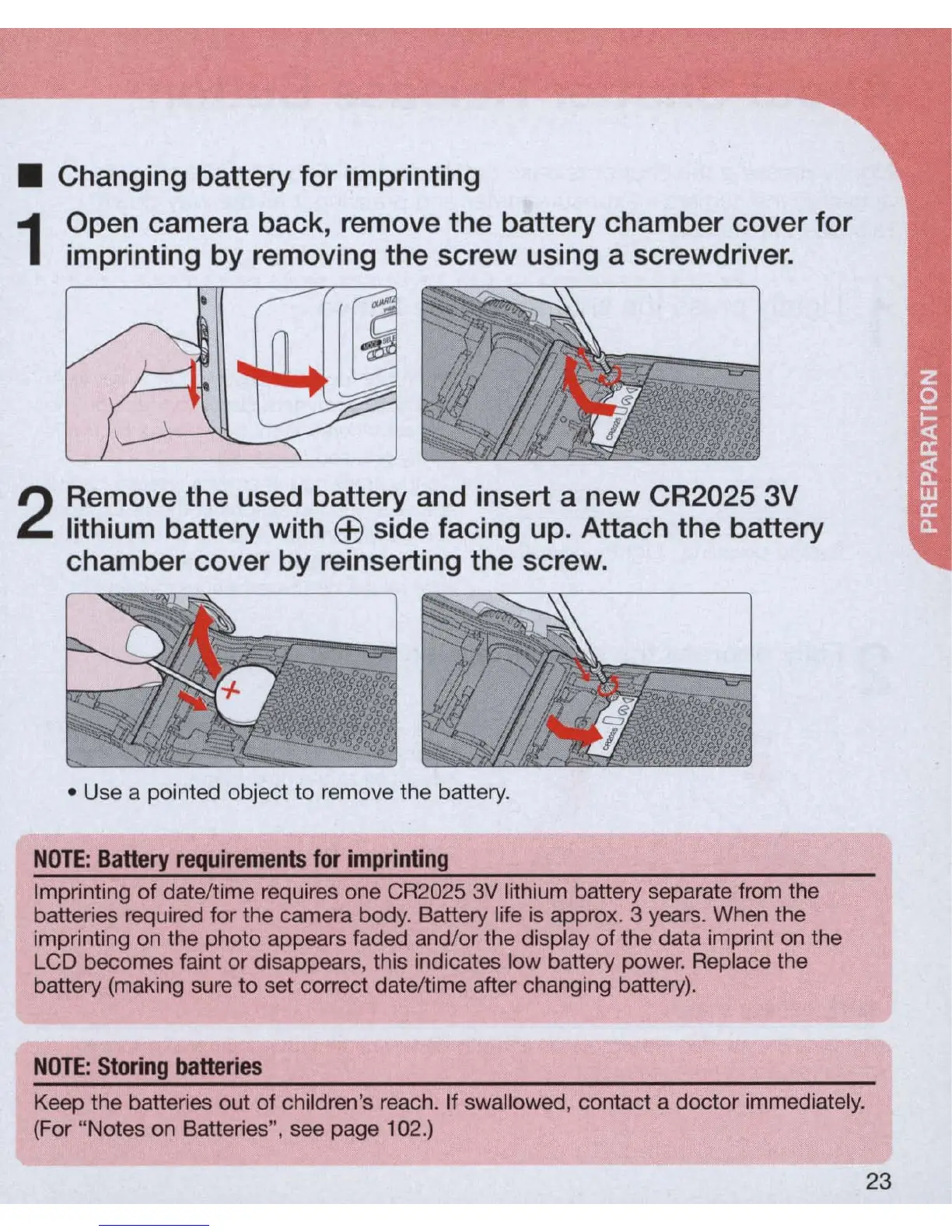
• Changing battery for imprinting
1
Open camera back, remove the battery chamber cover for
imprinting by removing the screw using a screwdriver.
2
Remove the used battery and insert a new CR2025 3V
lithium battery with
EEl
side facing up. Attach the battery
chamber cover by reinserting the screw .
• Use a pointed object to remove the battery.
NOTE:
Battery
requirements
for
imprinting
Imprinting
of
date/time requires one CR2025
3V
lithium battery separate from the
batteries required for the camera body. Battery life is approx. 3 years. When the
imprinting on the photo appears faded and/or the display of the data imprint on the
LCD becomes faint or disappears, this indicates low battery power. Replace the
battery (making sure
to
set correct date/time after changing battery).
NOTE:
Storing
batteries
Keep the batteries out of children's reach. If swallowed, contact a doctor immediately.
(For "Notes on Batteries", see page 102.)
23



 To Next Page