Using
Built-In
Speedlight-continued
3
Confirm
~
appears
in
the viewfinder, make sure the subject
is
within the flash shooti
ng
distance range and shoot.
• The shutter cannot be released unless
~
appears without blinking
in
the
viewfinder.
•
~
in
the viewfinder blinks appro
x.
3 sec. after full flash output. This may indicate
underexposure has occurred. Check the focus distance, aperture or flash shooting
distance range and shoot again.
• When the subject is dark, the AF-Assist Illuminator automatically turns on to guide
autofocus.
See
page 50 for details .
•
Av
ai
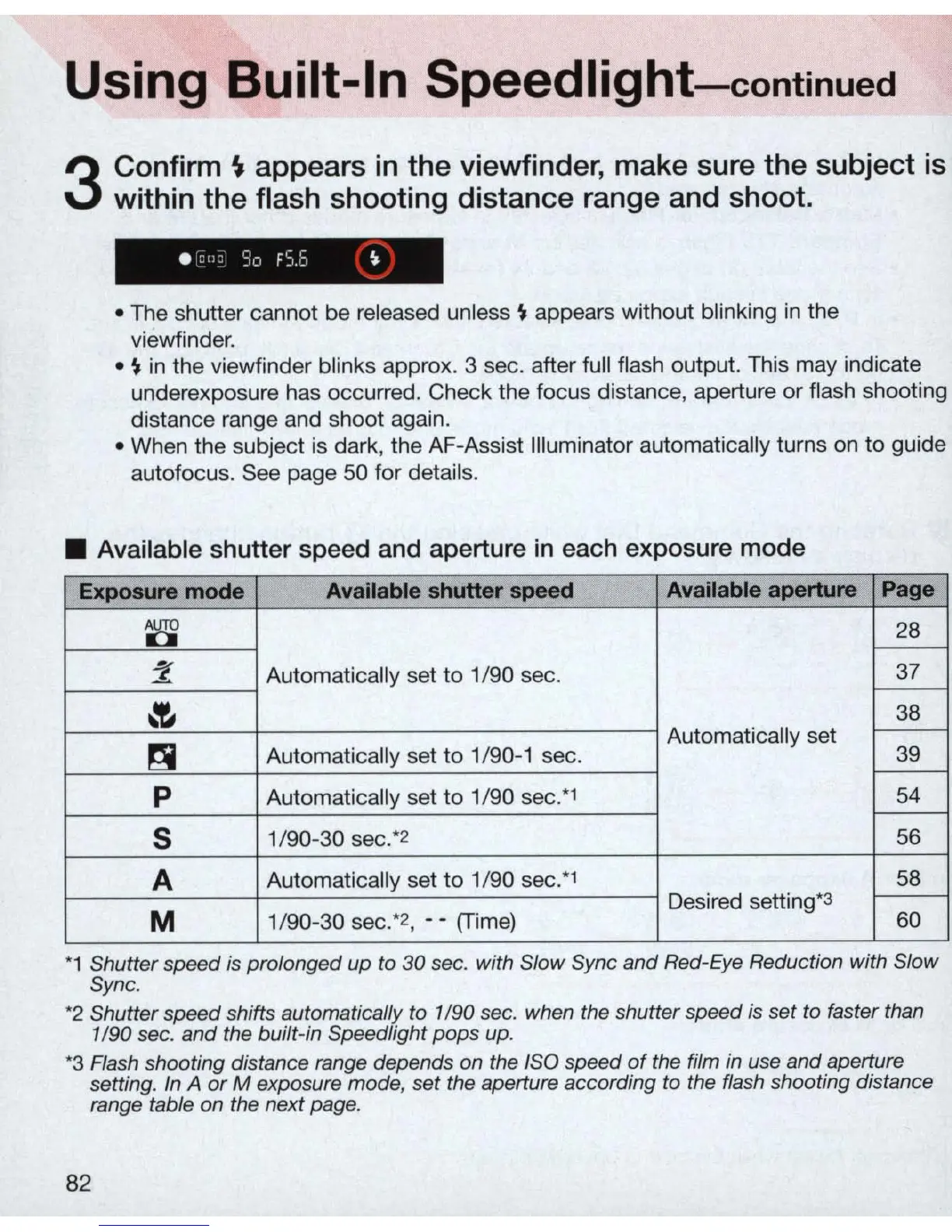
lable shutter speed and aperture
in
each exposure mode
Exposure mode
Available shutter speed Available aperture Page
~
28
r--
:2
Automatically set
to
1/90 sec.
37
r---
~
38
Automatically set
r--
~
Automatica
ll
y set
to
1/90-1 sec.
39
r---
P
Automatically set to 1
/9
0 sec.*' 54
r---
S
1/90-30 sec:
2
56
A
Automatically set
to
1/90 sec
:'
58
Desired setting*3
r---
M
1/90-30 sec:
2
, - - (Time)
60
*1 Shutter speed
is
prolonged up to
30
sec. with Slow Sync and Red-
Eye
Reduction with Slow
Sync.
*2
Shutter speed shifts automatically to 1/90 sec. when the shutter s
peed
is
set to faster than
1/90 sec.
and
the built-in Speedlight
pops
up.
*3 Flash shooting distance range depends on the ISO speed
of
the film
in
use and aperture
setting. In
A
or
M exposure mode, set the aperture according to the flash shooting distance
range table on the next page.
82



 To Next Page