NOTE
:
Standby
func
ti
on
of
optional
Speedl
i
ght
Make sure to cancel the standby mode
of
the optional Speedlight.
NOTE:
Flash
mode
with
optional
Speed
light
Only A (Non-TTL Auto Flash) and M (Manual Flash) modes are available with the
optional Speedlight. Proper flash operation cannot be performed when t
he
flash
mode is set to
TTL
Auto Flash. Wh
en
the optional Speedlight is set to
TT
L Auto
Fl
as
h
an
d the shutter
re
lease button is lightly pressed,
~
b
li
nks in the viewfinder to warn
that fl
as
h synchronization is not being performed and the optional Sp
ee
dlight wi
ll
fire
at full output. See your Speed light manual for details on Manual Flash.
3
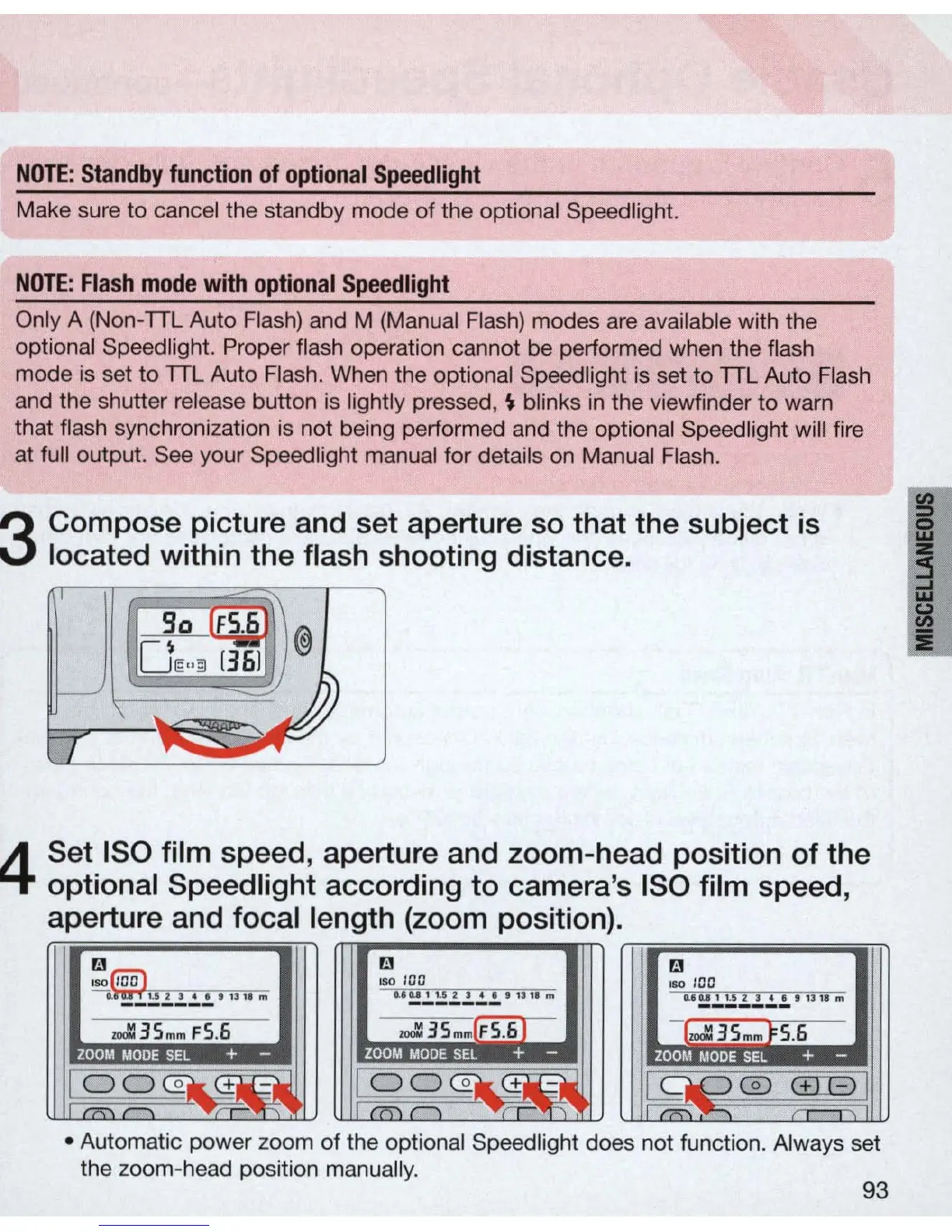
Compose picture and set aperture
so
that the subject
is
located within the flash shooting distance.
4
Set ISO film speed, aperture and zoom-head position of the
optional
Speed
light
according to camera's ISO film speed,
aperture and focal length (zoom position).
III
III
ISO
I
CC
laO
JOC
"
~!!.!..!.
.!.
!.
"!
1'
'''
"'
~!2
.!. .!. .!.
.!.'
d,i
m
U!!
.!.
!!
.!..!..!..!.
'''
II",
moll
3S
mm
FS.6
moll
3S
mm
l
FS
.61
[..:l
3Smm
} S.6
..
..
..
.
..
o 0 @II..
Ct
1i-:.l
00
Co
:&
Ct
1&:-:I.I
C
~
0
C±JE)
'7'\'
.,
....
,
.
..,
-
• Automatic power zoom of the optional Sp
ee
dlight
do
es not function. Always set
the zoom-he
ad
position manually.
93



 To Next Page